
Renderosity Forums / Carrara
Welcome to the Carrara Forum
Forum Coordinators: Kalypso, Anim8dtoon
Carrara F.A.Q (Last Updated: 2026 Sep 09 4:39 am)
Visit the Carrara Gallery here.

Subject: Putting snow on an imported item....how to?


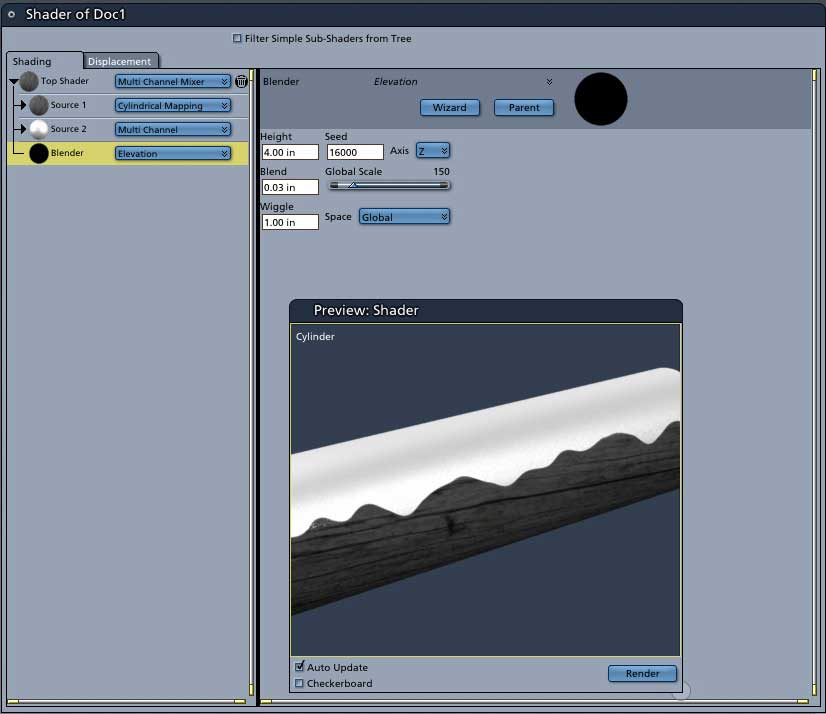
There are several ways to do this. Follow the same shader set up but you can switch the blender to:
-
Evironment>Snow. This one is great. It always puts the snow on the top of objects in your scene regardless of how you've turned them. However, it has no control over the edges so it's always uniform
-
Slope. Has good wiggle controls but needs to be modified if you've rotated your object in the assembly room.
-
Elevation. Shown above. Take a look at how the elevation controls have been altered to make this cylinder, which was rotated in the assembly room, to work with the object.
Mark

Thank you Mark, I've always wanted to get this effect but went to out-of-the-ordinary means to do it. At one point I was duplicating the object, cutting it up, raising it, texturing it, shading it, just to get a thick snow patch that followed the object's (top) shape. While that technique got me a thicker layer of snow, it was work.
Never Give Up!

Privacy Notice
This site uses cookies to deliver the best experience. Our own cookies make user accounts and other features possible. Third-party cookies are used to display relevant ads and to analyze how Renderosity is used. By using our site, you acknowledge that you have read and understood our Terms of Service, including our Cookie Policy and our Privacy Policy.
I import a fence...I want snow on top the railings, how do I do this. I'm thinking using mixed materials & a distribution based on slope etc...Am I on the right path? I'd appreciate a more in depth explanation :) Thanks :)