
Renderosity Forums / Carrara
Welcome to the Carrara Forum
Forum Coordinators: Kalypso, Anim8dtoon
Carrara F.A.Q (Last Updated: 2026 Sep 09 4:39 am)
Visit the Carrara Gallery here.

Subject: Character rig in progress.

Well so far in my exploration of the arm/hand setup to get a decent amount of control it will be fairly complex. It will work as follows.
A ELBOW control will control the bending and moving of the arm when bent and to a degree the arms rotation. I might set this up to control the elbows orientation.
A WRIST control will control the bending of the wrist through its movements.
A ARM control will control the bending of the shoulder and elbow. This control will allow movement without the elbow bending if desired.
A FINGERS control will control the bending of the fingers as a group.
A THUMB control will control the bending of the thumb.
And then their will be four individual controls for each of the fingers. These will be hidden until more precise movement is needed.
Thats a total of 9 target helper controls.
I can't see any other way of setting it up that allows the range of motion and control I'm looking for. EECK!
The head/neck controls are fairly simple.
A HEAD control to control the rotating of the head.
A NECK control that gives control similar to the SPINE control.
Well these are my thoughts on my setup. Anyone think its to complex or have a more elegant solution let me know. I'll post up the next version soon.
In total there will be 18 target helper controls. Though you should be able to do most basic animation using just 6 of them.
Message edited on: 08/25/2005 01:26

Just a note. I've played with this arm problem as well. I rigged a similar figure with the elbow controlling the sholder, wrist controlling the elbow and lower arm. That is as far as I went. It leaves the hand to fend for itself. The arm will move, but the hand will point forward, until I rotate the wrist... The fingers I rigged in just a hand model and found it worked okay, except often the rig would change in constraints and I'd have to go back and re-do it over again. Thanks for sharing your ideas and model with the group. R.
Never Give Up!

Privacy Notice
This site uses cookies to deliver the best experience. Our own cookies make user accounts and other features possible. Third-party cookies are used to display relevant ads and to analyze how Renderosity is used. By using our site, you acknowledge that you have read and understood our Terms of Service, including our Cookie Policy and our Privacy Policy.
Attached Link: http://www.eovia3d.net/showthread.php?t=4162
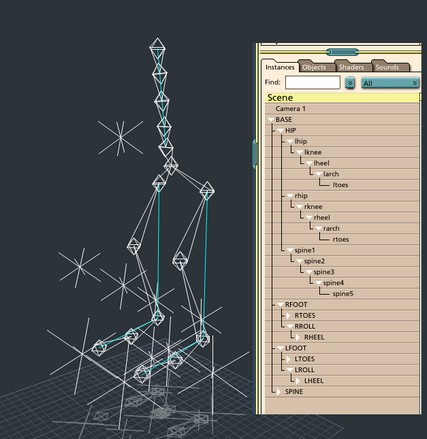
You can find the file at the attached address.With all the past talk on creating animation rigs. In my spare time I've been working on creating a decent rig. And I'm sharing. The current WIP I've uploaded at the attached URL, its name is BONERIGC4.car
This rig includes a partially setup realistic spine. A setup for foot roll. Constraints are placed. IK targets are hidden to reduce clutter. I've used target helpers for better manipulator objects. In the scene outline, the items labeled in caps are the manipulators and controls for the rig.
The RFOOT/LFOOT control the movement of the whole foot.
The RTOES/LTOES control the movement of the toes of the feet.
The RROLL/LROLL control the rolling of the foot. These mainly should be rotated on the x-axis.
The LHEELL/RHEEL control the movement of the heel of the foot.
The SPINE control controls the movement of the spine. This should be only rotated. Translate it for extreme movements of the spine.
The BASE controls the movement of the whole setup hips and all, use this when animating a movement like a walk cycle to get the forward motion.
The HIP controls the crouching movement of the rig. Rotate the HIP control for the side to side motion during a walk cycle.
I've completed more, including a head with neck. But I've had difficulty with the bone constraints of the arms and with the IK setup. I've as of yet been unable to get a working hand setup. Though I do have an idea, which I'll be trying out over the course of the next few days. Let me know what you think.
Some quirks with the current setup: rotating the feet on z-axis causes some shifting with the arch joint. Can't seem to eliminate this without actually locking the joint. The setup is also pretty cluttered. The best way around this is to just hide the controls that you won't be using.
Well enjoy and let me know what you think.
Message edited on: 08/24/2005 02:12