
Renderosity Forums / Carrara
Welcome to the Carrara Forum
Forum Coordinators: Kalypso, Anim8dtoon
Carrara F.A.Q (Last Updated: 2026 Sep 09 4:39 am)
Visit the Carrara Gallery here.

Subject: Toon Pro Review (The Jetsons Car Continued)


Nice review, it's called Cel Shading though, not Cell Shading. Cel is short for Celluloid Sheet, which is a traditional animation term, as they used celluloid sheets for drawing on, which they just called cels. Why they didn't write it cells, I don't know, but possibly because they wanted to distinguish it from the other meanings of cell. Although you could call the post render filter cel shading, cel shading is actually when you use a 1-dimensional light map like the toon pro shader system.

Privacy Notice
This site uses cookies to deliver the best experience. Our own cookies make user accounts and other features possible. Third-party cookies are used to display relevant ads and to analyze how Renderosity is used. By using our site, you acknowledge that you have read and understood our Terms of Service, including our Cookie Policy and our Privacy Policy.
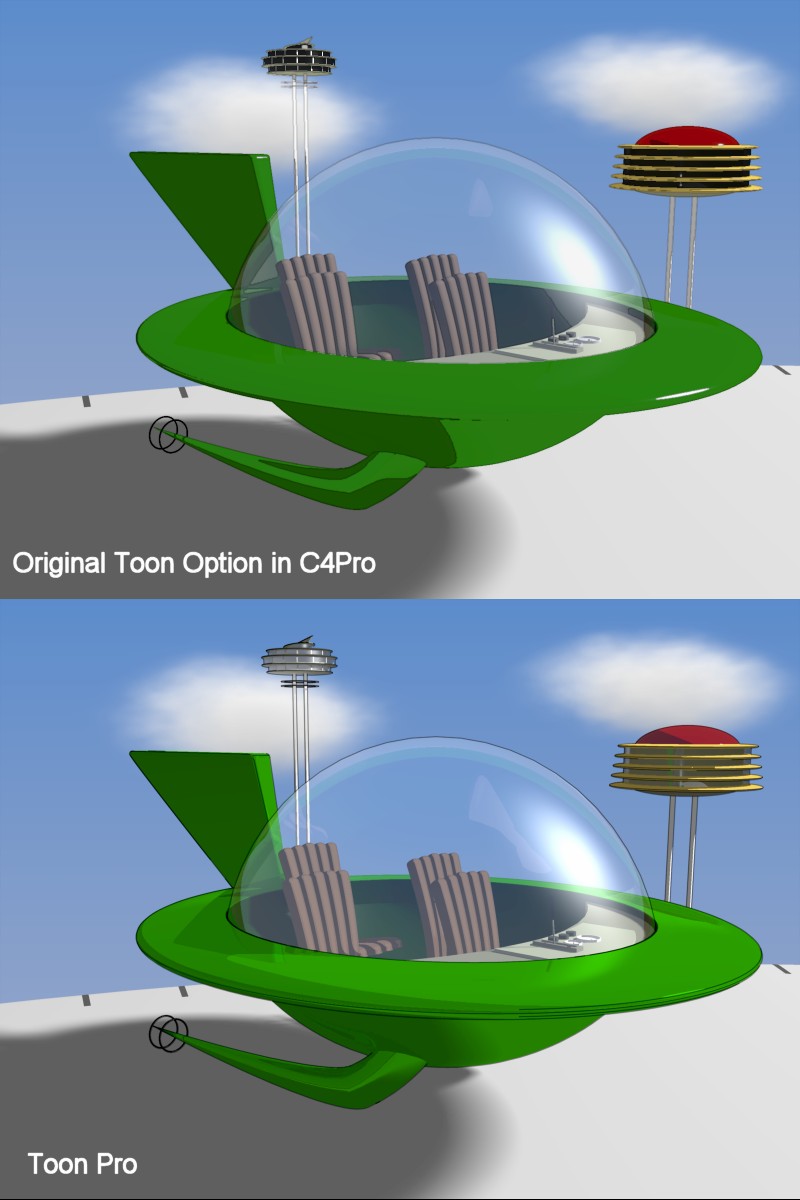
The TOON Pro difference. I've been working on the Jetsons car project for a little while now and it is only fair to generate a cartoon version of the final image considering the origins of the project. I originally used the latest toon option provided in C4Pro. The C4Pro toon option is a post processor which operates on the image after it has rendered. There are several settings for this tool which would include the thickness of the toon outlines, the strength of the outlines (how faded or pronounced the generated lines are in the final image), and the strength of the toon effect (how strong or pronounced the colorization changes from the original render are simplified into the cartoon colors. This I believe is called cell shading). The application of the toon option can be done by adding a filter in the scene settings. Simply turn it on, dial it in, and your done. Objects can have the toon effects turned off which can be a very useful for certain final images. It is particularly useful to preserve the generation of soft shadows (on a floor or wall for example). The toon override can be found in the objects properties tray. Results for the particular image that I'm trying to generate produces good and bad results. The line effects on the legs on the two buildings in the background have clear and obvious pixellation. Lines have also been added between shadowed and non-shadowed areas which aren't working as I would have hoped. In contrast, the cell shading results are fine. The color changes look ok and produce the cartoon effect as I would have expected! Bottom line, if I wanted to make an animated cartoon, I'm pretty sure the line effects would be a pretty serious detriment. I needed something that looked better so, I downloaded Toon Pro and gave that a whirl. Preliminary results using the demo mode were quite favorable (i.e., I didn't have to read too much documentation to turn it on and get it to do tricks). The lines looked really great in the small tests that I ran on simple scenes (blocks and spheres) so I purchased the plug-in and dove in. The package is essentially split into two mechanisms. One mechanism generates the lines and the other mechanism generates the cell shading. The line effects are activated by turning on a new rendering engine in the render room. It appears that the original image is rendered using the standard photo-realistic/GI engine and the lines are applied post process to each rendered block. There are several controls available (of which I haven't used them all). There is an option for line thickness which is more than just integer 1, 2, 3 but will generate floating values for thicknesses. The smoothness of the line can also be controlled via sampling options. There is an option for changing the line thickness depending on the location of the object (closer vs farther). There is also a cool option for extending lines past the object which could be quite useful for technical or architextural renders. Like the provided toon option, the Toon Pro lines can be turned off for individual objects. Summary on the line effects: Pros: Easy to turn on, easy to control, results are unbelievably fantastic! Cons: You may have to fuss a tweensy bit with the backfaces for lines to be hidden correctly but it's only an option switch away. Wants: You can see from the render that lines which are behind the glass dome in my final product do not get generated (which makes a lot of sense). It would be nice to figure a way to turn off hiding lines behind an object. If that were possible, the lines would appear for all that cool stuff I put in the cockpit of the car and for the legs of the building which extends behind the dome. It would also be nice for the lines to be colored like the object. Not sure how to choose the color (in other words, align it with the color of the object) but it would be a really nice feature. The cell shading is actually applied to each shader in the texture room. As is generally true with all things, the more power something has, the more complex it usually is. This turned out to be a small peeve for the cell shading. I had to alter all the textures in the scene individually and I had to generate new textures for objects which I didn't want to be cell shaded. On the flip side, the options provided for the cell shading are GREAT! You can choose how the highlights show up plus shadow effects and also choose the number of color steps the cell shader will apply. All really great options! As an added weird bonus, other shader features continue to be preserved. As an example, the reflections in my original texture continue to appear in the final render (not really toonish but I like em!). In essence the cell shader does provide quite a bit more control over the C4Pro provided option. Summary of cell shading effects: Pros: Lots of power! There are new options which allow the user the power to produce color effects on a wider range than before! Cons: You have to turn it on for each texture where you want it applied. The original provided C4Pro options was super easy to turn on. I would like to emphasize again that more power also means more complexity. The trade off for the simplification to engage the cell shader is worth it. Wants: The original toon option has a slider to choose the strength of the overall cell shading effect which does appear to be absent for Toon Pro (in either the shader tree or on an object override). In closing, if you are planning to generate any type of animated cartoon or are working on any serious cartoon type of project, toon pro is a have to have. -Kix-Kix