
Renderosity Forums / Poser 13
Welcome to the Poser 13 Forum
Forum Moderators: nerd, RedPhantom
(Last Updated: 2026 Aug 09 1:22 pm)

Subject: "Unable to connect license server"


You do need to be connected to the internet periodically to contact the license server. If you are connected, contact https://support.posersoftware.com/ for help.
Available on Amazon for the Kindle E-Reader Monster of the North and The Shimmering Mage
Today I break my own personal record for the number of days for being alive.
Check out my store here or my free stuff here
I use Poser 14 and Windows 11
On the poser HP I reached out to support.
Cannot do that via the programme, since it will no longer load.
Do I understand this correctly, if I fail to use Poser once in a while for a certain amount of time, I effectively get locked out?
Despite having spent A LOT of money on a programme I have always valued?
I am absolutely furious about this and incidentally, the copy of Poser 13 was bought here at Renderosity. Now, as it happens I suffer
from a number of serious illnesses where it can happen that I am out of action for some time. Does that mean, I get punished by Poser
for something that I have no control over? Thank you! Thank you very much!
No, you shouldn't get locked out. But Poser does phone home once in a while to verify your license. If it wants to do that, but your computer isn't online, you'll get an error message. Once you're online, it should work again. There were some site updates not long ago. There might be issues due to that.
Available on Amazon for the Kindle E-Reader Monster of the North and The Shimmering Mage
Today I break my own personal record for the number of days for being alive.
Check out my store here or my free stuff here
I use Poser 14 and Windows 11
My internet connection is currently fine.
Gave both Poser 13 and Poser 12 a go this morning and the both loaded up and my re-install of Poser 13 also hadn't damaged my settings in any way.
I wished I could say I was relieved but this affair has given me cause for concern. After all, I had been debating whether to upgrade my Poser 12 license to Poser 14.
Now that I have seen the entirety of the programme disappear because (presumably) there was a short server hickup.... I dunno... It all gives off a vibe of "this is not for keeps". :(
So much work would then be wasted.
It's a shame really because I have been using Poser since Poser 6. Was quite comfortable in my workflow on Poser 13, having converted quite a few DAZ assets and figures in Poser 10 and very much appreciated Dawn 2 and LaFemme/L'Homme etc.
The online registration shouldn't put you off upgrading if you need to upgrade.
The test will be how they support Poser 11 owners as they use the same online registration.
I would think and hope they do right by Poser 11 owners and make it possible to still use it without registration when that get's turned off, similar to what they did with Blacksmith3D.
Great.
Having finally gotten my Poser 13 working again, all of my Ken1171 Scripts have now stopped working saying "Verification has failed". Scripts that I have bought right here on
Renderosity. Scripts that I rely on almost all the time.
I DO NOT NEED THESE EXTRA PROBLEMS
And yes, I have figured out you are supposed to use your Rendo login rather than the Poser.com one and it still doesn't work.
Poser and Renderosity are pissing me off no end with all this

Just a thought that might be worth checking:
Since your internet connection is working, you could have a look at your firewall settings and make sure Poser is added as a trusted/allowed application.
If Poser (and now also the Ken1171 scripts) can't reach the license server even though you're online, it's possible that the firewall is blocking the outgoing connection.
I work in telephone support for online banking, and we occasionally see similar issues after a Windows update, a firewall update, or when security software has changed its settings. Sometimes applications suddenly lose permission to access the internet even though the connection itself is perfectly fine.
It might also be worth contacting Ken1171 directly. He may have some additional ideas, especially since the verification errors are now affecting his scripts as well.
Of course I can't say for certain that's what's happening here, but if it were a general Renderosity licensing problem, I would expect more users to be reporting the same issue. Normally the license check happens quietly in the background, so you don't even notice it's there.
Naturally I had been checking the firewall as well. I first started fiddling about with it before I remembered there is a simpler way of doing this.
Switched off the firewall and it had effect whatsoever.
Same error message.
Contacted Support but in both the Poser support and the Renderosity Support, there has been nothing yet.
And today I wrote to Ken as well, since I bought 6 scripts and would rather like to be able use them.
This situation with Poser makes me want to scream.
nb. Just noticed that all my SnarlyGribbly scripts are missing, including the library of HDRIs, settings and the EZskin presets. At this point, it is enough to just close the app
and give it all up.
I once had something similar happen where content suddenly disappeared from my Included Runtime. It turned out that somehow an older version of that Runtime had ended up replacing it. I honestly have no idea how it happened, and I never found the actual cause. In the end I simply restored it from the backup on my second PC.
Unfortunately, I'm out of ideas at this point. I really do understand your frustration, but I'm afraid I can't offer any more useful suggestions. I hope support or Ken can help you get everything working again.
One small thing though: for some reason, most of my scripts never show up in the Script menu on my system (Ken's are actually the exception). I always run them from the Python palette instead. I don't know if that's any help, but I thought I'd mention it just in case.
Snarly's script should be installed into the core Poser runtime, wherever that is installed. However, if you deleted that particular runtime folder, for any reason, you will need to reinstall those scripts also. As for Kenny's scripts, he did build a call home feature in the coding, which, I believe, is separate from Poser but tied to the Bondware servers. Getting in touch with him is the right call, but we are moving into a holiday weekend here in the US.
To clarify Poser's phone home, if you have several versions of Poser (P11, 12, 13, 14), you only need to check in on one version; all the others will still work after a long hiatus.
With it being a holiday weekend, response times might be a little slower.
Available on Amazon for the Kindle E-Reader Monster of the North and The Shimmering Mage
Today I break my own personal record for the number of days for being alive.
Check out my store here or my free stuff here
I use Poser 14 and Windows 11
Approaching late evening around here and I have been wondering how to get the programme to recognise it has python scripts. Nothing at all occurred to me since it is not
like with the usual libraries and syncing those.
So, I decided to re-install yet again. I wagered that the de-install and new install might look for data on it's first run. Seems I was right but I am not satisfied as to why this happened at all. 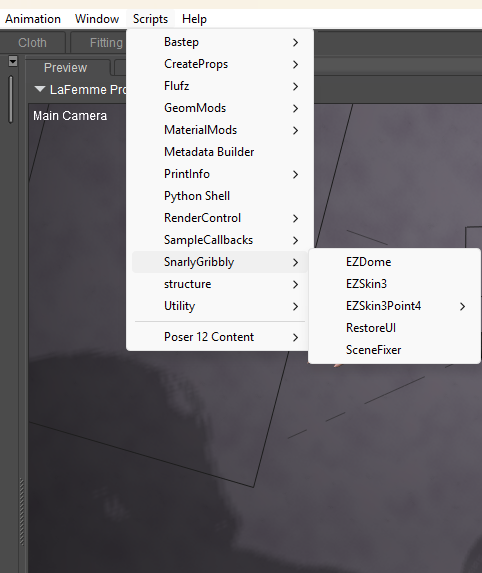

Privacy Notice
This site uses cookies to deliver the best experience. Our own cookies make user accounts and other features possible. Third-party cookies are used to display relevant ads and to analyze how Renderosity is used. By using our site, you acknowledge that you have read and understood our Terms of Service, including our Cookie Policy and our Privacy Policy.
Beyond belief!
Two months of non-use, I casually click my trusted Poser 13 link and?
And it always ran fine, so what is going on here????
Tried re-installing and the same issue. Checked all my anti-virus settings and it is all fine. I paid a lot of money for Poser 13 and 12.
Is that it now?
Have both installed and neither boots up anymore. Absolutely furious and scared I will lose my settings, library structure and everything.
If anyone has any tip that doesn't utterly destroy everything, I would be indebted.
Cheers