
Renderosity Forums / Poser - OFFICIAL
Welcome to the Poser - OFFICIAL Forum
Forum Moderators: RedPhantom Forum Coordinators: Anim8dtoon
Poser - OFFICIAL F.A.Q (Last Updated: 2026 Apr 07 12:09 am)

Subject: texture Convertor 2 help


Look for the tiny microscopic settings gear here
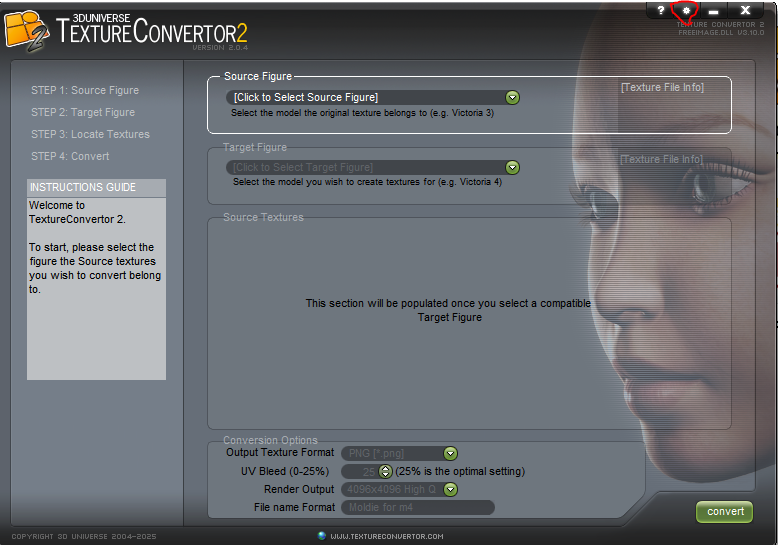
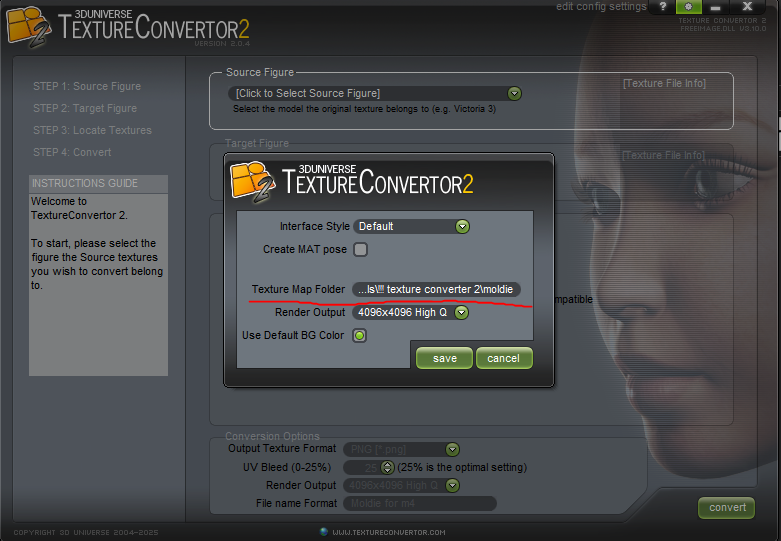
That will bring up a small window that gives you a chance to change folders
Available on Amazon for the Kindle E-Reader Monster of the North and The Shimmering Mage
Today I break my own personal record for the number of days for being alive.
Check out my store here or my free stuff here
I use Poser 13 and win 10


hborre posted at 12:03 PM Fri, 25 July 2025 - #4498118
Hborre, if you check out Willyb53's new freestuff contribution, a vest for L'Homme1, you'll see that LH is sporting M4's default body texture. If Miki 4 is the last compatible figure, then what program did the conversion from M4 to L'Homme? Any ideas?Texture Converter 2 is a very old texturing program at DAZ3D. The last figure compatible with it is Miki 4.
Link to Willyb53's newest freebie: https://www.renderosity.com/freestuff/items/99069/conforming-vest-for-lhomme-1-with-4-textures

i believe he uses Texture Transformer 2 & made his own M4-LH addon for it.
still lost in the wilderness
Poser 13 Superfly pretty much only these days

Privacy Notice
This site uses cookies to deliver the best experience. Our own cookies make user accounts and other features possible. Third-party cookies are used to display relevant ads and to analyze how Renderosity is used. By using our site, you acknowledge that you have read and understood our Terms of Service, including our Cookie Policy and our Privacy Policy.
The software is not supported by it's developer anymore. The issue I'm having is that I can't figure out how to configure what drive the new textures are saved on. The last time I used the software I had it set to a folder on Drive G. There is no more Drive G on my computer but that is where it is "saving" my files. So where are the files writing to? There is no error warning that Drive G no longer exists.
W10, Ryzen 5 1600x, 16Gb,RTX2060Super+GTX980, PP11, 11.3.740