
Renderosity Forums / Poser 11
Welcome to the Poser 11 Forum
Forum Moderators: nerd Forum Coordinators: Anim8dtoon, Digitell
Poser 11 F.A.Q (Last Updated: 2026 Jun 21 5:48 am)

Welcome to the Poser Forums! Need help with these versions, advice on upgrading? Etc...you've arrived at the right place!
Looking for Poser Tutorials? Find those HERE

Subject: Does not work anymore since update, please help


Hi Remy, please try the following :
1. Goto Edit > General Preferences

2. Select the Interface Tab and check Launch to factory State
restart poser.
if that does not work
please close poser, open your poser preferences folder location and rename it to poser 11.old
restart poser
if you do not know how to find your preferences, please use this python script and select
preferences parent.
Locked Out
So are they just leaving the French sans-Poser? How did the update mess that up? That's whack, yo! (drops mike and disembarks stage left). Seriously is a fix planned? If I was french and I retained my original installers (which I always do)...I might be inclined to delete the update and go back to pre-update version (re-install). Hopefully Remy can read English (he says knowing it was stupid since he posted his question in English). My point being not all French Poser-ites read English.

Privacy Notice
This site uses cookies to deliver the best experience. Our own cookies make user accounts and other features possible. Third-party cookies are used to display relevant ads and to analyze how Renderosity is used. By using our site, you acknowledge that you have read and understood our Terms of Service, including our Cookie Policy and our Privacy Policy.
Dear all,
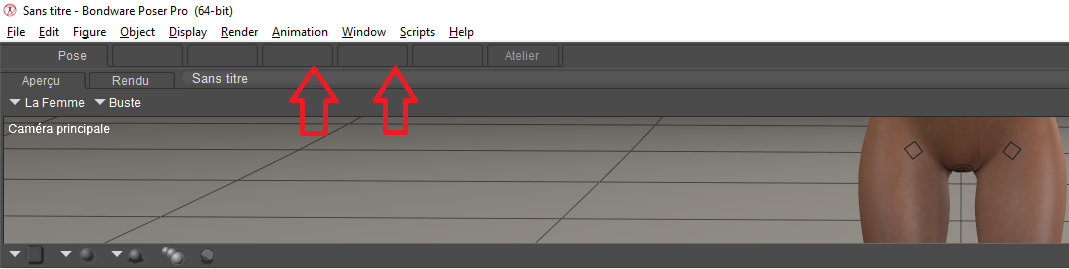
Like everyone else I downloaded the update and installed the latest version today. When I run Poser, the interface is completely weird. I uninstalled with Geek ... I did not change anything on my PC (graphics card or other) Email support does not answer me anymore!
you can see the images of the interface! thank you in advance for your help.
Remy