
Renderosity Forums / Carrara
Welcome to the Carrara Forum
Forum Coordinators: Kalypso, Anim8dtoon
Carrara F.A.Q (Last Updated: 2026 Jun 30 12:55 pm)
Visit the Carrara Gallery here.

Subject: Blackness when using GI


The bi-gradient bug is really weird. I found it when I was doing all the Enterprise renders over the holiday.
All the flat surfaces on the bottom of the models come out black but if you dial the horizon back one degree, it all gets fixed.
I haven't tried to re-produce it in the latest code version (151) but it was occuring in the previous two versions I was running (it was fine in the first few versions of C8 but it got busted along the way somehow).
I concur that moving the objects into a fresh C8 file should fix my gemstone issue. I'll give that a spin.
-Kix
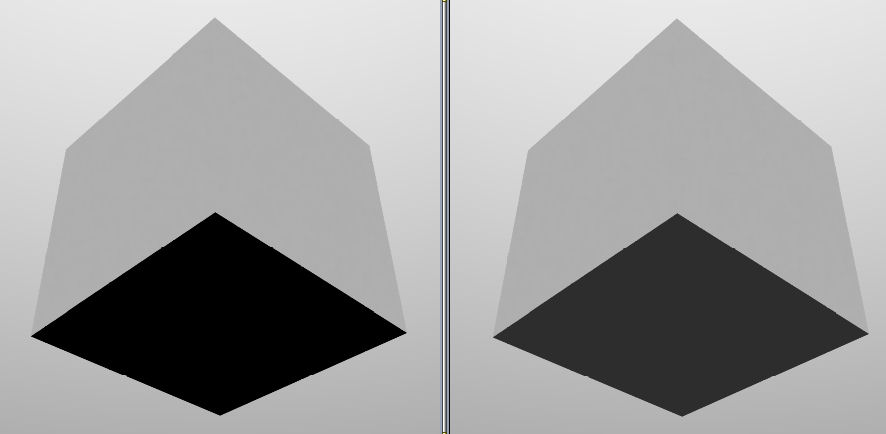
Weird.
The image shows the result. I jacked up the light contribution from the skylight to 300% just to get it to be as obvious as possible. The left image is with the horizon set to 90 degrees. The right is set to 89 degrees. There is no other difference in these renders.
-Kix

Privacy Notice
This site uses cookies to deliver the best experience. Our own cookies make user accounts and other features possible. Third-party cookies are used to display relevant ads and to analyze how Renderosity is used. By using our site, you acknowledge that you have read and understood our Terms of Service, including our Cookie Policy and our Privacy Policy.
There are a couple of interesting issues I've encountered in C8 that I thought I'd bring up here.
A friend of mine sent me a file with a bunch of gemstones that he couldn't get to render the way he wanted. It's a C7 file which I opened in C8. I made extensive modifications but the most interesting thing is that if I turn on indirect lighting, the gemstones render completely and fully black (weird).
I've tried a few things to deal with it but I couldn't get it figured out.
Another problem I've discovered comes from skylight. If you put a bi-gradient into the background, put white into the first color, black into the second and set the horizon to 90, what you get is a background that goes from white at the top to black at the bottom. I really like to use this for GI skylighting.
What I found is that all surfaces on the bottom render as completely black! The fix is to set the first box to white in the bi-gradient and the rest of the boxes to black and the horizon to 89 degrees (and bang it's fixed).
So, weird. I'm glad I can fix up the GI skylighting thing but the GI indirect light issue is weird.
Not sure if it's a translation issue from C7 or not. My friend uses Shoestring shaders and I don't have that. Maybe opening up a file with that plug-in setup in another version of C that doesn't have it tweaks it somehow.
-Kix