
Renderosity Forums / Carrara
Welcome to the Carrara Forum
Forum Coordinators: Kalypso, Anim8dtoon
Carrara F.A.Q (Last Updated: 2026 Jun 30 12:55 pm)
Visit the Carrara Gallery here.

Subject: Spline modeling


Carrara doesn't think of .eps as a vector art format but an image format instead. So, you can import a picture saved in an .eps format in the vertex room as a backdrop or as a background for a render - but not as a path document.
It's the same thing for the .dxf format which is a CAD format. But many CAD systems export .dxf as a flat image format for blueprints. Carrara "thinks" about .eps that way too.
I don't agree with the implementation but that's how it works. :-/
Mark

PaintShop pro is the only non Adobe program that I've heard of that will convert to AI file format... also note that you need to convert to an older format of AI (version 9 I believe) not the current CS version of the AI file for carrara to read it as a true vector...
being on a mac I've never worked with Paintshop pro but Corel is easy to get a hold of and ask if it'll do it.
Hexagon, Carrara, Sculptris, and recently Sketchup.

I've used Active Python in the past, and I only use AMD CPUs, so it may have been a case of 32bit vs. 64bit. Either that or an OS issue. It's hard to diagnose since I don't know what your system specs are.
Quote - Unfortunaly Gimp and Inkscape don`t export to AI and I cant find any convertor
I did find one but that needed another piece of software called active python but that wouldnt install on my PC as it didnt like the processor! (AMD)
Why does it have EPS as an option to import?
You where right **sparrownightmare I down loaded a 64bit version Now going for the 32bit
My plan is Gimp paths to SVG uniconvertor to AI
Now I have installed the uniconvertor but its a command line prompt program and I havent had any joy!
I change directory to c:phython26scripts which is where the unicov.cmd file is! type the name unicov test.svg test.ai
"python" is not a reconised internal external command!
I opened up the batch file
@python -c "from uniconvertor import uniconv; uniconv<>;" "%~1" "%~2"
None the wiser!
**

Privacy Notice
This site uses cookies to deliver the best experience. Our own cookies make user accounts and other features possible. Third-party cookies are used to display relevant ads and to analyze how Renderosity is used. By using our site, you acknowledge that you have read and understood our Terms of Service, including our Cookie Policy and our Privacy Policy.
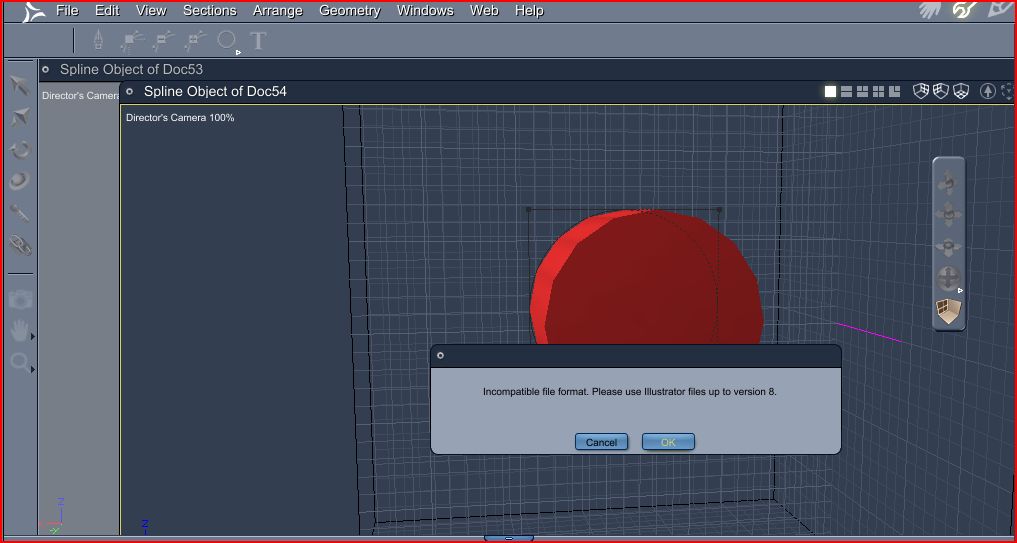
I want to use Gimp or Inkscape to model in carrara using the spline tool When i go to import there are 3 option Ai ai3 and EPS The only one I can get to work is AI Gimp and Inkscape only out put the paths to EPS or PS sometimes I get and AI from the net file but it will not import to Carrara saying it will only handle file up until version 8 I was told to save it as pdf and rename it as ai but that dosnt work ither Let say i want a simple 3 ring design and to extract it