Filter: Safe | Tue, Jul 14, 4:23 AM CDT

Renderosity Forums / Carrara


Welcome to the Carrara Forum

Forum Coordinators: Kalypso, Anim8dtoon

Carrara F.A.Q (Last Updated: 2026 Jul 11 2:50 am)


Visit the Carrara Gallery here.

Carrara Free Stuff here.

 
Visit the Renderosity MarketPlace - Your source for digital art content!


Subject: Alpha Channel


mikeberg ( ) posted Fri, 16 May 2008 at 9:58 AM · edited Tue, 14 July 2026 at 3:00 AM

I'm working with Carrara Pro v6,2.
I've exported from Cinema4D a tree with an alpha texture for the leaves. (textures are in jpg format)
Carrara imported well the obj file with the textures for the trunk but not the ones for the leaves.
The texture for the color of the leaves imported OK.
I have imported in the alpha channel as an image map the alpha texture file and it appears OK in the little square renderer in the texture room.
But in the rendering room, the leaves do not appear. Do I have something more to do ?
Thank you and excuse my english.

Michel


MarkBremmer ( ) posted Fri, 16 May 2008 at 10:37 AM

 Can you show a screen picture of the Shader? You may simply need to invert the color of the alpha texture. Also, make sure that the alpha map is in the alpha channel and not the transparency channel.

Mark


mikeberg ( ) posted Fri, 16 May 2008 at 12:09 PM

Sorry, I don't know how to send a screen picture but if somebody is interested in receiving a zip file of my tree and textures, I can send him my email address. Is that allright ?
Thank you.
Michel


GKDantas ( ) posted Fri, 16 May 2008 at 12:16 PM

You can hit the printscreen key in your keyboard, open some paint program and paste the content in the clipboard (that is the image you grab) then save the image as a JOG or something and attache it here... its better then receive the file it self.

Follow me at euQfiz Digital
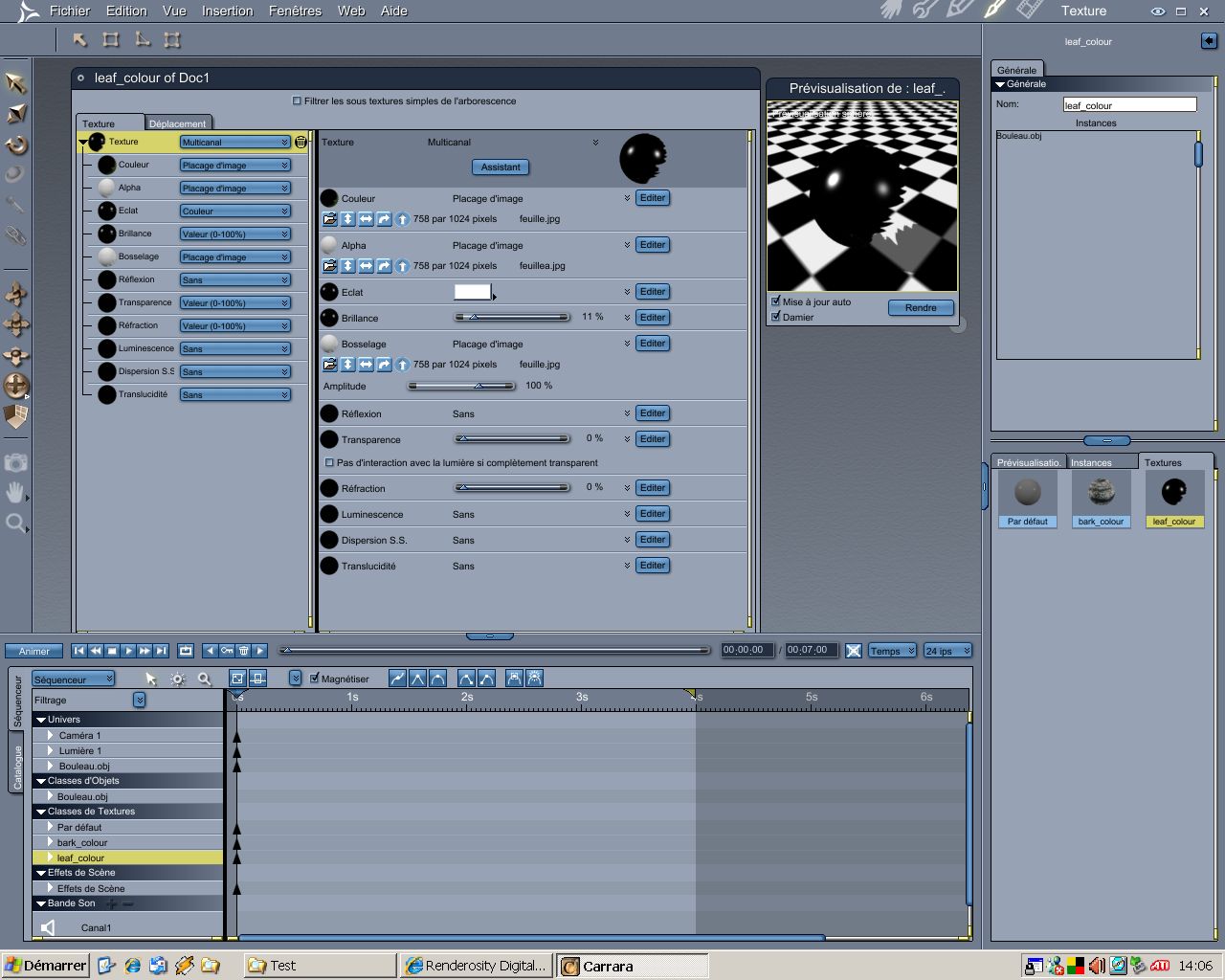


mikeberg ( ) posted Fri, 16 May 2008 at 1:14 PM

file_406245.jpg

Thank you so much GKDantas, I did'nt know it was so easy. OK, here is a screen picture of the texture room. If you need some other view, let me know or if you want me to send you an english screen picture. Michel


GKDantas ( ) posted Fri, 16 May 2008 at 2:12 PM

I think your alpha is inverted, sometimes when importing from another sopftwares we get a negative alpha. Click in the alpha channel and choove invert to see if you can see the shader in the preview, not a dark ball.

Follow me at euQfiz Digital
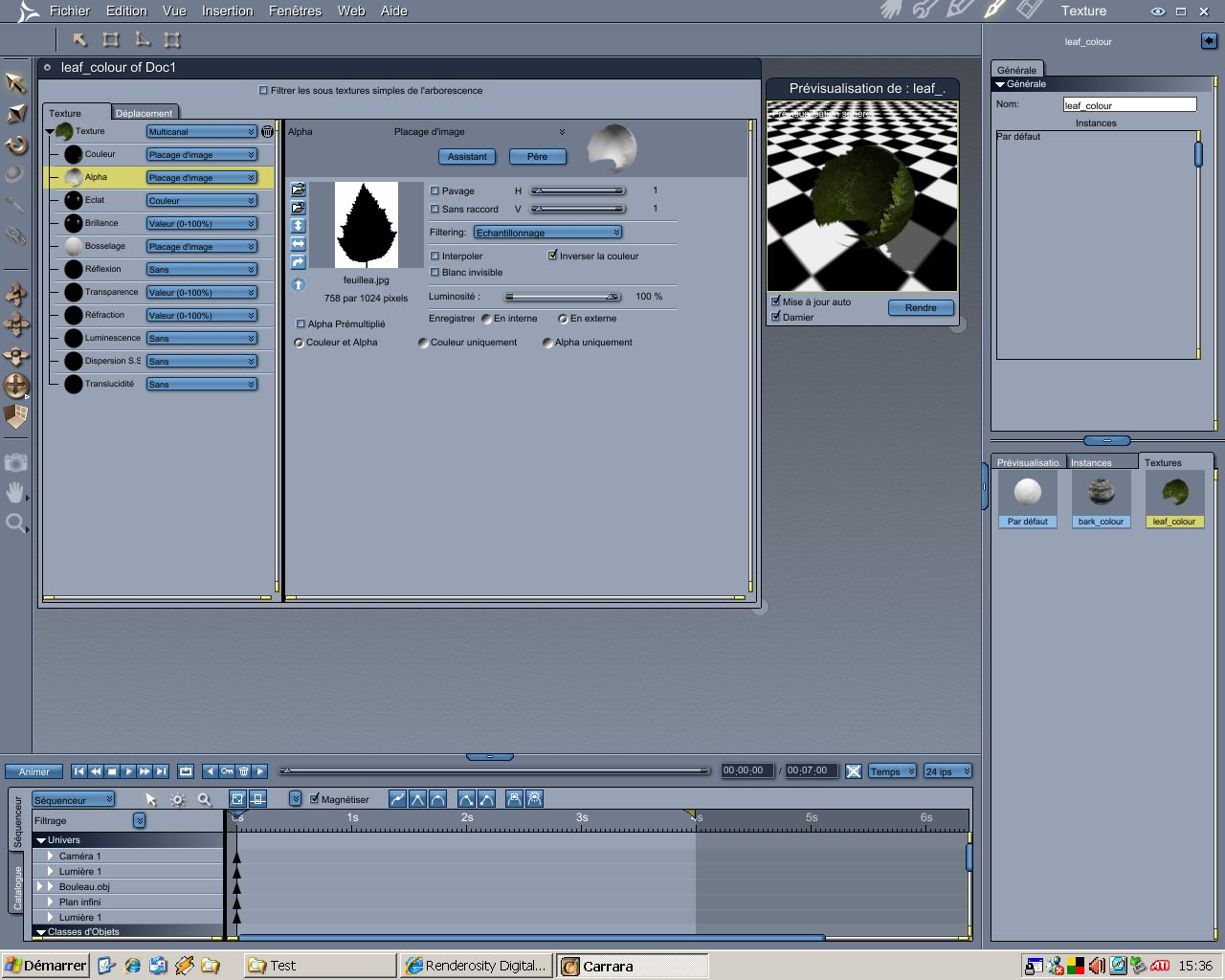


mikeberg ( ) posted Fri, 16 May 2008 at 2:45 PM

file_406250.jpg

I already try that because in Cinema4D, we have to do that sometimes. If I invert it there are no leaves appearing in the rendering room but we can see that leaves are there in the texture room. I really don't know what to do after trying hours and hours for some days now. Michel


GKDantas ( ) posted Fri, 16 May 2008 at 4:26 PM

Looks that I can see the leaf better now, OK send me a PVT message so you can send me the file.

Follow me at euQfiz Digital


mikeberg ( ) posted Fri, 16 May 2008 at 5:04 PM

Excuse me but what is a PVT and how can I send one to you ?
Michel


GKDantas ( ) posted Fri, 16 May 2008 at 5:21 PM

Its a private message, send it to euqfiz@euqfiz.com.br no problem!

Follow me at euQfiz Digital


mikeberg ( ) posted Fri, 16 May 2008 at 5:30 PM

Ok I sent you an email with a zip file containing all the files (.car and jpg)

Thank you again

Michel


GKDantas ( ) posted Fri, 16 May 2008 at 6:34 PM

Here we go... You will need t export the plant again from C4D because the problem look that is in the UVmap from the leaves. All leaves need to share the same UVMap but if you look at the UV Editor you will not see the UVMap (I really dont understand what happen to the UV, but it is not working).

Follow me at euQfiz Digital


mikeberg ( ) posted Fri, 16 May 2008 at 6:42 PM

But why is it working in Cinema4d and Bryce ?. I'll import the obj file in Bryce and export it again in obj format and try it again in Carrara...

Thank you again

Michel


GKDantas ( ) posted Fri, 16 May 2008 at 7:01 PM

Can you send me the OBJ file?

Follow me at euQfiz Digital


mikeberg ( ) posted Fri, 16 May 2008 at 9:34 PM

Ok Dantas I got it. When I exported from Cinema4D to an obj file, I exported it as only one objet when there were 5 meshes. If I export it as a 3ds format, all the meshes are separated and I can affect the textures to each mesh correctly.
I was not able to import 3ds format with Carrara until the new 6,2 updater. Now I can and that solved the problem.
Your idea of the UV map gave me the answer.
Thank you so much
Michel
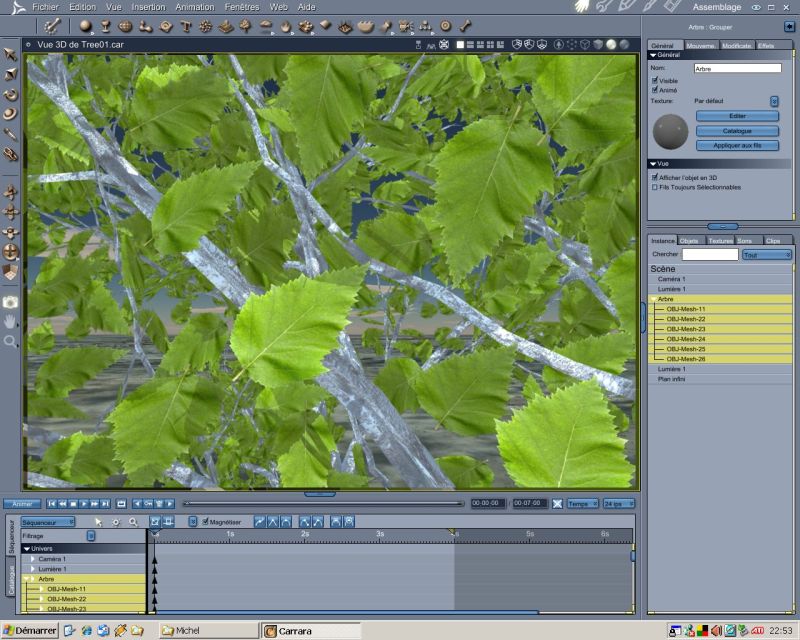

mikeberg ( ) posted Fri, 16 May 2008 at 9:59 PM

Here is a closed screen capture of the rendered leaves and trunck.

I just send to you the 3ds file so that you could see what was my problem.

Again thank you so much Dantas

Michel


mikeberg ( ) posted Fri, 16 May 2008 at 10:00 PM

Here is a closed screen capture of the rendered leaves and trunck.

I just send to you the 3ds file so that you could see what was my problem.

Again thank you so much Dantas

Michel


mikeberg ( ) posted Fri, 16 May 2008 at 10:02 PM

file_406277.jpg

Sorry the first scrren capture was too big I suppose. Here it is


GKDantas ( ) posted Sat, 17 May 2008 at 7:58 AM

That good! I send you the file too.

Follow me at euQfiz Digital


Privacy Notice

This site uses cookies to deliver the best experience. Our own cookies make user accounts and other features possible. Third-party cookies are used to display relevant ads and to analyze how Renderosity is used. By using our site, you acknowledge that you have read and understood our Terms of Service, including our Cookie Policy and our Privacy Policy.