
Renderosity Forums / Carrara
Welcome to the Carrara Forum
Forum Coordinators: Kalypso, Anim8dtoon
Carrara F.A.Q (Last Updated: 2026 Jul 11 2:50 am)
Visit the Carrara Gallery here.

Subject: Having Issue with Poser7 to Carrara6pro.. Help


I go into the motions tab in the properties palette and set the coordinates to 0,0,0. If I have other things already placed in the scene, I record the coordinates and use those as landmarks to place things away from the center.
I haven't found any other way, so if someone has another trick, I would love to hear about it, too!

Quote - Are you using the Browser to import this characters?
Browser, do you mean "Import" under File Tab??? When i import my scene/character into Carrara it is always out of the main picture, and i have to scroll out to get it, and collect all the obt/hair/clothing etc... and put them under the main character as a group, and then move it to where i want it. I even lcok child parts and the program sometimes doesnt keep them together. Another issue they need to work out with this program. I wish you could lock on an item that is in the room, like a couch and IMPORT the character to where or what you select.
I love Carrara and it is my best Renderer i own at this time. I have Shade, Hex, and Bryce as other platforms but have little knowledge on how to work it, but i would if i spent time with teh program long enough. I am self taught mostly, and learn as i go. You can see some of my work over at Artzone.com under the alias: Anonedel .
I appreciate the help and info in solving my issue. Thanks.
There are a couple ways to "import". One way is to bring in characters one at a time by dragging from the browser (equivalent to poser library) and dropping each item into the carrara window. This way always lets you at least see the character and grab and move it quickly. Drag and drop only! A double click on a browser item opens a new window.
Another way is to file import an actual poser scene. Be sure your default Carrara opening scene is medium-sized. The poser scene then should look normal.
If you open the poser scene into a carrara scene that is larger (like a terrain), the poser scene is tiny (room sized) within a space that Carrara is treating as world-sized. In the properties pallette you should see your poser scene listed as an item within the carrara scene. Click on it (or any item in it) and then look in the motions tab. Here you will find the x,y,z coordinates of your scene-within-a-scene. Here you can type in new coordinates so that you need not even drag your scene to where you want it to go. It will snap there on its own. 0,0,0 is always centered in Carrara's medium (room-sized) default window.

I dont have Poser 6 (only 5) I already imported a PZ3 file with dynamic cloth and hair and everything works fine here. You need to use Transposer to get dynamic cloth to be imported. Just open the file or import it after create a scene in Carrara.
Follow me at euQfiz Digital
Hi GKDantas,
thanks for yr advise. However, i understand that C6 has the Transposer and will automatically import in any Poser files.I'd successfully tried it b4 when i bought C6 but recently, what was eventually imported in are the props eg clothings..etc etc but no human form ie V3/V4/M3 are missing..can u further advise?
richard
Did you changed something in your Runtime configuration? Sometimes using more then one Runtime (one for clths and other for Vic) can produce this kind of effect. Did you have the latest update for Carrara? 6.1.1 is the latest
http://www.daz3d.com/i.x/support/downloads/-/?product=car_down&_m=d
Follow me at euQfiz Digital

Quote - hi, i am currently using carrara6pro and new to it. i'd tried importing Poser pz3 file into C6 by the usual import function: However i can only see the props in the screen and not V3/V4 or M3....!
can some1 pse help advise. thanks
richard
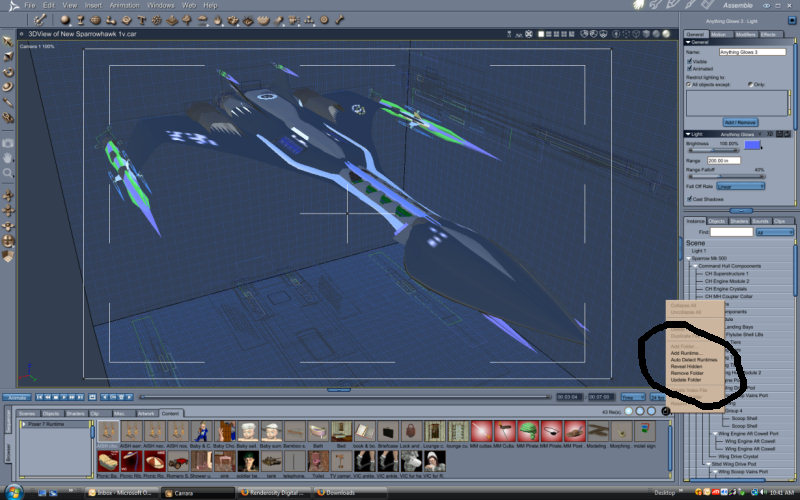
Just create the scene in C6 by pulling in Poser content using the C6 content browser. Less hassles, better results. Just open the browser, click the content tab and (providing you have told Carrara wgere to look for your poser runtime directory.) You should see all of your poser content in the browser. It's a lot more intuitive than the poser library and you don't have to wait for ages when switching between folders in the browser like you do in the Poser Library. Just click and drag whatever you want into the Carrara assembly room just like you would any object in the browser. For textures or morphs and such, just drag the item onto the figure you want it to go to, just like a shader. Once you get used to it (usually takes about 10 minutes) you will probably never touch Poser again.


Privacy Notice
This site uses cookies to deliver the best experience. Our own cookies make user accounts and other features possible. Third-party cookies are used to display relevant ads and to analyze how Renderosity is used. By using our site, you acknowledge that you have read and understood our Terms of Service, including our Cookie Policy and our Privacy Policy.
Is there anyway possible when loading a character from Poser7 or 6 ( i use 7), to Carrara6Pro or 5pro to place the figure where you want it to go in your scene, so you dont have to fish for it from across the grid and move it where you would like it (at least get it closer to where you want it)?
Thx