Filter: Safe | Tue, Jul 14, 8:31 AM CDT

Renderosity Forums / Carrara


Welcome to the Carrara Forum

Forum Coordinators: Kalypso, Anim8dtoon

Carrara F.A.Q (Last Updated: 2026 Jul 11 2:50 am)


Visit the Carrara Gallery here.

Carrara Free Stuff here.

 
Visit the Renderosity MarketPlace - Your source for digital art content!


Subject: When I zoom into a selection how do I bring the manipulator with me.


UVDan ( ) posted Wed, 20 February 2008 at 7:02 PM · edited Tue, 14 July 2026 at 7:30 AM
Forum Moderator

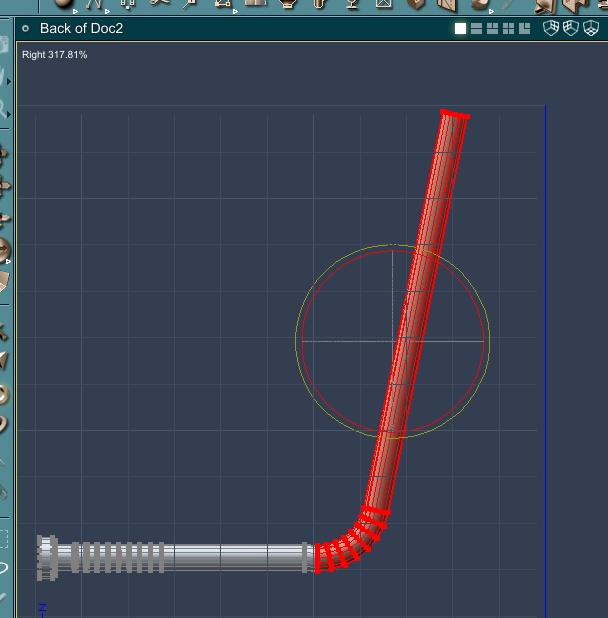
**When I zoom into a selection  I loose the manipulator.  How do I bring it with me?**

Free men do not ask permission to bear arms!!


UVDan ( ) posted Wed, 20 February 2008 at 7:03 PM
Forum Moderator

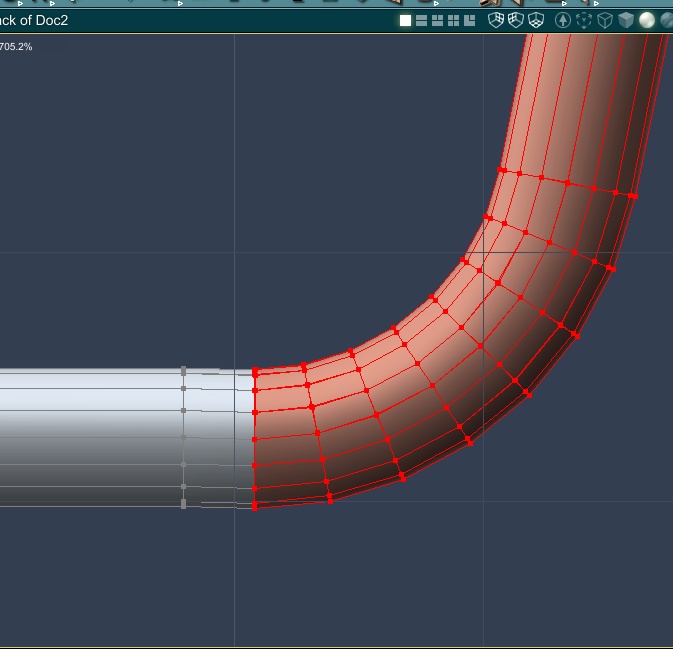
**Here I am zoomed in.  NO manipulator to be found.**

Free men do not ask permission to bear arms!!


Patrick_210 ( ) posted Wed, 20 February 2008 at 9:57 PM

You have a lot more selected than is showing in the zoomed view. The manipulator is still there, it's just out of view. The manipulator will center over the area selected. If you just want to manipulate the bend then only select that area.


UVDan ( ) posted Wed, 20 February 2008 at 10:57 PM
Forum Moderator

I need the selection as I have it to straighten the pipe segment by segment.  As I bend each segment I will select one less each time until the whole is straight.  I cannot believe that Carrara will not let me reset the manipulator so I can see it and the area I am interested in adjusting at the same time.   If I select only a small area, then the whole pipe will not be straightened as I want it.

Free men do not ask permission to bear arms!!


UVDan ( ) posted Wed, 20 February 2008 at 11:06 PM
Forum Moderator

If Carrara will not cooperate on simple things, then I can only imagine how hopeless the complex things will be.

Free men do not ask permission to bear arms!!


whkguamusa ( ) posted Wed, 20 February 2008 at 11:44 PM

Split the view - one far enough out to see and use the UVM  - the other zoomed in on the detail to see what effect it is having.

wayne k
guam usa


ShawnDriscoll ( ) posted Wed, 20 February 2008 at 11:52 PM · edited Wed, 20 February 2008 at 11:55 PM

Quote - When I zoom into a selection  I loose the manipulator.  How do I bring it with me?

I use the TRACK XZ button (or scroll wheel) to move the camera closer/farther.  The zoom lens is too crazy.

www.youtube.com/user/ShawnDriscollCG


UVDan ( ) posted Thu, 21 February 2008 at 1:19 AM
Forum Moderator

Thanks everybody.  I appreciate it.

Free men do not ask permission to bear arms!!


MarkBremmer ( ) posted Fri, 22 February 2008 at 6:19 AM · edited Fri, 22 February 2008 at 6:20 AM

 Additionally, you can move the manipulator control down by engaging the Caps Lock on your key board and then moving it with the axis arrows. When it's in the correct spot, disengage the Caps Lock and use it normally.

Mark


UVDan ( ) posted Fri, 22 February 2008 at 6:39 AM
Forum Moderator

Thanks Mark.

Free men do not ask permission to bear arms!!


Privacy Notice

This site uses cookies to deliver the best experience. Our own cookies make user accounts and other features possible. Third-party cookies are used to display relevant ads and to analyze how Renderosity is used. By using our site, you acknowledge that you have read and understood our Terms of Service, including our Cookie Policy and our Privacy Policy.