Filter: Safe | Wed, Jul 15, 5:48 PM CDT

Renderosity Forums / Carrara


Welcome to the Carrara Forum

Forum Coordinators: Kalypso, Anim8dtoon

Carrara F.A.Q (Last Updated: 2026 Jul 11 2:50 am)


Visit the Carrara Gallery here.

Carrara Free Stuff here.

 
Visit the Renderosity MarketPlace - Your source for digital art content!


Subject: Looking for the Test Render Tool


cryptojoe ( ) posted Fri, 18 January 2008 at 8:13 AM · edited Wed, 15 July 2026 at 5:46 PM

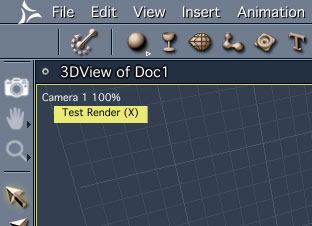
Anybody know where the test render tool is at on Carrara 6?

Can I find it in the Assemble Room or do I need to change to the Render Room. On this part the manual is as clear as mud.

Yank My Doodle, It's a Dandy!


Hoofdcommissaris ( ) posted Fri, 18 January 2008 at 8:50 AM

file_397907.jpg

It looks like a little camera. And, when you keep the X pressed on your keyboard, you can click-and-drag to start a test-render too. The tool takes the current render settings, so if you have Global Illumination and Depth Of Field and what have you ticked, it will take some serious time, depending on your hardware. You can skip test that take three days by pressing the escape key. Good luck!


cryptojoe ( ) posted Fri, 18 January 2008 at 8:52 AM

Ah! Thanx very much Hoofer!

Yank My Doodle, It's a Dandy!


ShawnDriscoll ( ) posted Fri, 18 January 2008 at 6:17 PM

Don't move the mouse or click on another app after you use the render tool.  Otherwise, your test render vanishes as soon as it completes.

www.youtube.com/user/ShawnDriscollCG


cryptojoe ( ) posted Fri, 18 January 2008 at 8:29 PM

Ah! Thanx Shonner...

Yank My Doodle, It's a Dandy!


danamo ( ) posted Sun, 20 January 2008 at 3:40 PM

If you have advanced settings on in the render room it is better to do the render there because the "test" or preview render only seems to us one processor, or core. If you have a multi-core processor, or machine this can save you a lot of time.


cryptojoe ( ) posted Sun, 20 January 2008 at 7:34 PM

danamo, can you elaborate please? I have four core duo's.

Yank My Doodle, It's a Dandy!


danamo ( ) posted Sun, 20 January 2008 at 8:19 PM

Hi crytojoe. I have only recently built a machine that uses a dual-core processor. When I do a render in the render room(top of screen, righthand filmstrip logo button) I see the output of all my cores during a render as a series of sequential "tiles". Each core handles a different tile, and if I recall correctly the tiles are numbered to show which core is rendering which tile. It seems that the preview render does not make use of more than I core. If I am wrong I am sure someone will correct me. Cheers, Dan


cryptojoe ( ) posted Mon, 21 January 2008 at 8:35 AM

Thanx Dan I'll look for that. I did a test animation render of a spinning cube, it was pretty simple so even 300 frames passed by so fast it took less than 10 seconds, I think, so with my poor vision, I'll have to look real closely to find this.

Thanx again.

Yank My Doodle, It's a Dandy!


UVDan ( ) posted Tue, 22 January 2008 at 9:30 AM
Forum Moderator

Glad to hear you have gotten the reactor fired up and the cores are working.  300 frames in ten seconds eh.  Most of us are happy to get 300 frames in ten MINUTES.

Free men do not ask permission to bear arms!!


Hoofdcommissaris ( ) posted Tue, 22 January 2008 at 9:42 AM

Mmmm. I was just getting used to 30 frames in ten minutes...


cryptojoe ( ) posted Tue, 22 January 2008 at 10:30 AM

file_398258.jpg

.

Yank My Doodle, It's a Dandy!


Privacy Notice

This site uses cookies to deliver the best experience. Our own cookies make user accounts and other features possible. Third-party cookies are used to display relevant ads and to analyze how Renderosity is used. By using our site, you acknowledge that you have read and understood our Terms of Service, including our Cookie Policy and our Privacy Policy.