
Renderosity Forums / Poser - OFFICIAL
Welcome to the Poser - OFFICIAL Forum
Forum Moderators: RedPhantom Forum Coordinators: Anim8dtoon
Poser - OFFICIAL F.A.Q (Last Updated: 2026 Apr 07 12:09 am)

Subject: Add keyframes only to active body parts?



My Sparsifier script does pretty much what you want. The ZIP
includes a separate 'GUI-less' version for Mac OSX.
My python page
My ShareCG freebies
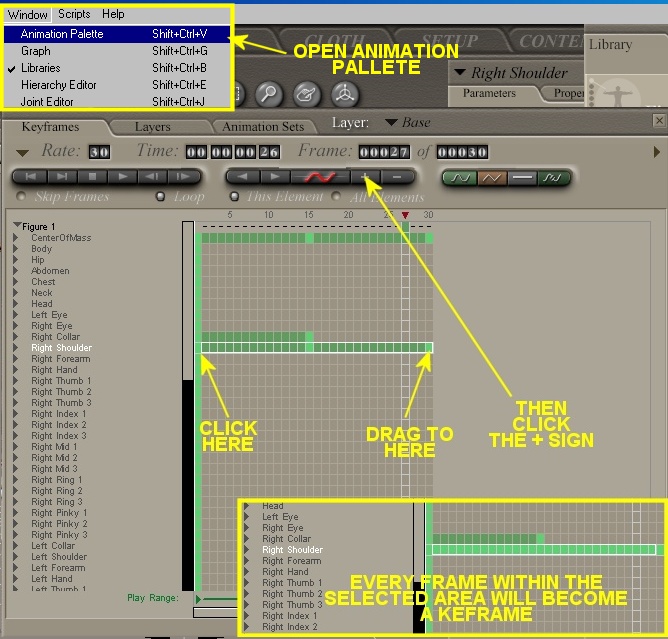
Thanks, Syntrifid. I did try that (after my posting) and it does work for the most part, but it's a lot of work, and you might miss something.
Ockham, I did stop by your site, since this seemed right up your alley, but I wasn't sure if anything would work for me, at least on the Mac. I'm not sure I understand how Sparsifier would work for me in this context, since what I want to do is add frames, not remove them--essentially, I want to "de-spline" the animation by turning splines between keyframes into all keyframes, one keyframe per frame, so the animation will still have smooth curves, but they'll be made up of zillions of keyframes rather than by splines between keyframes. (The reason I'm doing this is that I'm importing into an app that isn't translating the spline info correctly, but it seems to be importing individual points accurately.)
Alternatively, a script that eliminated all the zero morphs etc. might do it for me, but I don't think you have a Mac version for that...?
Thanks!--Tim
Oh. Well then, Densifier is the right one.
It's remarkably simple.
import poser
scene=poser.Scene()
for F in range(scene.NumFrames()):
for A in scene.Actors():
A.AddKeyFrame(F)
My python page
My ShareCG freebies
If you want only the current figure to be affected,
import poser
scene=poser.Scene()
Fig=scene.CurrentFigure()
for F in range(scene.NumFrames()):
for A in Fig.Actors():
A.AddKeyFrame(F)
My python page
My ShareCG freebies
Densifier is the code I put in the messages above. Just copy and paste
each one to a .PY file and put the PY files in your poserScripts folder.
I had some PBM-cleaners, which you've probably found. I don't remember
if they have the TkInter GUI or not ... maybe you can just try them and see
if Mac will swallow them or spit them out.
My python page
My ShareCG freebies
Hi Ockham,
Forgive my ignorance, but is there more to a python script than just the text you have here? I don't have any experience with writing or even altering a python script, and I'm looking at other scripts and there seem to be headers and footers and other code that I'm guessing are necessary, but I don't have a clue what to do with. I tried using just the code you sent, and it errored, but I'm sure I'm using it wrong.
And you are correct about the tkinter gui--doesn't play nice with my Mac. ;-)
Thanks--Tim

Privacy Notice
This site uses cookies to deliver the best experience. Our own cookies make user accounts and other features possible. Third-party cookies are used to display relevant ads and to analyze how Renderosity is used. By using our site, you acknowledge that you have read and understood our Terms of Service, including our Cookie Policy and our Privacy Policy.
I want to to add one keyframe per frame on the active elements of a Poser character animation. I know that you can do this in a global fashion where Poser will add a keyframe to every element in a figure, but that includes every single part and morph, regardless if they change in the animation or not, and results in a huge file. What I need is a way to add these keyframes only to the parts that move. Any suggestions?
Thanks--Tim (Mac OSX)