
Renderosity Forums / Carrara
Welcome to the Carrara Forum
Forum Coordinators: Kalypso, Anim8dtoon
Carrara F.A.Q (Last Updated: 2026 Jul 30 3:53 am)
Visit the Carrara Gallery here.

Subject: How do I save shaders?


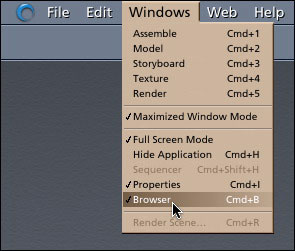
Thanks very much Mark! I see it now. 
Another question...
I'd eventualy like to create some freebie shader packs but I'm a bit confused about that.
Any shaders I create would use texture jpegs. The shader I'm saving now has one (a wood texture map) and Carrara would just load the jpeg from the location I specified on my comp, correct? But what it comes to sharing shaders with others, how does Carrara know where the jpegs are?
For example, I'm used to creating and sharing materials/shaders for P5/P6/P7. Poser has a texture folder inside the Poser Runtime. When someone downloads and installs the pack, everything is extracted to the correct place and Poser knows where to load the jpeg from.
I've found and downloaded a few freebie shader packs for Carrara, and the files are all set up to extract to "external" folders. By this I mean, they don't extract into any kind of folder structure within Carrara. For example, I downloaded a shader pack by Salashin. The files extract into these folder paths:
Salashin/Sal's Shaders (.cbr)
Salashin/Sal's Textures *(.jpg)
*So how do you get them into Carrara? Is there some way to import them? And once you do, I guess you would have to be careful not to move those folders, otherwise the next time you try to load/apply that shader, Carrara wouldn't be able to find them?
Sorry if these are really dumb questions...I just installed C5 today and I have no clue what I'm doing. :P
"You don't know what we can see
Why don't you tell your dreams to me
Fantasy will set you free." - Steppenwolf
Another problem. :(
I just saved that wood shader...dragged it down into the "My Shaders" library. I then closed out Carrara and browsed to:
C:/Program Files/Eovia/Carrara 5/Presets/Shaders/My Shaders
...and there's nothing there. No .cbr file, no nothing. The folder is completely empty.
I thought maybe it hadn't been saved correctly, so I fired up Carrara again and looked in My Shaders, and the wood shader is there. So what's going on? Why will it only show up inside Carrara?
I am really confused. :(
"You don't know what we can see
Why don't you tell your dreams to me
Fantasy will set you free." - Steppenwolf

Poser doesn't have the option to embed the textures with shader so it subscribes to the textures instead. As CFC noted above, you have the option to save them internally (embedded) with the shader in Carrara. However, if several of your shaders use the same texture map, then saving them externally to a folder is a good idea to keep file size down. That's what I did with my own shader set. You just have to advise folks that they will asked to locate the texture map when using the shader. They can put the folder containing the textures anywhere as long as they know where they put it! Carrara, unlike Poser doesn't have a "scheme" of where to locate the textures. You can create new folders from within the Browser which is what I usually do since most of my shaders are for specific jobs. That way, I have a custom Browser folder per project. Mark
I have no clue coocoo. :(
I'm still tinkering around with the shaders but haven't been able to figure out what's going on. I do hope someone can help us.
As for my other question about packaging up shader packs...I've been looking some more at the file structures and there is a TEXTURES folder:
C:/Program Files/Eovia/Carrara 5/Presets/TEXTURES
So...I'm sure you could set up a shader pack to extract to folders inside Carrara. I guess the ones I've managed to find and download just didn't do it that way, which is why that was confusing me.
I should be able to set it up like so:
Presets/Shaders/Neyjour/Wood-01.cbr
Presets/TEXTURES/Neyjour/Wood-01.jpg
So you'd just extract to your Carrara folder (whatever version you have) and all the files would fall into place.
Anyway, will test that later, as soon as I can figure out why my shader folders are empty...
"You don't know what we can see
Why don't you tell your dreams to me
Fantasy will set you free." - Steppenwolf
Thanks Mark!
Quote - As CFC noted above, you have the option to save them internally (embedded) with the shader in Carrara.
How do you do that?
Also, I still don't understand why my shader folders are empty. Or is that what the problem is...you have to save them "internally (embedded)" in order for them to show up as a .cbr when you're browsing through your folders in Windows Explorer?
"You don't know what we can see
Why don't you tell your dreams to me
Fantasy will set you free." - Steppenwolf
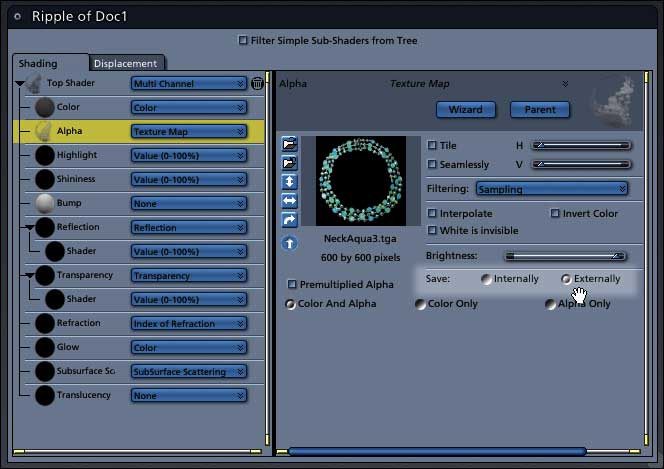
Ahh! Okay...I completely missed those Internally/Externally options. Thanks! I really appreciate all the help. :)
So what's the best way to share shaders with .jpeg textures? What do most people prefer?
-
Embedded
-
Linked - external folder that can sit anywhere on someone's comp.
-
Linked - packaged so that the textures and .cbr files extract to folders inside Carrara.
"You don't know what we can see
Why don't you tell your dreams to me
Fantasy will set you free." - Steppenwolf
another good question neyjour! I get confused, is a shader a texture? For example, if I save as an obj file, put that into UVmap, what do file do i need from Carrara to reconstruct the 3d? i need the .jpg right? and if it's embedded in the cbr file, you have to have Carrara to get to it. So I think Door #2 above would be the better option if using Carrara to create opjects to be textured in other programs on other PCs without a Carrara install. Or am I totally loosing it? thx.
that really helps thanks! u seem like a really smart guy...can u help me with this:www.renderosity.com/mod/forumpro/showthread.php
the verticle edges of the keyboard look bad. the lower one i photoshoped a layer (made it worse). But ya see the blockiness above the keys? i think the answer may be in a shader, but not sure. i've tried to change the shaders for the keyboard but they only seem to effect the horizontal surfaces. where ever there is a sharp verticle plain, the rock shader looks awful. it would be nice to be able to match the terrain shader, which i thought i was doing by cutting and pasting the entire hierarchy of shaders from the terrain to the keyboard, then editing it just a tad. thanks!
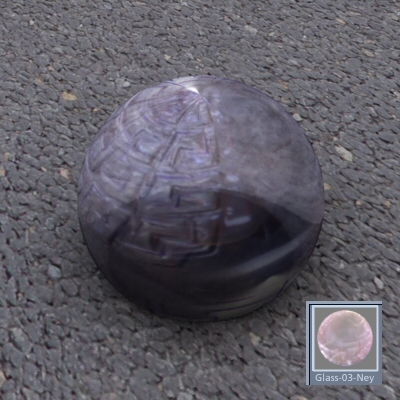
I made some fabric shaders last night and the thumbs looked good, but I'm making some glass shaders right now and the thumbs look nothing like the rendered image.
"You don't know what we can see
Why don't you tell your dreams to me
Fantasy will set you free." - Steppenwolf
That's because the object in your scene is picking up, reflecting and refracting the environment. The shader preview is strictly the shader attributes. So, to answer your question, no. If you had bricks underneath your scene, the shader would look vastly different. That's why the shader preview defaults to a neutral horizon line.

Privacy Notice
This site uses cookies to deliver the best experience. Our own cookies make user accounts and other features possible. Third-party cookies are used to display relevant ads and to analyze how Renderosity is used. By using our site, you acknowledge that you have read and understood our Terms of Service, including our Cookie Policy and our Privacy Policy.
I've edited an existing shader and would like to save it as a new one. From what I understand, from the Help PDF, you have to drag shaders to the Browser to save them. Is this correct?
Problem is, I can't find the Browser anywhere in the UI. Where do I find it, or how do I make it visible please?
"You don't know what we can see
Why don't you tell your dreams to me
Fantasy will set you free." - Steppenwolf