
Renderosity Forums / Carrara
Welcome to the Carrara Forum
Forum Coordinators: Kalypso, Anim8dtoon
Carrara F.A.Q (Last Updated: 2026 Jul 30 8:26 pm)
Visit the Carrara Gallery here.

Subject: Bubble shader


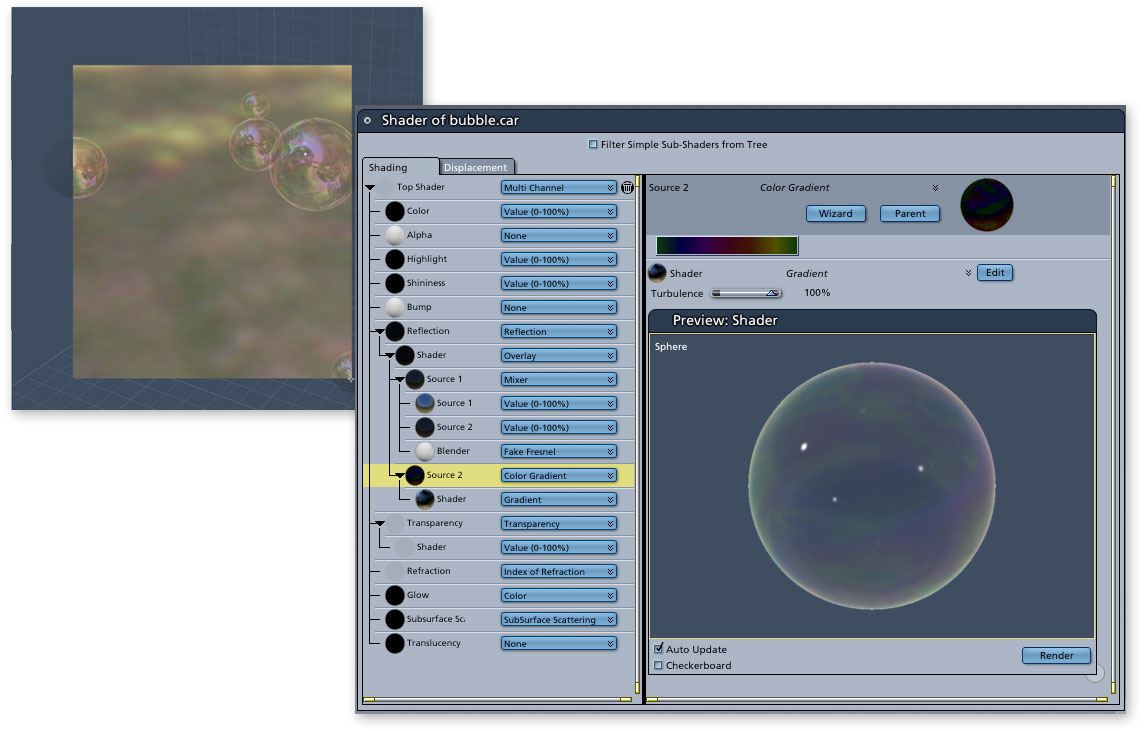
Edit: Ok, I just saw Mark's and its a billion times better than mine!! Also, I don't seem to have a "Fake Fresnal" option, is that from a plugin?
I don't know about other versions of Carrara but I am using v5 and it come with a bubble shader under the miscelaneous shader section. I didn't like it though so I modified it a little by adding an alpha channel with a cellular setting. Also I lowered the reflection alot. This is what I got.

Quote - Just click on the image to see it larger and read the shader. The magic of bubbles is in their reflection. So, try the settings shown above. Just as important is the environment that is reflected in the bubbles. Having an object that is nearly transparent, yet reflective, makes it disappear sometimes. Mark
Thanks for the info; few questions: What is "Fake Fresnel?" I don't see in list of options. What step/s did you use to create the "Source 2 / Shader" combo under "Reflection?" I can see what you have in the "Source 2" part of the shader but, of course, no other values are visible at the level of your screen capture. What are numbers are you using that I can't see? Thanks, Jim
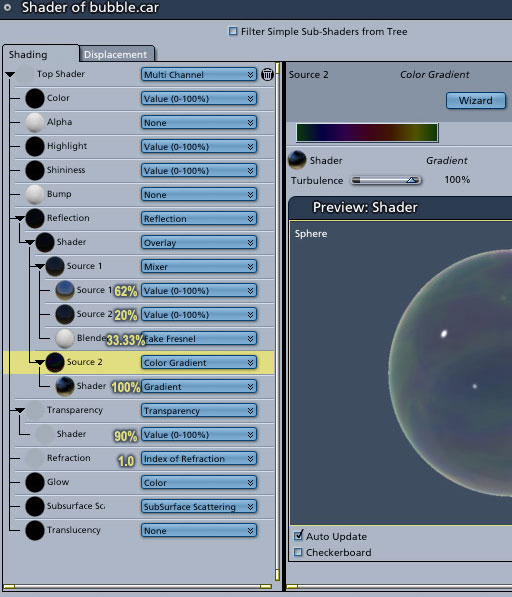
See previous post for Fake Fresnel. At any point in a shader tree, you can change a node to "mixer" and build out the structure you see there. For the actual color gradient, simply click on the color bar and it will open an edit window where you can build your gradient. Mark
Quote - > Quote - What step/s did you use to create the "Source 2 / Shader" combo under "Reflection?"
See previous post for Fake Fresnel. At any point in a shader tree, you can change a node to "mixer" and build out the structure you see there. For the actual color gradient, simply click on the color bar and it will open an edit window where you can build your gradient. Mark
Thanks; will experiment. I also located the Soap Bubble shader mentioned above that came with Carrara. I've not tried your bubble yet, but with the Carrara one, when the bubble is in front of or surrounding a glowing 3d-aura object, the light from the 3d glow does not shine through the bubble. The object itself is visible through the bubble, but not its 3d glow. What's up with that? Jim
Quote - > Quote - What step/s did you use to create the "Source 2 / Shader" combo under "Reflection?"
See previous post for Fake Fresnel. At any point in a shader tree, you can change a node to "mixer" and build out the structure you see there. For the actual color gradient, simply click on the color bar and it will open an edit window where you can build your gradient. Mark
Exactly which node am I changing to "mixer?" If I change any of the existing subcomponents of the Reflection portion of the tree then I no longer have all the components in your tree as shown in your image; the extensions of the tree I tried with "mixer" create a different looking tree branching system from yours. Jim
Hi Jim, Ahhhh, language is so imprecise - and sometimes I'm quite unclear too, especially when rushed at work. By default the reflection channel has a value stuck in there. So, select the value and the change it to Operators => Overlay from the pull down menu. Once Overlay is selected, you get two channels below it. Select channel 1 and then use the pull down menu again: Operators => Mixer. This will give you the structure you see in the image, i.e. two source channels and then a mixer element to combine them Now, that takes care of the first node under the original Overlay option. All that's left to do is convert the second channel to Color Gradient and build your bubble colors. Like all things, once you go through the the process you'll suddenly think, "Well that was easy. How could I have had any trouble at all?!" ;-) Mark
Thanks much, I'm working with your suggestions. Any ideas about the 3d issue I mentioned above, that is, when the bubble is in front of or surrounding a glowing 3d-aura object, the light from the 3d glow does not shine through the bubble, but renders the glow invisible like it is not there. The object itself is visible through the bubble, but not its 3d glow. Jim
Quote - Hi Jim, Ahhhh, language is so imprecise - and sometimes I'm quite unclear too, especially when rushed at work. By default the reflection channel has a value stuck in there. So, select the value and the change it to Operators => Overlay from the pull down menu. Once Overlay is selected, you get two channels below it. Select channel 1 and then use the pull down menu again: Operators => Mixer. This will give you the structure you see in the image, i.e. two source channels and then a mixer element to combine them Now, that takes care of the first node under the original Overlay option. All that's left to do is convert the second channel to Color Gradient and build your bubble colors. Like all things, once you go through the the process you'll suddenly think, "Well that was easy. How could I have had any trouble at all?!" ;-) Mark


Privacy Notice
This site uses cookies to deliver the best experience. Our own cookies make user accounts and other features possible. Third-party cookies are used to display relevant ads and to analyze how Renderosity is used. By using our site, you acknowledge that you have read and understood our Terms of Service, including our Cookie Policy and our Privacy Policy.
What sharder settings would I apply to a sphere primative to create a single large transparent bubble. Thanks, Jim