
Renderosity Forums / Poser - OFFICIAL
Welcome to the Poser - OFFICIAL Forum
Forum Moderators: RedPhantom Forum Coordinators: Anim8dtoon
Poser - OFFICIAL F.A.Q (Last Updated: 2026 Jun 22 7:06 am)

Subject: OT- very strange thing happening when I play a DVD/CD


The only time my icons change on me is if I am out of memory. Rebooting usually works.
"It is good to see ourselves as
others see us. Try as we may, we are never
able to know ourselves fully as we
are, especially the evil side of us.
This we can do only if we are not
angry with our critics but will take in good
heart whatever they might have to
say." - Ghandi

Quote - Icons can change if the file has been associated with a new program
Good point. Or even uninstalled one? Some of those programs and their installs are like freaking parasites and take over association of everything and then it's literally jumping through hoops to try and get your file associations back the way they were.
I remember I had installed some graphic program. It took over file association of everything graphic and all of the icons looked the same! I uninstalled the program and even that didn't help. All that did was give me icons without file association. I couldn't get back my default Windows icons no matter what I did. I went to the companies website and found out that there is no way to get back the association of default Windows without running a patch that the company created because too many people were complaining. Never installing that thing again!
"It is good to see ourselves as
others see us. Try as we may, we are never
able to know ourselves fully as we
are, especially the evil side of us.
This we can do only if we are not
angry with our critics but will take in good
heart whatever they might have to
say." - Ghandi
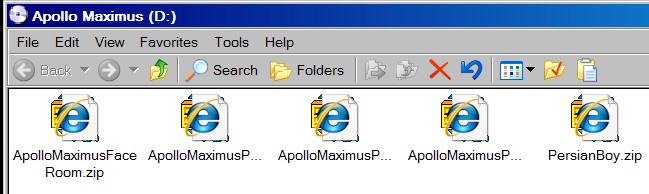
No new video files or players have been installed. And this problem only effects DVD and CDs while in the player. It does not show up anywhere else. When you look at the icons or files in the DVD/CD you can see the folder or the zip .exe, etc behind the IE icon. As a matter of fact the IE7 icon sits down and to the right of the folder or icon. I have never seen this before.
I want to uninstall IE7 I never use the darn thing anyway. But when I go to uninstall it I get this box that pops up telling me that the list of programs, just about all I have installed, may not work and depend on IE7 or some BS like that.

Quote -
I want to uninstall IE7 I never use the darn thing anyway. But when I go to uninstall it I get this box that pops up telling me that the list of programs, just about all I have installed, may not work and depend on IE7 or some BS like that.
If one of the programs is using IE to display helpfiles or "phone home": This function may not work anymore. But nothing other should be affected.
I've uninstalled IE because I'm using Firefox. Most of my programs now uses Firefox to make contacts to the web (docus, updates, etc).
I tried right click and open with IE7 and the zip opened in Winzip. Then I changed the association back to open winzip files using winzip all the time. It didn't change a thing. The icons still look the same only on DVD/CDs .
I don't understand it all was well yesterday I haven't done any changes or anything. The only thing I've installed new come to think of it was Utorrent and that was so my son and I could exchange torrents. But I don't see how that would effect the IE7 icon showing up on all files that have been burned on to my DVDs weeks ago and on all commercial DVD/CDs?
Have you scanned your system for viruses/spyware/trojans lately? Thats very strange. IE usually doesn't change icons on their own unless something got corrupted.
I suggest a scan/defrag.
I know everyone hates to do that. :)
torrents = not a good idea. (mho)
By your screenshot it looks like something is associating it's self that's causing that problem you need to remove it. And set it back to default settings. Not sure how it's done in IE7 as I use Netscape & Firefox.
Ran spybot, Avast, adware and windows defender and got nothing as I said it only seems to be doing this with the DVD/CD combo drive.

is it true that copyright holders can use bitTorrent somehow to get the IP addresses of folks who are uploading files? or maybe they can get the IP addresses of folks who are downloading files? I don't use bittorrent or any P2P software, so I dunno how they work. I just read in the papers about how college students are getting letters demanding that they pay the copyright holders or face court action, so they may be able to get their info without the formality of a subpoena.

Well after removing IE7 all is well and back to normal. I wonder if it was something that went nuts after this last M$ update 'cause to be honest I really hadn't ran a DVD since that update so that may have been what hosed it up I really don't know to be honest.
I generally do not like P2P programs but my kid wanted me to try it and so far it's pretty cool. He tells me there is only one torrent place he visits and that some place call Demon or Demoniod or something like that. But believe you me if I use a .torrent I sure as hell run Avast, Adware and Spybot and anything else after I'm done! Mostly I share with my son.
Well, under file types, it would have told you if something was'associating' it's self with your CD/DVDs but it went back when you took IE7 out. ;)
I dont use torrents for any reason those scare me. Thats like an invitation to browse your files on an open computer. No thanks.
Hope you got your firewall up and running when you use it.
Quote - I dont use torrents for any reason those scare me. Thats like an invitation to browse your files on an open computer. No thanks.
Problem is that actually a lot of torrent clients is spy- or malware. Use a malware free client from here:
http://en.wikipedia.org/wiki/Comparison_of_BitTorrent_software
Quote - > Quote - I dont use torrents for any reason those scare me. Thats like an invitation to browse your files on an open computer. No thanks.
Problem is that actually a lot of torrent clients is spy- or malware. Use a malware free client from here:
http://en.wikipedia.org/wiki/Comparison_of_BitTorrent_software
Wikipedia is hardly the Bible when it comes to information. What is posted there is posted there by someone who feels they have information that someone might want...and anyone can post or edit. I know I've edited more than a few of those entries because of inaccuracies.
Anyway, there is nothing to be afrarid of when it comes to "torrents". I use Bit-Comet to download MP3 files. I live in Canada and it's 100% legal to do that.
A torrent program is not a peer to peer program. The difference is that a peer to peer program such as Kazaa or eMule or Bearshare etc connects you directly to someone's personal computer / server and you download directly from their computer. While you are downloading they are in fact uploading the file. These programs can be considered "fast track" programs or not. Kazaa is considered fast track because it's pretty instant to get downloads. Other programs such as emule can require you to be connected for days before you get a whole file, so it's not considered "fast track". These types of programs are good for smaller files such as single MP3 files.
Torrent downloading is not fast track either because it takes hours and days to download. Torrents are better for larger files like whole CDs. Torrents are not peer to peer meaning you don't connect to anyone's computer. Files are uploaded to a central server in bits from everyone uploading that file. The server scans the files. When you download the file you are downloading it from a central server and not from any one particular person. And because it's been scanned, the chances of it having a virus are slim.
I use both means to acquire music files. All of these programs are perfectly legal and legit programs. The problem is when people take these programs and use them for illegal file sharing.
Not all files are illegal to share. In Canada as I stated it's legal to file share music. It's also legal for you to file share your own created content. I have used peer to peer programs to transfer large websites that I have created to the customer.
IMHO there is nothing to fear with torrents. Most fears come from lack of knowledge about how how these programs work. In fact they are pretty safe to use. I just recommend that you never use one unless you have an active and current virus scanner on your computer. In all of my years of sharing music I have never once gotten a computer virus. My virus scanner has flagged and cleaned files, but once the file is cleaned, it's fine.
"It is good to see ourselves as
others see us. Try as we may, we are never
able to know ourselves fully as we
are, especially the evil side of us.
This we can do only if we are not
angry with our critics but will take in good
heart whatever they might have to
say." - Ghandi
Quote - Torrent downloading is not fast track either because it takes hours and days to download. Torrents are better for larger files like whole CDs. Torrents are not peer to peer meaning you don't connect to anyone's computer. Files are uploaded to a central server in bits from everyone uploading that file. The server scans the files. When you download the file you are downloading it from a central server and not from any one particular person. And because it's been scanned, the chances of it having a virus are slim.
uh......no
torrents do not send the files through the server, basicly it's in this order of events
- someone creates a torrent, using most any client software that has the create ability
- another someone goes to the site he created the torrent on, there are many floating around, and major difference between these sites, and say kazaa, is the fact that watching torrents becomes their responsibility, as they usually choose just a few types of things to share (music, tv episodes, etc) and to keep a good reputation, will usually ensure the files stay clean, by deleting bad torrents
- said person downloads a torrent file, basicly containing a hash key (used for identity of yourself, and for checking downloaded data), and information for the client on what "tracker" to talk to
- the client software talks to the tracker server, which gives information (an ip address) on who has the files, or parts of the files, that are currently also connected
- client software connects to these addresses asking stats of files they contain (ie what % they have) and ask to download from them, if their client agrees (depending settings, if it has upload slots open) it will start sharing
- downloaded data is checked, to ensure its the expected data (can't make a torrent and later replace 1 file with another of same size/name thats a virus or check fails)
- once done, you have your files, and continue to seed to others who are trying to get it
torrents download data off both seeders (fully completed people) and leechers (still downloading), data you obtain is passed on to more people. the data sent is directly from their computers, not the server, as the bandwidth for that would be huge, the only further data is your computer reporting to tracker that you sent/received this/that amount of data, if the site required you to register and keep a decent share ratio (give as much as you take) to keep things balanced
sites also do not handle the data directly due to liability reasons, they simple keep the maps of who has what for people who are connected to it, so they dont accually touch illegal files if someone decides to wander off to the dark side
so now you ask, is it possible to see who has the files? assuming you are smart enough to use one of the "advanced user" clients, that will show ip addresses connected to you, then yes, you can see, and yes it can be tracked. some people use a proxy (lets just call it "call forwarding" for the net k?) which would show the proxy ip instead of your own, but slows the connection, understandably
torrents are much safer than programs like kazaa and emule, and never once have i got a bad file (yes i use virus scanners, just smart enough to see if things look suspicious, easy enough to avoid) and many torrent clients are free of malware and spyware, just depends which ones you go for
Quote -
I remember I had installed some graphic program. It took over file association of everything graphic and all of the icons looked the same! I uninstalled the program and even that didn't help. All that did was give me icons without file association. I couldn't get back my default Windows icons no matter what I did. I went to the companies website and found out that there is no way to get back the association of default Windows without running a patch that the company created because too many people were complaining. Never installing that thing again!
You must be talking about Irfanview. I now use XnView, and won't go back :)
Back to the subject at hand, we are forced to use Stuffit at work for ZIPs, and I am absolutely in awe of how horrid this little app is. Out of all the many, many free/cheap archive utilities, Stuffit is by far the worst I have ever used (NO DRAG AND DROP!!! WTF!?).

Quote - is it true that copyright holders can use bitTorrent somehow to get the IP addresses of folks who are uploading files? or maybe they can get the IP addresses of folks who are downloading files? I don't use bittorrent or any P2P software, so I dunno how they work. I just read in the papers about how college students are getting letters demanding that they pay the copyright holders or face court action, so they may be able to get their info without the formality of a subpoena.
What is happening there is the RIAA is trying to browbeat the colleges into turning over their tracelogs so they can snoop and sift until they find what they assume is pirating. About as ethical as whoring your 5 year old on the street corner, and while some colleges are cowering in fear of the bad ol Media, many are telling the RIAA to go forth and multiply with itself; they have no legal reason to do so unless there =is= a court ordered subpoena involved (one university basically told them to get lost; that they had a rotating IP scheme, so IP addresses changed at every power up, and that they dumped the logs after 30 days storage. And that it wasn't their job to keep those records any longer. They even sent the RIAA a bill for the time their IT staff wasted on this nonsense....). Why -someomne- hasn't hauled the recording industry into court on RICO is beyond me....
Quote - they dumped the logs after 30 days storage.
I asked my local public library about a book I had checked out six months ago, and they told me they purge their records on a regular basis. New policy started just a few years ago....
No records, no subpeonas. It's always nice to run into folks willing to stand up to corporate and government Nazis. As for RICO, keep in mind what the Mafia learned: Corporate crime is Ok. RICO is for folks who aren't our kind.
M
Quote - > Quote -
I remember I had installed some graphic program. It took over file association of everything graphic and all of the icons looked the same! I uninstalled the program and even that didn't help. All that did was give me icons without file association. I couldn't get back my default Windows icons no matter what I did. I went to the companies website and found out that there is no way to get back the association of default Windows without running a patch that the company created because too many people were complaining. Never installing that thing again!
You must be talking about Irfanview. I now use XnView, and won't go back :)
Back to the subject at hand, we are forced to use Stuffit at work for ZIPs, and I am absolutely in awe of how horrid this little app is. Out of all the many, many free/cheap archive utilities, Stuffit is by far the worst I have ever used (NO DRAG AND DROP!!! WTF!?).
I downloaded XnView and love it. It's a fantastic program!!

Privacy Notice
This site uses cookies to deliver the best experience. Our own cookies make user accounts and other features possible. Third-party cookies are used to display relevant ads and to analyze how Renderosity is used. By using our site, you acknowledge that you have read and understood our Terms of Service, including our Cookie Policy and our Privacy Policy.
When I put a DVD or CD in my player and bring up the files, in this case zip files, the zip file icons are covered over with the IE icon. This is happening with all DVDs and CDs whether I burned the or commercial products. Even music CDs have this IE icon over the files. So I don't get it? This happened today and wasn't this way last night when I turned the machine off and went to bed.
Thanks
My Facebook Page