
-
Marketplace
-
Free Stuff
-
Galleries
-
Community
Forums General
- News
- Deals
- Poser
- Contact
Renderosity Forums / Poser - OFFICIAL
Welcome to the Poser - OFFICIAL Forum
Forum Moderators: RedPhantom Forum Coordinators: Anim8dtoon
Poser - OFFICIAL F.A.Q (Last Updated: 2026 Mar 09 10:48 pm)

Subject: making a censor blur material in poser?

Report Post

Content Advisory! This message contains nudity
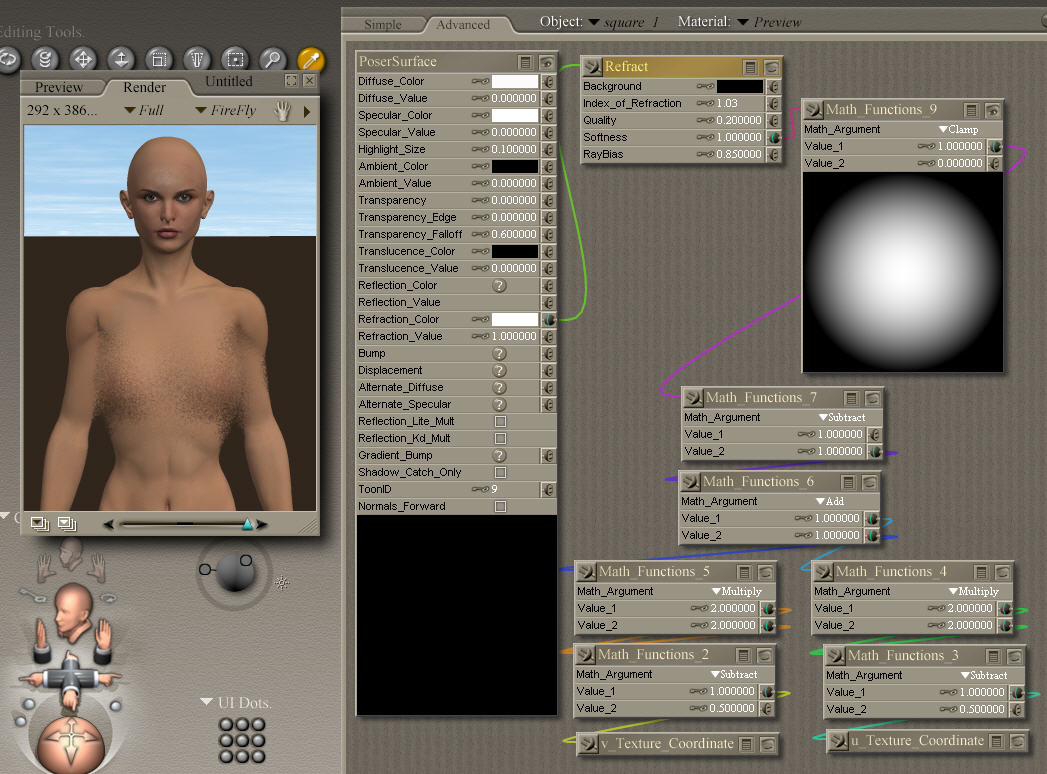
For a true blur, you must add together samples from dozens, even hundreds, of points around a given rendered point. There is no way to get the refraction to do more than one ray per pixel.
You can tell the refract node, using the "Softness" parameter, to automatically distort the direction of each ray, making each point to the "wrong" location. This produces a kind of distortion that looks a little like frosted glass, but it doesn't look like a true blur. I've done that in the attached image. The square is about 4 feet in front of the figure. The actual index of refraction and the distance between the square and the figure will have a large impact on the outcome. Try different settings. It is not strictly necessary, but I did a lot of math here to get a soft, circular mask to control the "Softness" - this keeps the edges of the square from becoming too distracting.
Your idea of doing the pixellated one is interesting. However, in practice the math required to cause "convergence" would be very difficult. You'd have to take into account the precise position of the camera, the world coordinate of each point on the square prop, and the world coordinate of the focal points on the target geometry that is being pixellated and come up with the right index of refraction to trick the Refract node into pointing at specific locations. Wow, I'm good at math in the material room and I just don't see it happening. :) If you manage to do it, I'll be very impressed.
Renderosity forum reply notifications are wonky. If I read a follow-up in a thread, but I don't myself reply, then notifications no longer happen AT ALL on that thread. So if I seem to be ignoring a question, that's why. (Updated September 23, 2019)
-
- Renderosity Page
- Renderosity Communities
- Blender 3D
- iClone
- Poser Users
- Poser Software
- Become an Affiliate
- Memorials
-
About
- About Us
- Contact Us
- Team
- Policies
- Terms of Service
- Copyright Policy
- Refund Policy
- Licenses
- Standard License
- Extended License

Privacy Notice
This site uses cookies to deliver the best experience. Our own cookies make user accounts and other features possible. Third-party cookies are used to display relevant ads and to analyze how Renderosity is used. By using our site, you acknowledge that you have read and understood our Terms of Service, including our Cookie Policy and our Privacy Policy.
just an idea that popped in my head out of boredom, seemed interesting to try to conquer the mat room again :)
how to make a "censor blur" material to put on say a a square prop and get the effect?
i know lf 2 kinds, 1 is a plain "blur", 2nd is a patch of say 16x16 pixels that just averages out what it blocks(basicly lowering the resolution of the one patch of picture), so how to do both kinds?
obviously both would use refraction, if one wishes to go for detail, especially in animations
but what else would be needed to get the effects? thoughts?