
Renderosity Forums / Carrara
Welcome to the Carrara Forum
Forum Coordinators: Kalypso, Anim8dtoon
Carrara F.A.Q (Last Updated: 2026 Jul 11 2:50 am)
Visit the Carrara Gallery here.

Subject: Strange lines in Hexagon display


Thanks -- sorry VOB? I'd appreciate if you could clarify (and excuse me if I'm being dense)...
SF to LA: From June 1 to June 7 2007 I will be riding my bicycle 545 miles to help support people living with HIV/AIDS. Please visit my homepage: http://www.aidslifecycle.org/6010
Thanks! I think that did it!
SF to LA: From June 1 to June 7 2007 I will be riding my bicycle 545 miles to help support people living with HIV/AIDS. Please visit my homepage: http://www.aidslifecycle.org/6010

Thanks for the link - I signed up and read through some one the many issues.
I will probably post one tonight, similar to this one.
ATI X800 video card (256M), P4 3GHz, 3G of RAM.... and no refresh of the workspace after some actions (change symetry plane, apply a material, etc...). Refresh does happen when I move the cursor over the model.
And I also have strange black sport when I try to paint on the surface.
All that after 15 mins of use. Definitely not ready for primetime as far as I am concerned.
- agiel - www.linfa.net

Privacy Notice
This site uses cookies to deliver the best experience. Our own cookies make user accounts and other features possible. Third-party cookies are used to display relevant ads and to analyze how Renderosity is used. By using our site, you acknowledge that you have read and understood our Terms of Service, including our Cookie Policy and our Privacy Policy.
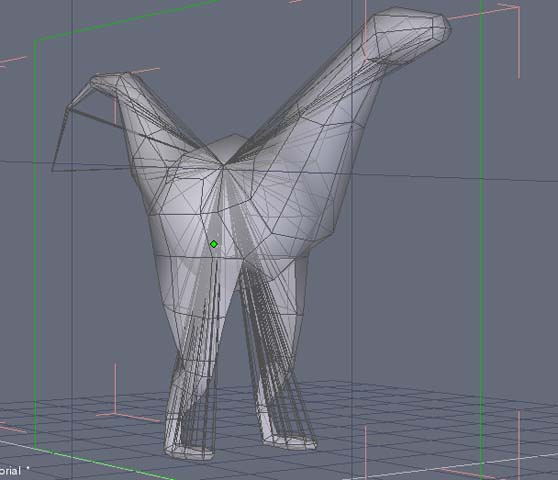
Hey, I've just gotten Hexagon 2; I'm enjoying getting used to it -- kind of like Amapi, but just different enough to be a challenge. Anyway, I notice that I'm getting all sorts of strange lines emanating from various vertices to some not-quite center point. (See picture) Is this somthing that's supposed to be there for a reason? If so, can I shut it off? Or is it a bug? It makes it kind of hard to see what you're working on. I've got Hexagon 2.0, on a Mac Dual 2Ghz PowerPC G5, 1.5 GB DDR SDRAM; OSX 10.3.9. I'd appreciate if anyone knows about this before I report it as a bug. Thanks!SF to LA: From June 1 to June 7 2007 I will be riding my bicycle 545 miles to help support people living with HIV/AIDS. Please visit my homepage: http://www.aidslifecycle.org/6010