Filter: Safe | Wed, Jul 15, 3:44 PM CDT

Renderosity Forums / Carrara


Welcome to the Carrara Forum

Forum Coordinators: Kalypso, Anim8dtoon

Carrara F.A.Q (Last Updated: 2026 Jul 11 2:50 am)


Visit the Carrara Gallery here.

Carrara Free Stuff here.

 
Visit the Renderosity MarketPlace - Your source for digital art content!


Subject: funny white area in my renders


estherau ( ) posted Mon, 03 April 2006 at 3:02 AM · edited Wed, 15 July 2026 at 3:43 PM

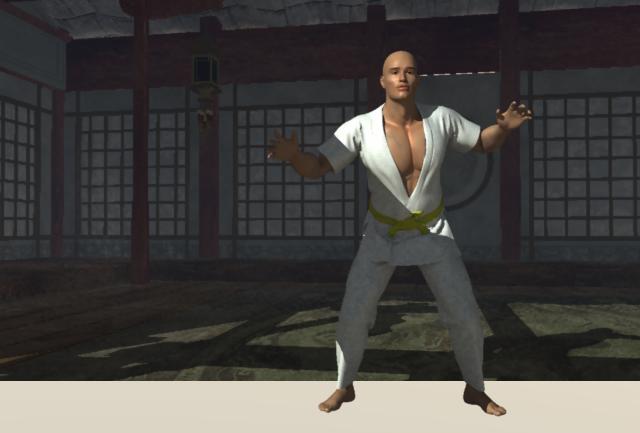
file_288443.jpg

the foreground under his feet does not look like that in preview renders nor when I do the little test render in the edit box of the scene. I deleted every ground I could find. I reimported and started again but nothing I did can fix this. Love esther

MY ONLINE COMIC IS NOW LIVE

I aim to update it about once a month.  Oh, and it's free!


MarkBremmer ( ) posted Mon, 03 April 2006 at 6:41 AM

Turn off Interpolation in the render properties. Mark


estherau ( ) posted Mon, 03 April 2006 at 7:08 AM

thanks, okay just rendering now. will let you know. Love esther

MY ONLINE COMIC IS NOW LIVE

I aim to update it about once a month.  Oh, and it's free!


estherau ( ) posted Mon, 03 April 2006 at 7:16 AM

Nope, the problem still exists. I wonder if the pZ3 is corrupted or something. I'm just trying to redo the animation right now. Love esther

MY ONLINE COMIC IS NOW LIVE

I aim to update it about once a month.  Oh, and it's free!


Patrick_210 ( ) posted Mon, 03 April 2006 at 7:33 AM

Was this a scene you bought somewhere? If so, someone else at Eovia3D.net had a similar problem except the front part of the ground was black. Maybe there is a mapping problem with ground planes brought in. Look at the shader for the plane.


estherau ( ) posted Mon, 03 April 2006 at 7:45 AM

Hi, no the scene was fine initially when I rendered, then I reimporte dthe pz3 after some changes just to the pose and animation, and the problem started after that. Love esther

MY ONLINE COMIC IS NOW LIVE

I aim to update it about once a month.  Oh, and it's free!


MarkBremmer ( ) posted Mon, 03 April 2006 at 8:37 AM

Are you rendering with Sky or Realistic Sky as an evironment? If so, you may want to uncheck the Ground Plane option in the sky settings. I've had this happen myself - and I've fixed it before. I just don't remember what it was I did... :-P


Patrick_210 ( ) posted Mon, 03 April 2006 at 1:30 PM

Maybe when you reimported the PZ3, another plane was brought in.


estherau ( ) posted Mon, 03 April 2006 at 2:38 PM

enable ground is off already in sky settings and I can't see any extra planes.. Love esther

MY ONLINE COMIC IS NOW LIVE

I aim to update it about once a month.  Oh, and it's free!


MarkBremmer ( ) posted Mon, 03 April 2006 at 2:42 PM

I remember now. Enable Full Raytracing. ( at least I think I remember! )


ren_mem ( ) posted Mon, 03 April 2006 at 4:31 PM

Yeah, that's not even white...more like off white.Could you also try refreshing or reloading the texture map to the floor.

No need to think outside the box....
    Just make it invisible.


sfdex ( ) posted Tue, 04 April 2006 at 10:39 AM

I had almost the same thing -- my cut off area was black. The solution was what Mark said second -- full ray tracing. Good luck! Dex www.pandemoniummovie.com


estherau ( ) posted Tue, 04 April 2006 at 2:29 PM

Hi Dex, thanks. well unfortunately we had a powerfailure and the file wasn't saved so I will have to make the pic again some other ttime. Love esther

MY ONLINE COMIC IS NOW LIVE

I aim to update it about once a month.  Oh, and it's free!


ren_mem ( ) posted Wed, 05 April 2006 at 12:06 AM

Esther,...man. You gotta get a UPS. Brown outs happen all the time 5sec or less never, never mind power failure. Money well spent.

No need to think outside the box....
    Just make it invisible.


estherau ( ) posted Wed, 05 April 2006 at 5:49 AM

it was less than a minute. A UPS would be great! it's on my wish list Well it was a prset scene sky and i still have thepz3 - shouldn't be hard ti recreate - spoketoo soon - the pz3 lost it's animation and when i rerun it looks different, love esther

MY ONLINE COMIC IS NOW LIVE

I aim to update it about once a month.  Oh, and it's free!


estherau ( ) posted Wed, 05 April 2006 at 5:49 AM

oops we have to tick a box now to be notified of replies - ticking now

MY ONLINE COMIC IS NOW LIVE

I aim to update it about once a month.  Oh, and it's free!


dirk5027 ( ) posted Wed, 05 April 2006 at 1:06 PM

did you find the problem? I had this exact thing happen to me and finally figured out IT WAS an extra ground plane imported from poser, look over to the side and see if there is an extra ground, square, or plane listed..if that's not it, i'm not real sure, i'm new to carrara too:blushing:


ren_mem ( ) posted Wed, 05 April 2006 at 6:11 PM

Esther lost it. Just like the tootsie roll pop...the world may ever know! 😉

No need to think outside the box....
    Just make it invisible.


estherau ( ) posted Wed, 05 April 2006 at 10:38 PM

problem gone now but i've upgraded to 5.1, used new sky, and invisibled poser ground prior to inport to carrara, so theworld might never know, but i strongly suspect it was the poser ground. love esther

MY ONLINE COMIC IS NOW LIVE

I aim to update it about once a month.  Oh, and it's free!


Privacy Notice

This site uses cookies to deliver the best experience. Our own cookies make user accounts and other features possible. Third-party cookies are used to display relevant ads and to analyze how Renderosity is used. By using our site, you acknowledge that you have read and understood our Terms of Service, including our Cookie Policy and our Privacy Policy.