
Renderosity Forums / Carrara
Welcome to the Carrara Forum
Forum Coordinators: Kalypso, Anim8dtoon
Carrara F.A.Q (Last Updated: 2026 Jul 11 2:50 am)
Visit the Carrara Gallery here.

Subject: Poor poser support in demo?

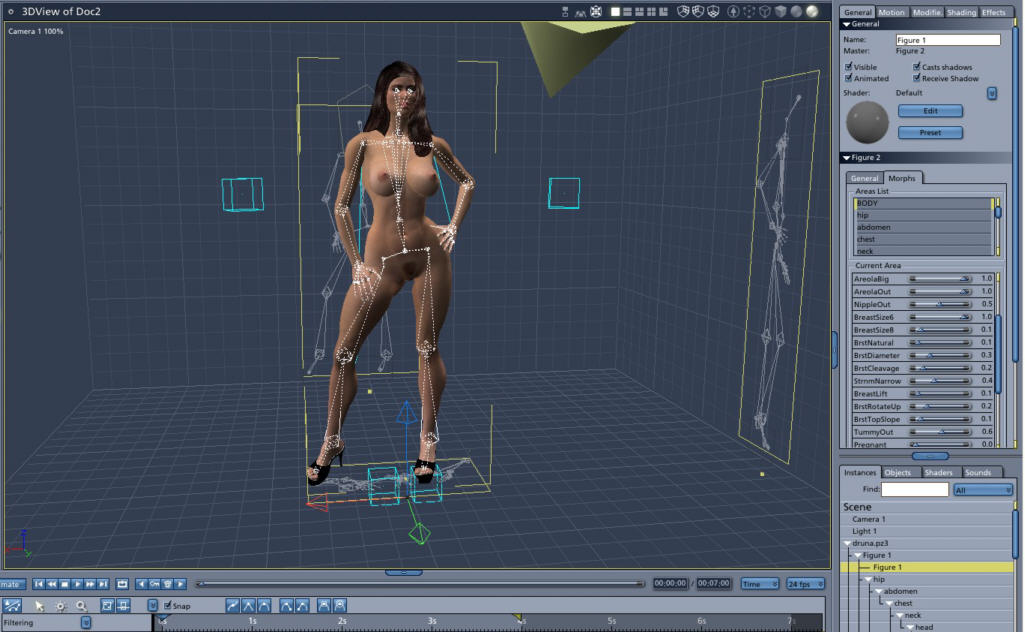
I'm not sure what is happening in the demo version of C5. I'm using C5Pro with the latest update 5.0.2 and I have been loading Pz3s, CR2s from both Poser 6 and Poser 5 with out the problems that you mention. using the Native poser import the Pz3 bring in the animation data if you animate the figure in Poser 6. You can continue to add Poses, use morph targets, load clothing, Hair, to your character within Carrara 5. Now if you are using Dynamic hair than that will not load via Native poser import. For that you need Transposer 2. Transposer 2 is only included with C5Pro. If you only want C5 than you can also purchase Transposer 2 as a plugin for it. May I ask what Poser figure are you trying to load into Carrara 5?
Michael 3 or Victoria 3. I was able to load a .cr2 of Michael, but without morphs. I tried loading Aery Soul's Kielo (a morphed V3), both as a .cr2 and in a .pz3 file, but Carrara froze every time. I don't think I'm doing anything unusual; I'm not loading any dynamic hair or cloth. The only thing I can think of is, maybe the demo version is not up to date? I gather Poser 6 support is only a recent thing. I love Carrara's renderer, it's almost worth the price all by itself. But not without the ability to render my existing content.

Content Advisory! This message contains nudity
__________________________________________________________
My Rendo Gallery ........ My DAZ3D Gallery ........... My DA Gallery ......
First you need to use TransPoser to import dynamic hair and clothes. Apparently you are using the native importer. If you don't see TransPoser it means you have the old version of the demo and you should download it again. if you keep having problems please email me at charles@eovia.com and we will look into them and fix them.

I tried installing the demo on a very different machine (a presario laptop) that has the same runtime. Got the same result: in general, .cr2s will not load and those that do load come in minus morphs and props. Clothed victoria figures will not load at all, either from .cr2 or .pz3 files. To me this suggests two possibilities: 1) Carrara's native import function isn't actually as good as it's advertised to be; or 2) There's something wrong with my runtime. I'm going to build a new runtime next week to test #2. I'll let you know my results. I really want Carrara to be the program that I hope it is. Thanks for the offer, Charles, and DustRider's screenshot gives me hope; maybe if the .cr2s don't work I can get the same result with .pz3s? Note that I haven't tried TransPoser at all yet, because my specific interest is in having the characters be rigged. (For unrigged characters, I can just use Vue.)
Hello,
Some DAZ characters come without morph targets because the morphs are not stored in the cr2. In Poser, you have to import the morph as a Pose. You need to do the same thing in Carrara. Especially, Victoria 3 and Michael 3 come with only a couple of morphs and you have to inject the morphs.
If you have problems when importing cr2/crz, do not hesitate to contact me directly. It is best if you can send me a file that is not working and explain quickly what are the problems (a crash when importing, the morph targets are missing, the geometry is wrong...), I will look into it and do my best to fix those problems.
Thank you,
Pierre
pierre@eovia.com
Thanks for all the suggestions. I've traced most of the cr2 problems to bad paths in the cr2 files. It seems that Poser is still able to load these files even though the paths are completely wrong (!) which is what threw me. Some files using relative paths still don't load, though. Transposer still won't load more than the simplest .pz3 file. I suspect that this problem is related to the outstanding one with the cr2s. Eovia's offers of help were immediate and reassuring, as were the comments on this forum. I'm more and more impressed with this product and am swiftly becoming convinced that I can figure out these last issues. I expect I'll be buying Carrara. :-)
Hello,
Which version of the demo do you have (you can see the version in the bottom-right corner of the splash screen) ? We updated the Demo when we released the 5.0.2's patch. The last version is 5.0.2 and contains some fixes concerning the cr2 importer. If you have the version 5.0.1, download the demo again to have the last version.
Thank you,
Pierre
pierre@eovia.com
I import Poser scenes to Carrara (C4Pro) almost every day and have very little trouble. I'd say 90 percent of the time there are no glitches. In busy scenes the odd prop or texture might not make it in but that's usually easy to correct. I did have a problem for quite a while where I couldn't get Eternal Judy to load. Never did figure out what was wrong. I ended up reinstalling Poser for other reasons and suddenly Carrara imported her just fine. I'm very happy with the Carrara/Poser combo over all.

Because I could work around the problem by morphing/clothing/posing figures inside Carrara, I decided to buy it. (Build the equivalent of cr2s inside C5 itself.) I picked up C5 Pro and installed it, and lo and behold, .cr2 import works perfectly in the new version. I'm experiencing occasional "Memory Allocation Error" render failures, but other than that, the program appears solid. Interestingly enough, in one case simply moving the camera made that error go away.

Privacy Notice
This site uses cookies to deliver the best experience. Our own cookies make user accounts and other features possible. Third-party cookies are used to display relevant ads and to analyze how Renderosity is used. By using our site, you acknowledge that you have read and understood our Terms of Service, including our Cookie Policy and our Privacy Policy.
I'm running the demo of C5pro and am puzzled. Although it looks like a fine program, my specific interest is in having something other than poser to rig, move and render pre-built figures in. Eovia advertises that C5 can do this, but after hours of trying to use the native import feature, this is what I've been able to do:
--Import a couple of props
--Import one .cr2 file out of numerous attempts; this one came in with its morph information missing (Poser has external morph file option turned off)
--Load one .pz3 file out of numerous attempts; this one came in with the figure missing her (prop) hair and not rigged.
In all other attempts, the program locked up after loading the figure but before displaying it. My system is a brand new dual-core 64-bit AMD system running 32-bit XP-pro, with 4 gig of memory; so I don't think it's a resource issue. Carrara is pointing at the correct runtime directory; I only have one runtime and I'm running the most current fixpack on Poser 6.
My question is: is this normal? Will Carrara really not load .pz3s or .cr2s of even average complexity? I also have Vue5I, and it will load any .pz3 I throw at it. Its limitations are that you can't rig in it, it doesn't import poser procedural textures (but what does?) and it's crash-prone. But at least it works.