
Renderosity Forums / Carrara
Welcome to the Carrara Forum
Forum Coordinators: Kalypso, Anim8dtoon
Carrara F.A.Q (Last Updated: 2026 Jul 11 2:50 am)
Visit the Carrara Gallery here.

Subject: Noob seeks help:D


If you got c4pro it has transposer include, but not Transposer2.C5 has native support tho.I think transposer tapped out at 4.My experience has been that doing it that way you need to reset textures. That's from DAZ studio tho. It's not too bad.The main thing is how you export. Might check out 3dxtract.com(great stuff in the mags)also try eovia and eovia3d.net.There are quite a few poser users here.
No need to think outside the box....
Just make it
invisible.

Attached Link: http://www.eovia.com/products/carrara_addons/transposer.asp
An update is available for Transposer 2 for C4 with Poser 6 support on the eovia website.Message edited on: 01/01/2006 01:03
I know that the poster does not have Transposer 2. However if they want to import Poser 6 and Transposer 2 is the only support for Poser 6 use with Carrara 4 or maybe just upgrade to Carrara 5 for native Poser 6 support (or C5Pro to get Transposer 2 included). I had Poser 6 with C4 and gave up on trying to make them work together. It was down right frustrating. The down side here is that it may cost some money, however, right now there is a 20% discount on all Eovia products until January 5. Just spread a little helpful info. You can take it or leave it. I also salute anyone that has got P6 to work with plain old C4. I know there were plenty of posts about this subject on this forum a little while back. Maybe do a "Poser 6" search to see if you can dig up any info on any successful methods that worked with P6 using C4. For me I had no such luck...until C5 came out. Good luck anyone in this boat, Stan

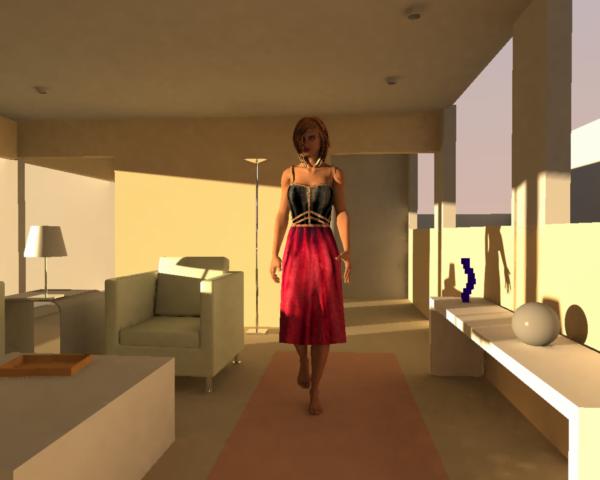
Well.I have only been at it for one day,but this is what i have done to get P6 and C4Pro to work together.I make my scene in DAZ Studio(something i normally do not use) Export it as an obj and then import it onto C4Pro.Delete the pubic hair,cornea and eyebrow objects,tweak the mats to my liking and voila.But my issues with this are the hair and eyelash transparencies looks like sh@i so far.Otherwise i am very imressed with the way it renders.I got C4P for xmas so i wont be upgrading till i learn it.I am a dedicated Vue Infinite user abnd already i like the lighting in C4 much better.Ok,off to learn more:D Have a great day all.

Did you try inverting the tranparency maps in the shader editor, and turning on transparency (the box checked) in the render settings? The default is to have transparencies turned off, and Poser uses the inverse "color" for transperency compared to Carrara (thus the reason for putting a check mark in "invert colors" for the T map in the shader editor).
DR
__________________________________________________________
My Rendo Gallery ........ My DAZ3D Gallery ........... My DA Gallery ......
Samhain74,
Glad your getting the hang of it! Carrara is a great piece of software, with a fantastic render engine. A lot of options to learn about for sure. Transposer was one of the best additions. I have C4Pro, and am saving my pennies to upgrade to 5. The native Poser import sounds very interesting, along with a lot of the other new features.
Good Luck!!!
__________________________________________________________
My Rendo Gallery ........ My DAZ3D Gallery ........... My DA Gallery ......

In Carrara you need to place a light in front of the eyes in order for them to be anything other than very dark. Eyes are a lot like a dark porch in front of a house that is facing north (in the northern hemisphere) that doesn't get much light during the day.
www.youtube.com/user/ShawnDriscollCG
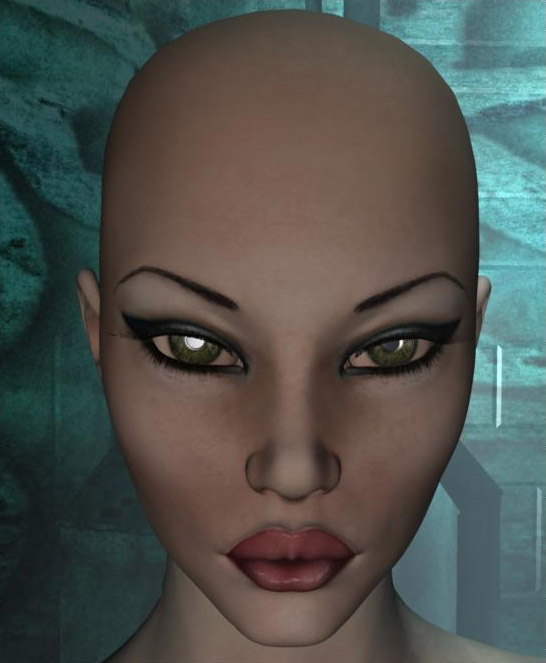
Yeah SHONNER,Vue has the same problem,but the workaround i figured out for that was to make the eyes slightly luminous.I do not know if C4P has this option,but this is with a lightbulb right in front of her,hence the glow in the pupils,i do not like that one bit.Althought if you were to change the hilite on the upil to red or something it would be great for night scenes.Ah well,all software has its limitations.This is qwith the TransPoser 2 update for C4P NAd although it takes a butt load of time to import,it is nice.Handles skin very well.Now if i can only figure out the blaasted render room:D Have a good day all. -S74
Tons of options in texture and rendering...even more options in render room in c5.You really do have to play w/ lighting with people. I think the plugin is a better way to go...why beat yourself over the head. I don't have poser so it's a bit different.If I start to do more of that I am sure I will be getting poser or quidam unless DAZ does something. They're a great company so wouldn't surprise me. I am actually waiting for a bit better export out of D|S, which is the real problem. Altho, I am still trying to investigate it's ability to put out pz2 or pz3 in an indirect way. I would mention that using the transparency on seperate levels can be a bit confusing for people trying to use carrara from other programs. I would just use the alpha. I personally haven't seen enough difference to make it worth the extra steps.
No need to think outside the box....
Just make it
invisible.
Well, it depends on what is being rendered. Some Layers list or specific lighting can be quite intense. But between the 2 Vue is slower, by far from my experience w/ the 2.In fact, carrara has been faster than the other renders I have used. There are many little settings that can be used or not used to optimize this tho...might want to play or give specifics for some help.All 3d apps will take all they can get.It could very well be your lighting settings.This is, of course realtive to what you were expecting. :)
No need to think outside the box....
Just make it
invisible.

Privacy Notice
This site uses cookies to deliver the best experience. Our own cookies make user accounts and other features possible. Third-party cookies are used to display relevant ads and to analyze how Renderosity is used. By using our site, you acknowledge that you have read and understood our Terms of Service, including our Cookie Policy and our Privacy Policy.
Hello all, HAPPY NEW YEAR! O.k. now thats out of the way.Got Carrara 4 pro for the holidays and want to import Poser 6.I do not have Transposer or what its called and would like to know if there are any good toots on how to do it with exported .3ds .obj ect.With trans in tact for the eyebrows,hair and such.I have ZERO knowledge of Carrara nor do i desire to model.Thanks for the info and the help.Have a great year everyone.Also some generally "getting started" toots would be cool to.:D -S74