Mon, Mar 23, 3:24 PM CDT

Renderosity Forums / Carrara


Welcome to the Carrara Forum

Forum Coordinators: Kalypso, Anim8dtoon

Carrara F.A.Q (Last Updated: 2026 Feb 15 8:54 pm)


Visit the Carrara Gallery here.

Carrara Free Stuff here.

 
Visit the Renderosity MarketPlace - Your source for digital art content!


Subject: Carrara 5 problems with eyebrows casting square shadows and especially on...


jtbullet ( ) posted Fri, 02 December 2005 at 7:46 AM · edited Fri, 27 February 2026 at 3:36 PM

file_309111.jpg

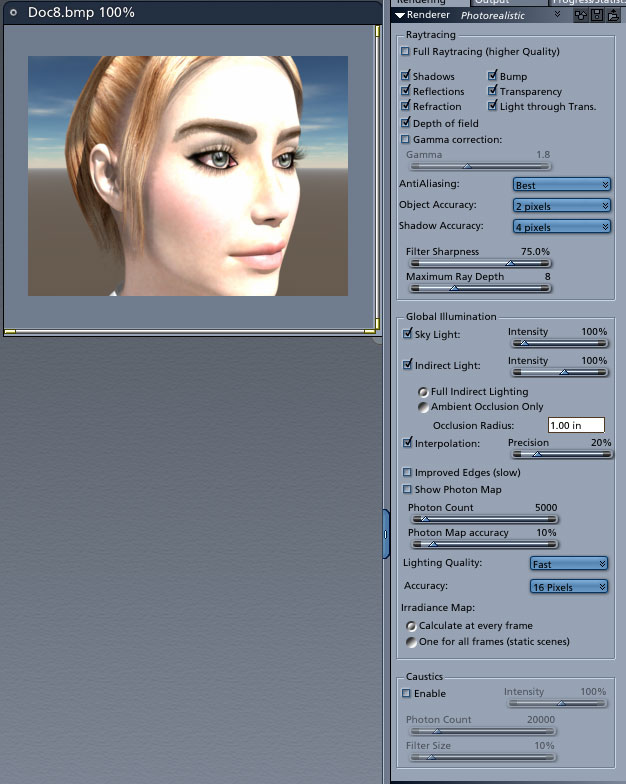
global illumination. When I render there is strange artifacting around the eyebrows. It is not very noticeable in normal rendering, but when using gi, it is bad. Any help? Take a look and see what I mean.

This is a .pz3 inported into carrara 5 beta.

Jarrett


Hoofdcommissaris ( ) posted Fri, 02 December 2005 at 8:02 AM

I think in the shader you have to tick the box 'no light interaction when fully transparent' and check if the alpha mask is REALLY black.


jtbullet ( ) posted Fri, 02 December 2005 at 1:05 PM

This one is really frustrating. If anyone knows how to fix it, please let me know. I am setting up a database of options to try to discover what is going on. Really, I am having problem trying to make alphas cast correct shadows when gi is on.


Miss Nancy ( ) posted Fri, 02 December 2005 at 4:34 PM

Did someone say to turn off interpolation in these cases? I don't have C5 yet.


ShawnDriscoll ( ) posted Fri, 02 December 2005 at 6:35 PM

Post a screen of the eyebrow object's shader properties for us.

www.youtube.com/user/ShawnDriscollCG


R_Hatch ( ) posted Sat, 03 December 2005 at 12:24 AM

I'm doing some tests now, but I only have C4 Pro, not 5. Can you see if you have the same problem in C4? Also, in addition to what SHONNER said, could you let us know what trans map you're using? If it's a freebie, a link to the site or freestuff would make things easier as well.


Ringo ( ) posted Sat, 03 December 2005 at 11:01 AM

You may also wait a little longer for the final version of C5 and see if it is some thing they have fix/change in the final version.


ShawnDriscoll ( ) posted Sat, 03 December 2005 at 3:10 PM

I see that problem in lots of Carrara versions. It always has to do with the Carrara shader used for the eyebrow mesh not matching another app's shader.

www.youtube.com/user/ShawnDriscollCG


Miss Nancy ( ) posted Sat, 03 December 2005 at 6:02 PM

The eyebrows always worked for me in past versions, if the face was imported as vertex object. litst had a tutorial posted here on how to do the transparency correctly on an imported poser object, and I think Ringo also posted something at the carrara group about how, unlike Poser, carrara obeys the laws of optics in regard to transparency.


Ringo ( ) posted Sun, 04 December 2005 at 8:43 AM

JT ARe you just using the sky and GI with no other light source?


jtbullet ( ) posted Sun, 04 December 2005 at 11:45 AM

Ringo, I dont have that file saved. I know that if I load in the global illumination file with the trumpet, the lighter of ther 2 secen files, and hit render, this happens. In some cases, pushing interpolation to 100% has helped, but the skylight seems to be the culprit.


Pete_Exxtreme ( ) posted Sun, 04 December 2005 at 1:52 PM

Hi, As far as i remember, i already had that one with some Pz models, the one of the Victoria family i think... could you try another model (with another set of maps) and see if it stills occur ? good luck


jtbullet ( ) posted Wed, 11 January 2006 at 4:27 PM

Hi. This has been documented as a known bug. They are working on it. I verified it by importing via transposer and native the same figure side by side. The transposer figure renders correctly using gi and indirect whereas the native import will show artifacts around the eyebrows and eyelashes.


enigmaticredfrog ( ) posted Thu, 12 January 2006 at 9:45 AM

Thanks for the update... waiting ever so impatiently for the fix!

Christina -- "Love me but don't tell me so" Lilly Bart

My Art


Privacy Notice

This site uses cookies to deliver the best experience. Our own cookies make user accounts and other features possible. Third-party cookies are used to display relevant ads and to analyze how Renderosity is used. By using our site, you acknowledge that you have read and understood our Terms of Service, including our Cookie Policy and our Privacy Policy.