
Renderosity Forums / Carrara
Welcome to the Carrara Forum
Forum Coordinators: Kalypso, Anim8dtoon
Carrara F.A.Q (Last Updated: 2026 Jun 21 11:17 pm)
Visit the Carrara Gallery here.

Subject: HELP PLEASE! frustration with Carrara UI!!



biggert, A work around that I used a lot in fot the selection problem is to select the "back" vertices and hide them. That way you can't select them while working details. Version 2 had the "select through" problem, Version 3 with the small icon that shows what you are selecting, seems to be much better at this. mike
Also...DON'T ZOOM...not sure why so many people zoom in the directors camera...but one that distorts the movement (rotation..pan...etc) because you are not truly at that vantage point you are zoomed in. Since its the directors camera just pull your camera closer.....I never zoom with the directors camera. Brian brian@vizualds.com http://www.vizualds.com
I know it does..but it in my experience distorts the view. Trying it now...just to make sure I'm not losing my mind:) Ok...yeah...rotation is nominally fine..but pan...etc are slightly effected..probally due to the fact that the camera is technically in its same location....really I see no point in zooming using the directors cam..its just as quick to press the e key and move the mouse.... The see through problem you are seeing with poser objects is a known bug....was somewhat fixed as trav said in CS3... Brian brian@vizualds.com http://www.vizualds.com
I do get the distortion when I zoom out again. Seems like I'm forever restoring the Director's camera. At least the views are "sticky" now. I remember the hell of Carrara2 where every time you changed windows the cameras you had been using reset. I've never had the "selected wrong face" but I do set a lot of a mesh to invisible before trying to work. You get too close, and you start seeing the wrong surface through the mesh facing you, and it gets confusing.
thanks very much for the tip Trav. that was very helpful! =) about the zoom.....heres a weird thing that always happens to me....after i click once or twice to zoom in from 100%, what happens is the zoom goes straight through something like 10,000% or some thing that's sooooo zoomed in it goes to scientific notation like 2.34 E+5 or something like that.......weird....and i got the patch for 2.0... is there any other modeler thats as powerful (or more) as Carrara AND as user friendly? i really want C3...especialy with Transposer out. thanks for the input you guys gave me! =)
To zoom with the magnifier icon on the screen you should drag- click a box around the intended zoom area. If you just click the program sometimes interprets the click as a drag-click around an VERY small area. This gives you the zoom of 2.34 E+5 problem. As stated earlier it is best not to use zoom in the directors camera. Often it "confuses" the view to the point of unusability with stretched images and wierd viewpoints that require a program restart. This is all better in C3 IMHO User friendly is more a matter of what you are used to than program design. Good Heavens some people think Amapi is user friendly! (grin, no hate mail please) Give yourself a chance to adapt (software always seems less buggy after a few months of use) and upgrade to C3: it is a MAJOR improvement. Ed

As a general rule of thumb, never zoom unless you're using one of the isometric views. The problem that's being caused is due to the strange distortion you get away from the center of the camera. Turn on the production frame and you can see how far off center you'll get. The better thing to do is to actually dolly the camera (i.e., move the camera closer). Using zoom (other than the standard front, back, left, right, top, bottom cameras) can get you VERY screwed up. -Kix
-Kix

Privacy Notice
This site uses cookies to deliver the best experience. Our own cookies make user accounts and other features possible. Third-party cookies are used to display relevant ads and to analyze how Renderosity is used. By using our site, you acknowledge that you have read and understood our Terms of Service, including our Cookie Policy and our Privacy Policy.
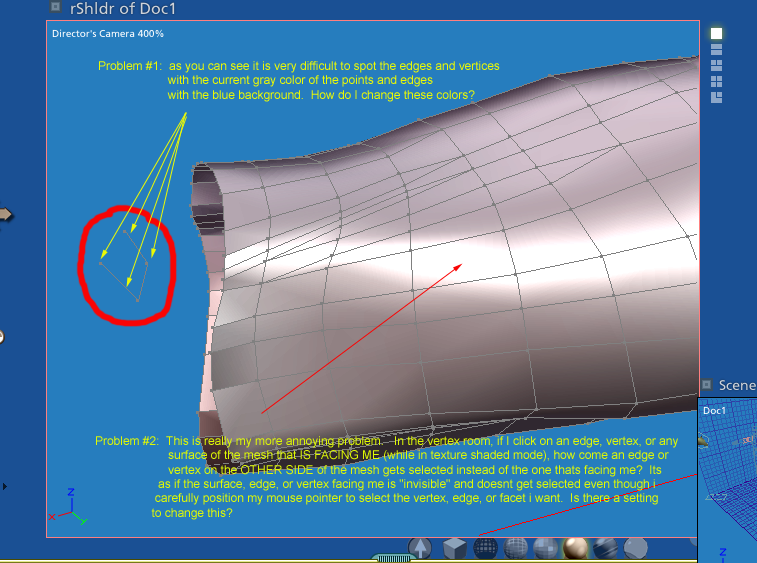
ok....so far ive managed to model a couple of clothes in carrara with extra effort. what do i mean? well its the UI of Carrara 2.1 that caused extra time. please see the picture i made. these are the main things preventing me from buying C3. please help....any tip much appreciated....TIA for any. thanks again guys! =)