
Renderosity Forums / Carrara
Welcome to the Carrara Forum
Forum Coordinators: Kalypso, Anim8dtoon
Carrara F.A.Q (Last Updated: 2026 Jun 21 11:17 pm)
Visit the Carrara Gallery here.

Subject: modeling problem


The least practical or usefull tip is actually to upgrade to C3, because the Vertex Modeller is one of the main improvements, now there is the extrude tool, that makes straight extrusions if you keep you shift-key pressed. I did not use the VM in previous version, so I am not sure if that is something you can do (or is extruding just numerical?). The VM was too illogical and messy for me before C3, so I understand your struggle. I gave up and made that kind of extrusions/forms in the Spline Modeller for years.
In your first picture the vertex on the left is in front of the drawing plane. That's why the extrusion is twisted. As well as doing as sailor_ed suggests and using quad view, you might also try selecting the poly you want to extrude then choosing Selection>Move to Drawing Plane before doing the extrusion. Make sure you have the correct drawing plane active! The Carrara VM is not very intuitive. The Director's Camera view does not give a reliable way of placing vertices. It's essential to know which drawing plane you are working on and which constraints to use. Mark

Privacy Notice
This site uses cookies to deliver the best experience. Our own cookies make user accounts and other features possible. Third-party cookies are used to display relevant ads and to analyze how Renderosity is used. By using our site, you acknowledge that you have read and understood our Terms of Service, including our Cookie Policy and our Privacy Policy.
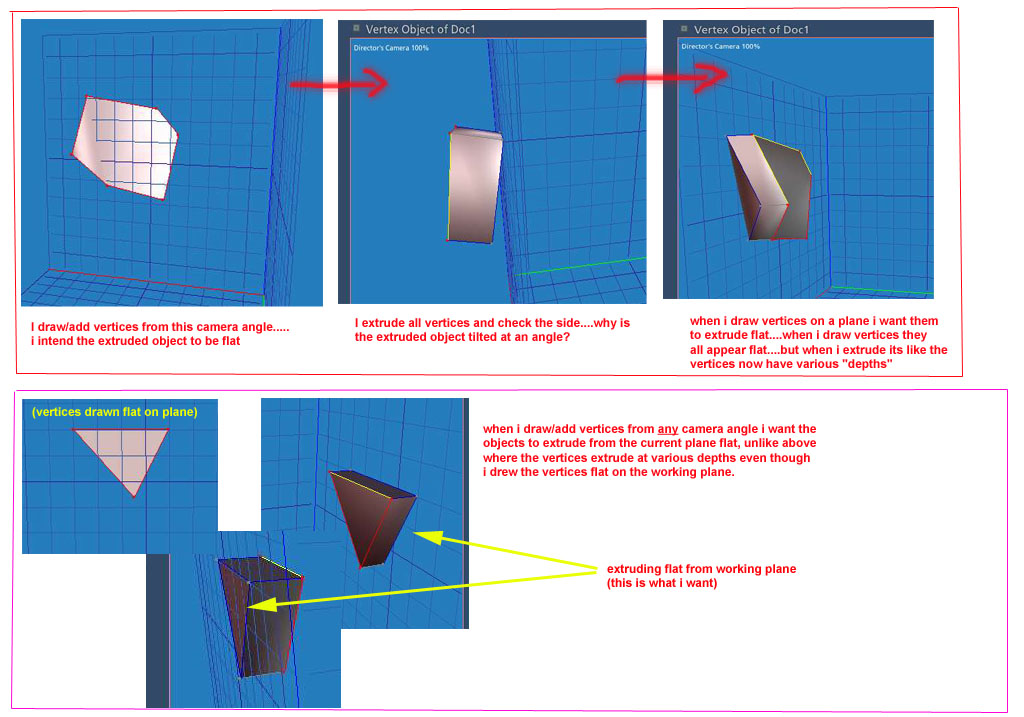
hi! i have a problem in Carrara 2.1.. when i draw vertices on a working plane in the modeling room from a specific camera angle, the vertices appear to be flat...in other words they all seem to be at the same "depth"....but after i extrude them and check the sides, vertices have extruded at different depths. it appears that the Camera Angle has much to do with whether the vertices extrude flat from the working plane...if the camera is focused perfectly on, say, the Left side (by choosing the left side from the camera pull-down menu) then the vertices all extrude "flat" from the working plane....but as soon as i manually /randomly move the camera to a different angle, the vertices extrude at various "depths" even though i drew them perfectly flat on the working plane (well, at least it appears flat from my perspective.) is there a way to turn this feature off in CS 2.1? what i want to happen is, when i draw vertices on any of the 3 planes from any camera angle, i want the vertices to ALL extrude flat from the working plane, and not at various depths. at the bottom of the picture, the triangle vertices were added while the camera was set to left view by selecting the Left View option in the pull-down menu. hope someone can help. thanks in advance for any tips. =)