
biggert opened this issue on Mar 04, 2004 · 5 posts
biggert posted Thu, 04 March 2004 at 11:57 PM
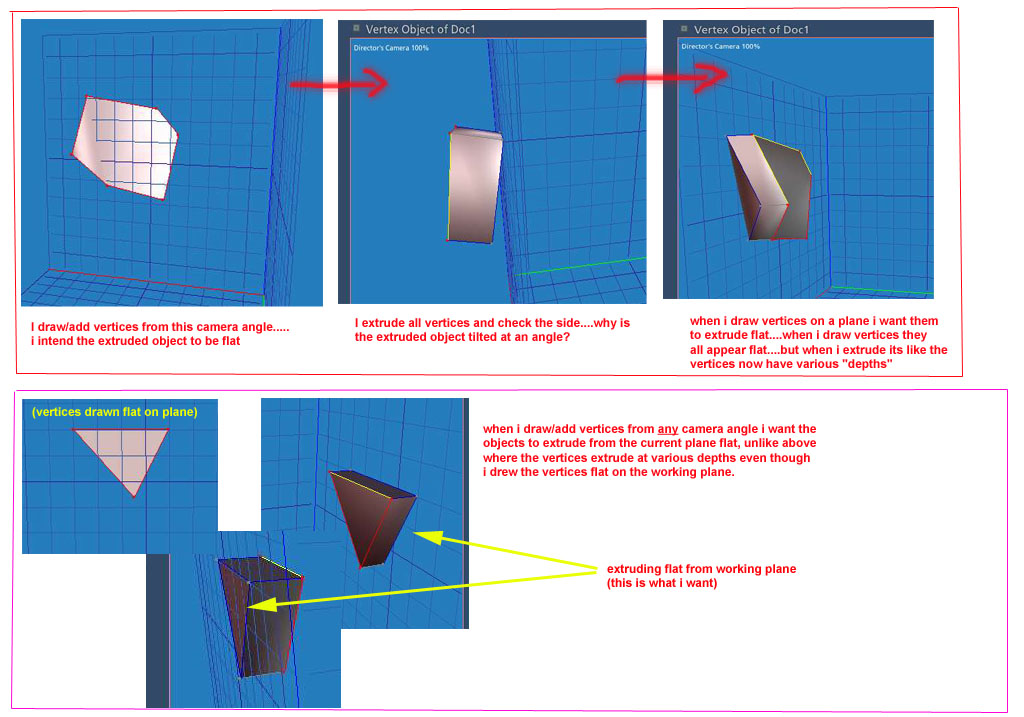

Hoofdcommissaris posted Fri, 05 March 2004 at 2:22 AM
The least practical or usefull tip is actually to upgrade to C3, because the Vertex Modeller is one of the main improvements, now there is the extrude tool, that makes straight extrusions if you keep you shift-key pressed. I did not use the VM in previous version, so I am not sure if that is something you can do (or is extruding just numerical?). The VM was too illogical and messy for me before C3, so I understand your struggle. I gave up and made that kind of extrusions/forms in the Spline Modeller for years.
sailor_ed posted Fri, 05 March 2004 at 6:36 AM
I would work only in quad view. (Top,side,front,perspective) If you want a surface oriented other than flat to one of the axis I think you would have to rotate it. I don't think you can do what you want to do in the perspective view. However I will happily bow to any other advice :-) Ed
falconperigot posted Fri, 05 March 2004 at 8:42 AM
In your first picture the vertex on the left is in front of the drawing plane. That's why the extrusion is twisted. As well as doing as sailor_ed suggests and using quad view, you might also try selecting the poly you want to extrude then choosing Selection>Move to Drawing Plane before doing the extrusion. Make sure you have the correct drawing plane active! The Carrara VM is not very intuitive. The Director's Camera view does not give a reliable way of placing vertices. It's essential to know which drawing plane you are working on and which constraints to use. Mark
biggert posted Fri, 05 March 2004 at 11:02 AM
thanks for the advice guys falconperigot: ill try your advice about moving vertices to drawing plane. thanks.