
-
Marketplace
-
Free Stuff
-
Galleries
-
Community
Forums General
- News
- Deals
- Poser
- Contact
Sun, Apr 5, 6:30 AM CDT
Renderosity Forums / Rhino 3D
Welcome to the Rhino 3D Forum
Forum Moderators: UVDan
Rhino 3D F.A.Q (Last Updated: 2024 Aug 27 11:07 am)
FORUM BASED TUTORIALS
OFF SITE TUTORIALS
FORUM CHALLENGE RULES
NEWBIES GUIDE TO POSTING PICTURES
OFF SITE RESOURCES
OFF SITE TUTORIALS
FORUM CHALLENGE RULES
NEWBIES GUIDE TO POSTING PICTURES

OFF SITE RESOURCES
RENDEROSITY HAS A ZERO TOLERANCE FOR ILLEGAL SOFTWARE USE OR REQUESTS TO OBTAIN ILLEGAL SOFTWARE
Checkout the Renderosity MarketPlace - Your source for digital art content!

Subject: stretching the polysurface made in Rhino - how?

Report Post

-
- Renderosity Page
- Renderosity Communities
- Blender 3D
- iClone
- Poser Users
- Poser Software
- Become an Affiliate
- Memorials
-
About
- About Us
- Contact Us
- Team
- Policies
- Terms of Service
- Copyright Policy
- Refund Policy
- Licenses
- Standard License
- Extended License

Privacy Notice
This site uses cookies to deliver the best experience. Our own cookies make user accounts and other features possible. Third-party cookies are used to display relevant ads and to analyze how Renderosity is used. By using our site, you acknowledge that you have read and understood our Terms of Service, including our Cookie Policy and our Privacy Policy.
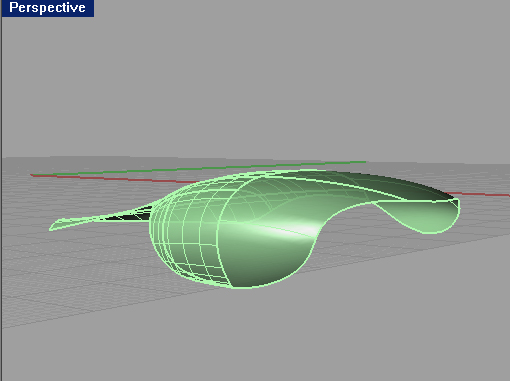
I createda surface in Rhino. And I want to stretch it a little bit, in one (longer) direction. How can I do this? I tried with Control points, but this command does not work with the polysurfaces.Any help please.
Here is the file:
http://www.gamefront.com/files/20336667/roof2.3dm
Thanks.