
Renderosity Forums / Animation
Welcome to the Animation Forum
Forum Moderators: Wolfenshire, msansing
Animation F.A.Q (Last Updated: 2026 Apr 10 6:00 am)
Characters, motion graphics, props, particles... everything that moves!
Enjoy , create and share :)
Remember to check the FAQ for useful information and resources.
Animation learning and resources:
-
11 Second Club: Monthly character animation competition.
-
Animation Mentor: Online school. Learn from the animation masters.
-
Rigging 101: Maya rigs and rigging tutorials.
-
AnimWatch: Showcasting the best of independent animation.
-
FlashKit: The best place to learn Flash.
-
Armaverse: Stop-motion armatures for animation.
-
60+ great Character Animator's sites: Get inspired.
Checkout the Renderosity MarketPlace - Your source for digital art content!

Subject: Poser Reflections -- The Final Cut

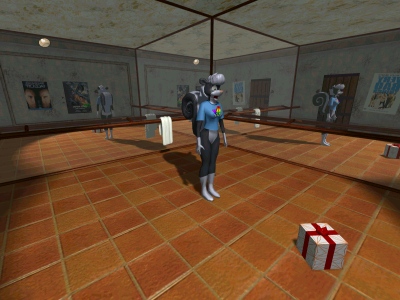
By the way, it's a lot easier to do these reflections when the camera is locked in place and not moving. But I like a challenge, and it created a more dynamic presentation. :) You'll probably notice a couple of sync glitches in the reflections, which occur over the course of several frames.

Great work
it shows that ingenuity
can often be a substitute
for fancy wiz bang features and a $2000
price tag for your program.

LD---I'm going crazy here trying to figure out how you did that! I tried importing an avi as a background and it refuses to show up. I've tried several different files, but to no avail. What am I doing wrong? I go to file--> import --> avi file... and then import my avi. When I return to mu poser document, nothings changes. There's no background image or movie or anything. I change frames, render, and still nothing. I'm bummed. Any suggestions?
I'm not sure why it wouldn't show up. Here are a few thoughts: Do you have the "Show Background Footage" option enabled in the Display menu? Do you have the necessary codecs for the video (can you see it in Media Player)? Is the background actually viewable in your scene, and not obscured by objects? For instance, the mirrors in my dance studio are transparent, so you can see the background behind them.
Yes to all the above. To make it simple, I just have one figure in the scene. I created a simple animation of Vicky moving. I made the video to be the same size as the document window, After spinning vicky around and reversing her movements, I imported the background video.... and nothing. Harumph!!!
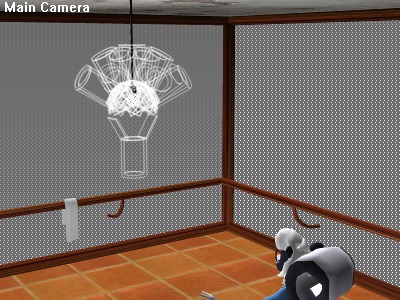
I did a head count last night; the scene has 25 spotlights and 3 infinite lights. 10 spotlights have shadows enabled, with map size 256; the lightbulb directly over Sabrina's head uses nine, and the remaining shadowed light was against the back wall, aimed at the table. All of the other lights had shadows disabled, and were used for ambient/global lighting effects.
I've confirmed that the lights were causing my memory problems. As a test, I removed half of them, and was able to render the entire sequence without interruption, even with other applications running.
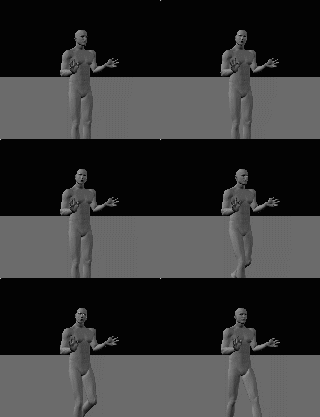
I wish I could offer some advice, black cat, but this probably has something to do specifically with your installation of Poser and Video for Windows setup. Sorry. I would like to know how you reversed Vicky's movements, however. My technique involves flipping the AVI horizontally (reversing the video, in other words), but being able to reverse the motion might be useful in my work. I'm familiar with the use of the Symmetry command to swap right and left, but how do you apply it to an entire animation?

Privacy Notice
This site uses cookies to deliver the best experience. Our own cookies make user accounts and other features possible. Third-party cookies are used to display relevant ads and to analyze how Renderosity is used. By using our site, you acknowledge that you have read and understood our Terms of Service, including our Cookie Policy and our Privacy Policy.
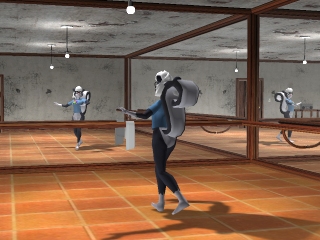
[Video clip](http://205.122.23.229/littledragon/SabStudio.mpg) (MPEG format, 1.37MB)Credits:
Sabrina -- Eric Schwartz
Music -- Chopin (getting sick of it yet?)
Motion -- BVH file downloaded from LocoMotion Studios
All meshes (including Sabrina) modelled in MilkShape 3D
Rendered entirely in Poser (no postwork)
For those of you with dial-up, I apologize for the filesize, but I couldn't bear to compress it any further. It looks really nasty as it approaches the 1MB boundary.
This took longer than expected, due to the fact that Poser decided that it didn't have enough memory and would stop rendering the sequence after a few dozen frames. I removed Lemurtek's Lionheart character from the scene (he was leaning against the back wall by the cassette player), and reduced the resolution to 320x240; there was nothing left but a low-poly figure and environment with low-res textures, and still it choked on me. Eventually I resorted to rendering the animation in chunks and splicing them together afterwards.
Serves me right for finding a way to make Poser 4 do stuff that it can't do (reflections and omnidirectional lighting). Although the reflections weren't really a resource hog. I have to admit, though, that the machine has only 128MB of memory and I had roughly 20 spotlights in the scene, so that might have contributed to the problem.
This time, I think it actually was slower than raytracing.