
Renderosity Forums / DAZ|Studio
Welcome to the DAZ|Studio Forum
Forum Moderators: wheatpenny Forum Coordinators: Lobo3433
DAZ|Studio F.A.Q (Last Updated: 2026 May 12 6:01 pm)


Subject: How do I remove duplicate icons in the library?


Duplicate at which level? If you are looking in the Materials folder inside a product (or sometimes just in the base props or whatever folder) you may be seeing 3Delight (RSL) and Iray (MDL) settings. Hovering over the item until a pop-up appears, or selecting and looking in the Info tab, will give the real location of the item.
Greyed items may not have been added to the Content Management System correctly - for example, if you close DS and immediately launch DIM it's possible that PostgreSQL will still be shutting down when DIM would ask it to start and as a result it won't be running when you install.
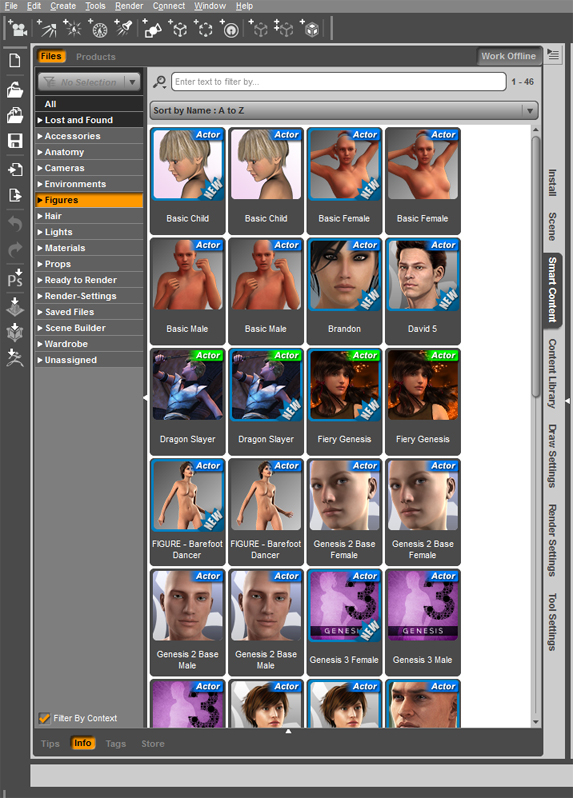
I found a thread on the daz forums with almost the same issue, but it was for 4.6 and her library was showing icons for .dsf and .duf files when she looked at the paths. So I checked tha,t but mine are all pointing to the same .duf files.
RHaseltine posted at 12:00PM Fri, 17 February 2017 - #4297755
Greyed items may not have been added to the Content Management System correctly - for example, if you close DS and immediately launch DIM it's possible that PostgreSQL will still be shutting down when DIM would ask it to start and as a result it won't be running when you install.
I usually don't even open DS until I've installed the content from DIM, because I usually have to restart DS anyway in order to get the newly installed content to show up. Yesterday I installed Jai hair for Genesis via DIM and when I opened DS it wasn't showing up in the library. It was only showing in the "available" tab, with the grayed out icon and the download symbol. So I had to install it again through the DS library in order to load it.
I think I'm just going to reinstall everything on a separate hard drive, since I need to free up space on my main drive anyway, so maybe that will solve the problem.
Yes both icons always point to the same file path and name. The new duplicate items have 'new' on them until I click on it then that goes away but the duplicate thumb stays. This happened after I used the database maintenance menu a few weeks ago to re-import meta data, because I was trying to find some files that weren't showing up. It was after that when I discovered that some files I had installed via DIM were still showing as not installed in the library with the black and white thumbs.
I imagine that if I do the re-import meta data again then I'll get 3 icons for every item, so I haven't done that again.
Oddly enough it doesn't show a duplicate item for any of the character morphs, such as M6, M7, V6, V7, etc, even though they were all installed prior to the meta data re-import.
You can export user data (assuming there are any adjustments or additions you want to keep - including saved file information) and then reset the database before reimporting (all from the Content DB Maintenance dialogue) though I'm not sure that reimporting the same data would cause a double reference.

Privacy Notice
This site uses cookies to deliver the best experience. Our own cookies make user accounts and other features possible. Third-party cookies are used to display relevant ads and to analyze how Renderosity is used. By using our site, you acknowledge that you have read and understood our Terms of Service, including our Cookie Policy and our Privacy Policy.
A few weeks back I re-imported meta data trying to find a product, and since then several of the items in my smart content library are duplicates. Is there a process to remove duplicate thumbs or do I have to delete them manually? And if I delete them manually will it delete the product associated with it?
Also, I have a number of product thumbs in black and white that are asking me to install them, but they've already been installed through DIM, I just can't access them until I install them from the library. Why is this?
I'd ask this on the daz forums but they seem to be down for maintenance at the moment.