
Renderosity Forums / Blacksmith3D & Texture Transformer
Welcome to the Blacksmith3D & Texture Transformer Forum
Forum Moderators: tim, msansing
Blacksmith3D & Texture Transformer F.A.Q (Last Updated: 2026 Jun 10 1:05 am)
BLACKSMITH3D Version 8 for Windows (FREE Distribution)
https://www.posersoftware.com/blacksmith3d

Subject: How do I install Blacksmith3D Pro v5?


Hi Guardian
I had the same issue till I figured out which was the serial number since I was under the impression that it would be E-mailed to me wasn't till I looked in my account and in the order is the serial key and if you click on the Printer friendly button at the top of the page you will see the whole actual key which part of it was hidden due to it not fitting all on one line in regular view. In printer friendly view you will see your whole serial key. they should change the product info from where it says
"Even if you are buying the software, you will need to download the trial software, and then your registration key will be emailed to you after your completed purchase."
But that is how I got ti to work hope it helps
Lobo3433
Blender Maya & 3D Forum Moderator

Quote - I have the same exact problem.
I downloaded the winzip for BS3D.
After unzipping I opened the folder.
I tried both EXE files. Both want a serial number.
I really have no idea what to do next. I waited until I could afford it and now my time is running out but I can't try it out!
HELP!!!
Did you look on under your orders list at the order invoice for your blacksmith3D? Your serial # should be listed on it. After Lobo3433 helped me get a previous older trial cleaned off of mine - I just copied the serial from my order invoice/reciept & pasted it into the Blacksmith registration area & it worked.Lobo3433 is good at helping & is way more knowledgeable about this program than I am :)
Guardian_Angel_671
Daz Studio Coordinator
May the hands of fate be kind to you and yours. :)
guardian_angel_671@renderosity.com
Thank you for the compliment Guardian_Angel but we did figure it out together in the end. So to try and help quietrob your trying to use the trail you have not purchased it yet? If so it will ask you for that serial number on every start up. Now if it is closing down perhap you have had a previous version installed on your PC even an older trail version that perhaps you forgot was installed on your system. If I recall correctly in Guardian_Angel circumstance on the Windows 7 machine we found old files refering back to an older version in C:UsersMaster GuruAppDataRoaming folder. This folder is usually hidden by defualt. To make it visible open up Windows Explorer then tools >Folder Options click on the view tab and tick the button for Show Hidden Files, Folders and drives. Once you have done that you go to C:UsersMaster GuruAppDataRoaming and search for any folders with either name Blacksmith3d or realityPaint delete those folders because if is very possible these were from older versions and are still storing older information that is cuasing the conflict with you being able to run the new version. I hope this helps
Lobo3433
Blender Maya & 3D Forum Moderator
I did a search and found nothing with the word guru in any of my files (I use fast search by garrysoft). However, I found an old folder with a copy of blacksmith 3d files in it and deleted the file. I found a folder named realitypaint. I deleted that as well.
I'm still at the point where it asks for a serial number then immediately closes.
Would it help if I purchased the product without trying? Although really, the program never prompted me to enter a serial number at any point.
On the BS3D website, I tried to register the product thinking that might help. For some reason, the website doesn't like my yahoo ID and refuses to acknowledge it as a valid email addy. Sooo I can't register even though I HAVE PREVIOUSLY REGISTERED WITH BLACKSMITH 3D.
Only two days left on the sale. I am very grateful for the help I've recieved so far. I'll work as hard as is needed to get this to work.
Sorry that was suppose to read C:UsersYour usernameAppDataRoaming when I copied and pasted I thought I had edited it to say it meaning your username my apologies
Lobo3433
Blender Maya & 3D Forum Moderator
That's okay. I didn't lose any real time. I figured out what you meant and was surprised to see the folders for both Reality Paint and Blacksmith 3d there. I deleted both. It still asks for a serial number then shuts down. It seems like more of a crash than a shutdown.
My history is that
I download the zip file from the forum here.
I unzipped the zip file into it's own folder. (Shouldn't it have installed something?)
I click on the file, 'Blacksmith3D-Launcher.exe'
Message appears on the screen 'Serial Number is invalid'
Then the Blacksmith3D 64 has stopped working...
Also :
Here are my specs. (don't laugh!)
AMD Athlon II X2 215 Processor 2.70Ghz
4G Ram
ATI Raedon HD 3200 Graphics
Windows 7 Home Premium 64 bit
I shouldn't have a problem running BS3D should I?
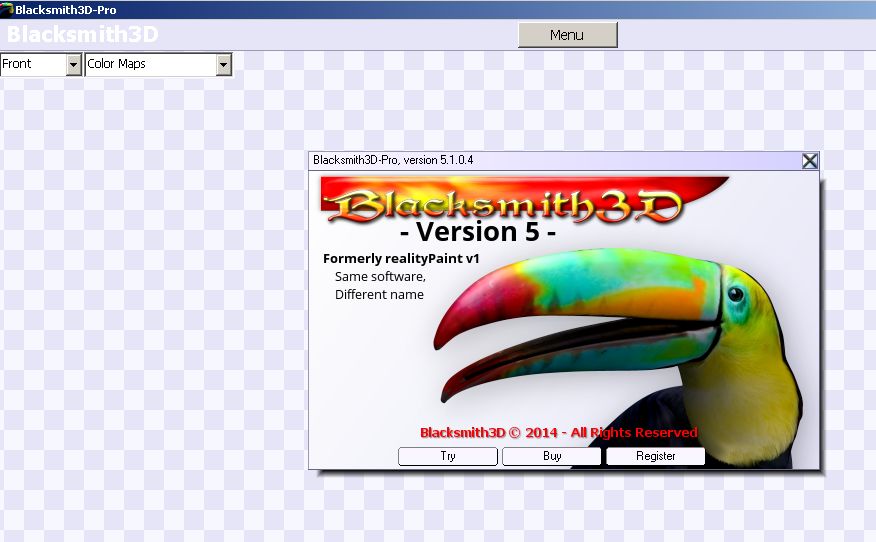
Hope this helps
Lobo3433
Blender Maya & 3D Forum Moderator
Lobo could there be some registry files hiding? Didn't I have a few of those from the previous trial that I had installed?
as for the trial zip that you download from here- It doesn't install as that is the full program in the zip file if I recall right. I got that 'Serial Number is invalid' message myself till I had all of the references to the previous version removed.Lobo helped me go tru my registry & make sure that the refereces were removed but I forget how to do that & wouldn't want to tell you wrong & mess up your system.
Guardian_Angel_671
Daz Studio Coordinator
May the hands of fate be kind to you and yours. :)
guardian_angel_671@renderosity.com
Quote - Lobo could there be some registry files hiding? Didn't I have a few of those from the previous trial that I had installed?
True there might be some registery files hidden but I normally do not recommend going into the registry unless you know what your doing because there are always risk with going into the registry if you are not fimilar with how to navigate it. If quietrob knows how to navigate into the registry all he would need to do is search for any refrences to both Blacksmith3D or realityPaint and delete any of those keys but before he tries that should back up the registry another perhaps easier route would be if you have a utility like CCleaner installed which is a free app has a registry checker and can run a scan on the registry for any orphaned files or bad refrence files that can be cleaned out of the registry.
The manual and more sure of way to clean out the registrty of any entries is to go to
Start>run>regedit when the regedit window pops up goto
Edit>Find in the dialog box first type in Blacksmith3d when it finds an entry it will highlight it just click on your delete key to delete the entry. hit the F3 key to go onto the next entry after you have found all the Blacksmith3D entries time to search for the realitypaint same steps. You might find many or just a few of each entries. But again I stress that if you are not comfortable doing this dont do it. Deleting the wrong keys can make your PC not start up again.
Lobo3433
Blender Maya & 3D Forum Moderator
Quote - > Quote - Lobo could there be some registry files hiding? Didn't I have a few of those from the previous trial that I had installed?
True there might be some registery files hidden but I normally do not recommend going into the registry unless you know what your doing because there are always risk with going into the registry if you are not fimilar with how to navigate it. If quietrob knows how to navigate into the registry all he would need to do is search for any refrences to both Blacksmith3D or realityPaint and delete any of those keys but before he tries that should back up the registry another perhaps easier route would be if you have a utility like CCleaner installed which is a free app has a registry checker and can run a scan on the registry for any orphaned files or bad refrence files that can be cleaned out of the registry.
The manual and more sure of way to clean out the registrty of any entries is to go to
Start>run>regedit when the regedit window pops up goto
Edit>Find in the dialog box first type in Blacksmith3d when it finds an entry it will highlight it just click on your delete key to delete the entry. hit the F3 key to go onto the next entry after you have found all the Blacksmith3D entries time to search for the realitypaint same steps. You might find many or just a few of each entries. But again I stress that if you are not comfortable doing this dont do it. Deleting the wrong keys can make your PC not start up again.
very true.I just figured I'd ask.
Guardian_Angel_671
Daz Studio Coordinator
May the hands of fate be kind to you and yours. :)
guardian_angel_671@renderosity.com
It is possible seems so far almost the same identical issue to when I helped you hidden files in AppDataRoaming folder which when previous version are uninstalled do not uninstall completely. Perhaps that is why the new version runs from the unzipped folder and does not actually install anything. But especially on Vista and Windows 7 machines that use a roaming profile folder this is a problem with the older installed version of Blacksmith3D all the files do not uninstall and when you try to run the new version there is a conflict.
Lobo3433
Blender Maya & 3D Forum Moderator
Quote - It is possible seems so far almost the same identical issue to when I helped you hidden files in AppDataRoaming folder which when previous version are uninstalled do not uninstall completely. Perhaps that is why the new version runs from the unzipped folder and does not actually install anything. But especially on Vista and Windows 7 machines that use a roaming profile folder this is a problem with the older installed version of Blacksmith3D all the files do not uninstall and when you try to run the new version there is a conflict.
I rebooted.
I'm not squeamish. I opened up regedit. I backed up my registry and did a find for blacksmith3d. Found one entry under debug and deleted it. Did the same with realitypaint. It found some value listed in the audio of windows internet explorer. I didn't delete that file.
I tried both 32 and 64 version of blacksmith 3d and it gives me the same serial number problem.
Anything I did in the registry shouldn't require a reboot. I'm still open to any suggestions. Just for the heck of it I checked and magically, in the roaming data, there is a reference to Blacksmith3d. I'm going to delete it but I don't see what that has to do with a missing serial number.
At this point I am stumped not sure what else to try except Email info@blacksmith3d.com we have tried everything I can think of at this point. The program itself has merit and the sale price is worth it I feel in the long run but you need to be able to run it and that is where checking with the developer at this stage is a must. I wish there was more help I could provide.
Lobo3433
Blender Maya & 3D Forum Moderator
I tried it one more time.
The 32bit version in the folder...NOT the blacksmith3d.exe in the previous folder.
It worked!
Going to try 64 version...
That's 2 for 2!
Okay. The Fix is go to the users appdata find blacksmith 3d delete REBOOT and then go for the version in the folder.
Lobo, thank you for time. I'm going to put it through it's paces but that price is too good to pass up! I wish I could for the PRO version but I can get the upgrade funds for the next sale.
Again, it speaks volumes to everyone who is interested that someone would help a stranger off and on for hours and most of all, had the right answers.
Thank you again for your time and help. Thank you, all! (Guardian Angel)
 I so glad it worked and it was my pleasure helping and the team here at Renderosity is always willing to do what we can to help. I am just glad you got it to work. Dont ever hesitate to ask for help that is one of the things I truly feel we have a great community here and everyone will jump in and help if they can
Good Luck 
Lobo3433
Blender Maya & 3D Forum Moderator
Glad I was able to help Guardian
Lobo3433
Blender Maya & 3D Forum Moderator

Privacy Notice
This site uses cookies to deliver the best experience. Our own cookies make user accounts and other features possible. Third-party cookies are used to display relevant ads and to analyze how Renderosity is used. By using our site, you acknowledge that you have read and understood our Terms of Service, including our Cookie Policy and our Privacy Policy.
Sorry I'm totally new to this & just bought it lol.I downloaded the zip from the editorial tab on the Blacksmith3D Pro v5 product page.I downloaded the windows as I use Win7 64 bit. I unzipped the zip file which is currently on my external drive & went to click on the realityPaint-Launcher.exe & got a popup saying invalid serial #.Then I figured try click on the Blacksmith3D-Launcher.exe got the same message. the Blacksmith3D-64.exe & the Blacksmith3D-32.exe just plain out crashed. I'm pretty sure I'm messing something up. Is there instructions on how ta do this? I'm not able to install or even get a spot to enter my serial #.
I did before have a previous trial version installed - I thought I removed it but could some of it still be on file & causeing my prob?
Thanks for any help for a lost peep.
Guardian_Angel_671
Daz Studio Coordinator
May the hands of fate be kind to you and yours. :)
guardian_angel_671@renderosity.com