
Renderosity Forums / 3DS MAX
Welcome to the 3DS MAX Forum
Forum Moderators: wheatpenny
3DS MAX F.A.Q (Last Updated: 2024 Aug 27 11:07 am)
Welcome to the 3DS Max Forum!
Considering 3ds Max? Download the FREE 30-day trial here

Ready to purchase 3ds Max? Go here
Renderosity maintains a zero tolerance policy concerning the trading/use of illegal software.
Refer to the Terms Of Service for the lowdown concerning warez.
POSER/MAX FAQ - This covers MANY of the issues involved when using Max in conjunction with Poser.
Take the time to look over this post before starting a thread in the forum.
Checkout the Renderosity MarketPlace - Your source for digital art content!

Enjoy your stay and keep coming back!

Subject: Edge thickness


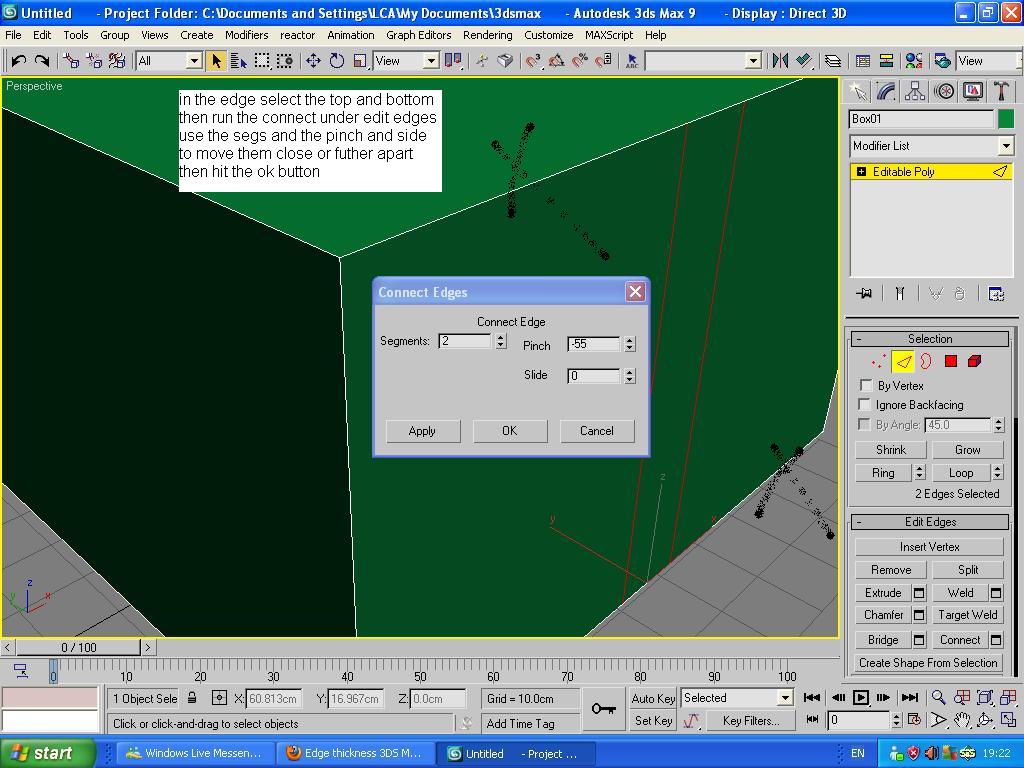
If you run a connect through your object and use 2 segs pinch or side the sides together then that hold down the shift key and click on the polygon this will convert your edge into a poly then extude your edge. But if you just want to extude the edge then no.
If you can add a shell modifer to your object but the shell modifer applies it to the whole object
Anthony LCA


which adds unnecessary edges and is NOT what the OP wants
I'm not sure you can increase the display size of a selected edge - I've never really felt the need to though, the red highlight is usually enough for me
My Freebies
Buy stuff on RedBubble
The OP just wants to increase the DISPLAY size of the edge not the actual edge itself
My Freebies
Buy stuff on RedBubble
Quote - I'm not sure you can increase the display size of a selected edge - I've never really felt the need to though, the red highlight is usually enough for me
Well, I guess I'm used to C4D where the edges are thicker. In fact I think from all the programs I've tried I only had this problem with Max. Maybe I should try changing the colors of the edges. That IS possible, right?
one thing you could try which I do a lot is to set the colour of whatever it is to black and then apply a dark grey material. That can make the edges a bit clearer.
It might be possible to do it - I just don't know how :biggrin:
My Freebies
Buy stuff on RedBubble

I’ve personally never had a problem viewing the edges but that’s just it…everyone is different and have idiosyncratic likes and dislikes. I for one would think having the option to change the edge’s size would be a good feature. I’m also thinking that screen resolution would have a direct impact on how discernable the edges are and so with that in mind I’m thinking that perhaps is the reason why I’ve never had a problem with viewing the edges at 1600x900 on a 24” flat monitor.
I could be wrong but as far as I know 3DS Max doesn’t have a dedicated feature to change the edge’s width. But I have read where if you go in the menu to customize: preferences: viewport: "configure drivers" in the "display drivers" section: and disable "enable antialiased lines in wireframe views", in the "appearance preferences" section that this would make it easier to view the edges but having attempted this several times...for the world of me I cannot discern a difference. But by all means give that a try and see if it works for you.
Along the same lines but different beast, I’m sure that everyone knows you can provide a mesh with a shader option that would render the mesh as a wireframe and the edge’s size there can be manipulated using the material editor: putting a tic in “wire” in the "shader basic parameters" section and then moving down to the "extended parameters" section and providing a "size" and applying the material.
On the other hand, if you can’t make out the edges because they are confusing because you can see through to the backside edges of the object then right clicking on the object and putting a tic in “Backface cull” in the "object properties" selection window will help.


Privacy Notice
This site uses cookies to deliver the best experience. Our own cookies make user accounts and other features possible. Third-party cookies are used to display relevant ads and to analyze how Renderosity is used. By using our site, you acknowledge that you have read and understood our Terms of Service, including our Cookie Policy and our Privacy Policy.
Hi,
Just starting with 3ds Max and got something that annoys me, and that's the lack of edge thickness.
Is there any way to make them thicker, at least when they are selected? Because I can barely see them as it is, but if I have a background image they're pretty much invisible.
I'm using 3ds Max 2012.