
Renderosity Forums / Poser 11
Welcome to the Poser 11 Forum
Forum Moderators: nerd Forum Coordinators: Anim8dtoon, Digitell
Poser 11 F.A.Q (Last Updated: 2026 Mar 04 9:12 am)

Welcome to the Poser Forums! Need help with these versions, advice on upgrading? Etc...you've arrived at the right place!
Looking for Poser Tutorials? Find those HERE

Subject: GoZ not working for me


The GoZ files are in the Support Files installer so make sure you've installed that as well as the main application.
----------------------------------------
Not approved by Scarfolk Council. For more information please reread. Or visit my local shop.
Nope, nothing special. IIRC there should be a folder called Poser with 4 files in it (called GoZ_Config, GoZ_Info, GoZBrushToPoser and Instructions) located at Users/Public/Pixologic/GoZApps on Windows (or Users:Shared:Pixologic:GoZApps on Mac). Those are the files that are installed by the Support Files installer.
If the error message is saying GoZMakeObjectPath.exe not found, then reinstall Pixologic's separate GoZ installer to get that file back.
Those are the only things I've had to troubleshoot with GoZ and Poser on my system, so if you're getting a different error, can you post a screenshot of the error message?
----------------------------------------
Not approved by Scarfolk Council. For more information please reread. Or visit my local shop.

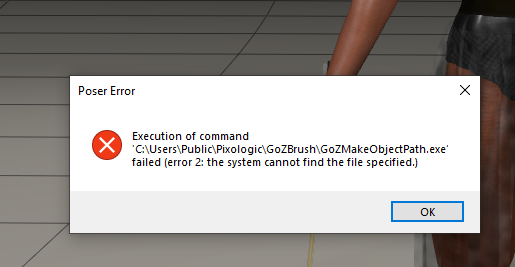
I've had that problem and the solution for me was to reinstall the GoZ installer from Pixologic as it's one of their files that Poser can't find. I was able to find a separate installer for the GoZ plugin by searching the Zbrush site; alternatively send Pixologic a support request, or worst case, reinstall Zbrush.
----------------------------------------
Not approved by Scarfolk Council. For more information please reread. Or visit my local shop.
I put in a support request to Pixologic stating that neither my Poser 11pro GoZ nor the MD9 GoZ are working and they responded with - Both these GoZ plugins are produced by other developers and are not Pixologic's responsibility. You will need to contact them for support.
Disappointing to say the least. Thanks anyways guys-
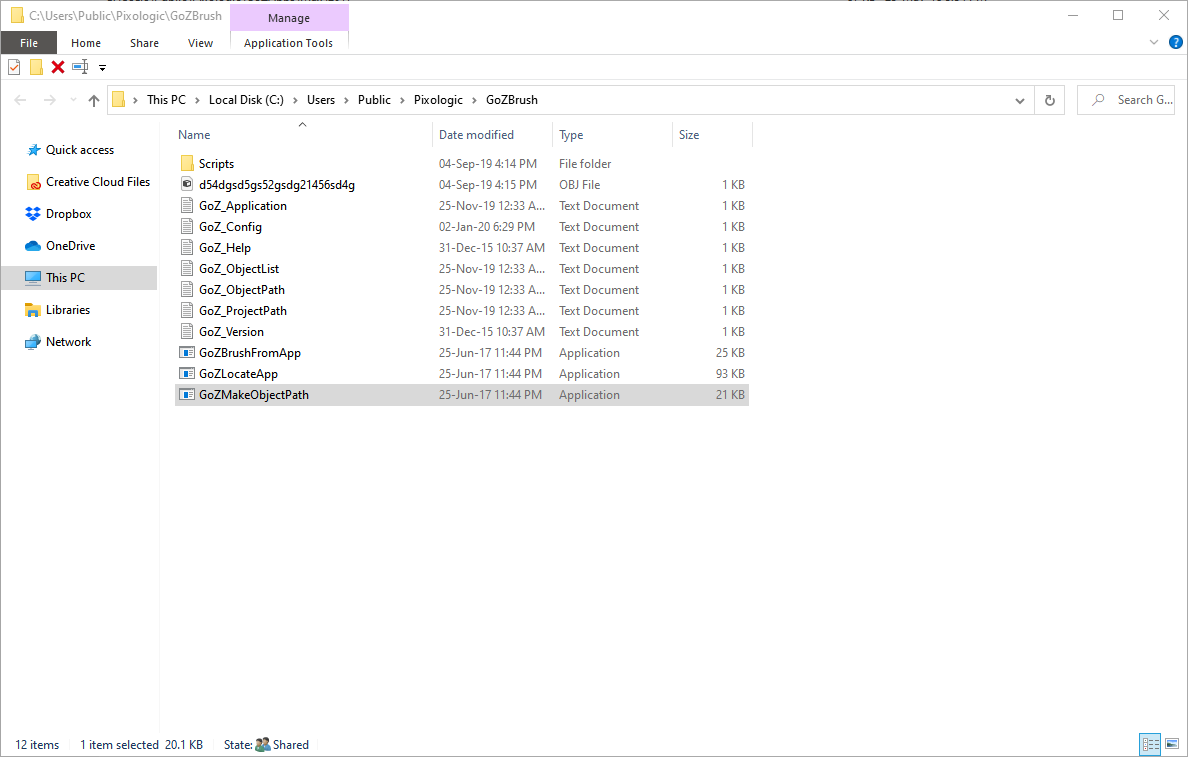
Did you reinstall Pixologic's GoZ installer? The file that cannot be found - GoZMakeObjectPath.exe - is installed by that installer, or by the full Zbrush installer. It should be in C://Users/Public/Pixologic/GoZBrush. I know that because I have had the exact same issue.
Pixologic support are correct, but the issue is with the GoZ plugin install itself not the separate application plugins ;)
----------------------------------------
Not approved by Scarfolk Council. For more information please reread. Or visit my local shop.
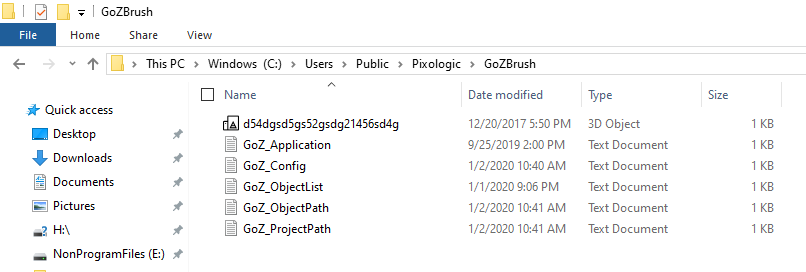
This is what's in mine ... looks like you could be missing a few files ...
----------------------------------------
Not approved by Scarfolk Council. For more information please reread. Or visit my local shop.
Glad you're up and running again!
----------------------------------------
Not approved by Scarfolk Council. For more information please reread. Or visit my local shop.

Privacy Notice
This site uses cookies to deliver the best experience. Our own cookies make user accounts and other features possible. Third-party cookies are used to display relevant ads and to analyze how Renderosity is used. By using our site, you acknowledge that you have read and understood our Terms of Service, including our Cookie Policy and our Privacy Policy.
GoZ function no longer works for me. I get an error message when attempted, any help is appreciated. Poser 11 Pro. 2020 ZBrush. I've downloaded and installed the latest Poser from the download site.