
Renderosity Forums / Blacksmith3D & Texture Transformer
Welcome to the Blacksmith3D & Texture Transformer Forum
Forum Moderators: tim, msansing
Blacksmith3D & Texture Transformer F.A.Q (Last Updated: 2026 Jun 10 1:05 am)
BLACKSMITH3D Version 8 for Windows (FREE Distribution)
https://www.posersoftware.com/blacksmith3d

Subject: I purchased Blacksmith but I have not used it much


Hey there. I actually felt the same way for a long time but I kept going back to it and also reading the manual. I do a lot of work in Blender and blender is pretty much famous for not being the easiest thing to deal with when it comes to materials and texturing.
So I kept coming back and asking.
Finally, one day I stopped asking so many questions and just decided I was going to do it--so here are my tips:
-
try just painting with it first--dont do the images and such --just noodle around with the paint and the brushes.
-
When you load in your object, don't forget to control A to select it--i then go to utilities and to the paint setup wizard and just have it generate a UV map for me.
-
When you have done that, you are ready to paint---when yiou load in a model load in something simple like a cube just so you play around a bit.
-
save often.
5 hit space for the menu--its faster
-
Control S to save
-
you can change tools quickly too by utilizing the F keys--try it.
-
Finally, I have a LOT to learn and I am new at this like you--when I was born, Noah was sitting at his rickety old wooden table drawing up plans for a really big boat--so I am NOT the most computer saavy of them all but I don't give up.
9 Questions: Post your questions in a specific manner and someone WILL answer. You don't need to explain the situation that much just be direct. Again do not try to learn everything at once. You will get frustrated very fast.
TO EVERYONE ON THIS FORUM:
I have just added my two cents worth as far as tips go--please feel free to jump in and relate your own experiences and lets me this thread a handy tips page--the software is well worth the effort! :-)

I have to agree with the OP, in that the software can be very daunting for a newbie. I have the standard version. I tried for months to come to grips with the program, but ultimately abandoned it. There is not much in the way of support for the program and comprehensive tutorials are rare. The UI, in my opinion, is clunky at best. Having to constantly bring up the main menu and dig through submenus to find what you want is cumbersome. I think the UI from past versions was better (again, just my opinion). The lack of activity in this forum during a sale of the software should say something.
I find 3dCoat to much easier for painting textures and sculpting/creating morphs than Blacksmith 3D. It uses a layer system for painting much like Photoshop or PaintShop.
Having said all that, I also agree with uresaman. IF you can get past the UI awkwardness, then you should indeed follow uresaman's advice.

Please note that we are planning on a UI revision when we start on a new version. Also, for educational help, we have video tutorials available at https://www.youtube.com/user/blacksmith3D and http://www.youtube.com/user/realityPaintVideos and a software manual which is still being worked on can be found at http://www.blacksmith3d.com/?page_id=1397. Hopefully, these can help you.
I have to say that I was not thrilled with the interface at first but after using the program and getting accustomed to it, I found it quite intuitive. The program does so many things that I am sure it is difficult to create a user interface that evertone will like.
There are so many tools and options. Of course, I would like to see even more tools and options. Popping the menu up when I need it seems like an extra step but it is actually easy to accomplish by tapping the space bar to otoggleit off or on and I do not want to give up that much of my screen when I am working on fine details.
I think uresaman has created quite the complete list of helpful hints. I use other sculpting and painting tools, but I do not see any of them using anything close to a standard interface. I am not sure one could be developed as each program goes about doing things in a different approach. I am also sure that each person has their own preferences.
I found the online tutorials helpful. I viewed them multiple times. Maybe I am a slow learner but I am persistent. The manual is still a work in progress but I like it and I like the tone it is written in.
I think uresaman is also correct, in just go into the program and try things out and see what happens. You need some basic understanding of the program functions to make this worthwhile.
I am sure that a new interface will have its supporters and detractors just as the current one does but more importantly what you can accomplish with the program is most important.

I just bought Blacksmith3D because of the sale, and the fact that it has a particlular niche in this Daz/Poser market that usually gets overlooked by the more full featured programs.
Im not thrilled with the UI as it is. I've been an Art Director for many years, and I can tell when an Engineer designs an interface :) Not that it's a bad thing, it can make sense if you look at it from a certain perspective. Even next-gen software like Substance Painter can have interface quirks that don't make sense. You just have to get your brain working in that direction, and sometimes artists have a harder time doing that.
I'm glad you posted the link to that manual. That will help me a lot. I wish that there were more video tutorials geared towards DAZ users. Please don't forget us. Thanks for your hard work.


The video tutorials are great. They are intuitive and every one covers a functionality from the beginning to the end explaining the workflow and giving a fair amount of fundamental background information. After watching them you should be able to use the software without any trouble.
The interface is second nature to me after having assigned hotkeys to the functions that I use more frequently. The software works very well with a tablet ... I use a Wacom Intuos for painting.
I like it for what it is ... a streamlined texture and morphing tool.
My 2c.
Hi, I have just downloaded Blacksmith with the sole purpose of generating a Head from a Photo. This head will be exported thru 3DXchange into IClone to be animated. Although IClone claims to be able to generate Realistic Heads from a 2D Photo, the final product is far from the original.
I followed every step in the 6 tutorials, however faced some problems with the texture on the forehead and around the eyes.
Where did we go wrong?
We tried using both a genesis and kids 4.
Hi, I have just downloaded Blacksmith with the sole purpose of generating a Head from a Photo. This head will be exported thru 3DXchange into IClone to be animated. Although IClone claims to be able to generate Realistic Heads from a 2D Photo, the final product is far from the original.
I followed every step in the 6 tutorials, however faced some problems with the texture on the forehead and around the eyes.
Where did we go wrong?
We tried using both a genesis and kids 4.
Sorry, I'm not sure how the exporting 3DXchange or importing into iClone process works or what type of limitations those software programs might create, especially with using genesis and the kids 4 nor do I know what 6 tutorials you are referring to.
If you have a specific question about Blacksmith3D, we might be better able to help you. But, we are unable help with export and inports of other software.

I am on the fence. While supportive of the Blacksmith development effort, my experience is not great. I feel the same as the OP. I have maintained Blacksmith since version 3, and although I have attempted many times ~ have yet to complete a project or even a texture map with the software. Probably due to unfamiliarity, I always ran into various dead ends and reverted to ZBrush to complete the project. ZBrush I use almost every day and cost me $700 to procure.
The decision I am facing is do I update BS again with a very incertain ROI? Version 6 will cost me $80, which puts my total BS investment at more than $600. With all the paid updates we are approching the cost of a professional package. Pixeologic does not charge for its ZBrush updates. So will Version 6 finally meet expectations and become my go to app for painting and sculpting DAZ & Poser Figures?
Frankly history does not support that projectuon and it appears that annual updates are part of the business plan making the total cost of ownership comparable with mid-range professional 3D software.
dreamcutter & booksbydavid, I'm sorry to hear that. I really do believe that Pro-6 is a superior product to Pro-5, and hope that the new additions, the new user interface and the general improvements would be worthwhile to give it a try again using the free trial. Just please remember the free trial is to see how it works now, you cannot save or export using it. Please note that the Blacksmith3D updates are free, and its the new versions that have a upgrade fee (which is standard in software), but we'll be glad to give you free upgrades if you pay us $795. (joking) : )
Also, for a limited time, we are allowing the coupons to work on the software (which coupon usually are not allowed on software), in case that helps in trying to decide.


Ha ha. At least GOT my value with ZBrush, on the first release (4.0) I purchased. If the last 2 rollouts of BS were not so disappointing I would consider taking the plunge. BS3 to 4, then to V5 was so minor and some key features were actually removed... then the VirtualPaint debacle. Now the main feature is a reversion to the old "working" interface but no real new block-buster features. Have you seen the brush-set and vast capability of ZB? It affords TONS of value, and the free upgrades were not just improvements to the product but substantial capability enhancements. I think Blacksmith could learn alot from Pixeologic's approach.
Ha ha. At least GOT my value with ZBrush, on the first release (4.0) I purchased. If the last 2 roll outs of BS were not so disappointing I would consider taking the plunge. BS3 to 4, then to V5 was so minor and some key features were actually removed... then the VirtualPaint debacle. Now the main feature is a reversion to the old "working" interface but no real new block-buster features. Have you seen the brush-set and vast capability of ZB ? It affords TONS of value, and the free upgrades were not just improvements to the product but substantial capability enhancements. Recognizing that the comparison maybe a bit unfair with a consumer oriented product, however still I think Blacksmith could learn a lot from Pixeologic's or 3D Coat's approach to value. I might suggest to consider a customer loyalty reach-back approach and consider a free/heavily discounted upgrades to clients who have committed to your product through several paid upgrades to regain confidence.
O/T - Admin, sure wish we could have more time or perpetual ability to edit & delete our posts. Some messages should not last for eternity and posters positions evolve.
ssgbryan, please make sure that you have the free updates for Texture Transformer that were put out in May and June this year. You should be on version 5.1.0.10. We are hoping to have new development plans in place soon, so I can't say "when" more Texture Transformer updates are coming, but our goals are to continue updating our software to improve it.
ssgbryan, please make sure that you have the free updates for Texture Transformer that were put out in May and June this year. You should be on version 5.1.0.10. We are hoping to have new development plans in place soon, so I can't say "when" more Texture Transformer updates are coming, but our goals are to continue updating our software to improve it.
As a reminder - you never did fix the "update" button (as you assured us in this very forum that you would), so I am still at .8. Not to mention the fact that there doesn't appear to be a link anywhere to the update at 'Rosity. And no, I can't actually go to my downloads and update it because I bought it over at Hivewire and you refuse to support those of us who bought it there.
Hi ssgbryan,
The 'update' has been working since the last couple of updates, which I'll get the latest update to you in just a few minutes. I had an 'update' link at the top of the forums which was lost during the last forum update and I'll get that back up there too. Hivewire choose not to give us their buyers' email (for privacy reasons) so we could ensure proper update support, and they said that they would make updates available to their buyers when we sent them notices. I apologize if you haven't gotten those updates from Hivewire, but I'm going to 'gift' you a Texture Transformer from our system so your records will be here and you can get updates and notices properly going forward.

I purchased TT as a stand alone app. It served its purpose at the stage I was at. I would now like to purchase the Pro version as the Standard version seems to have limits.
Standard doesn't read like Pro minus TT. Am I wrong. Is Standard simply Pro without the added benefit of TT? If I buy Pro, have I thrown money away buying TT?
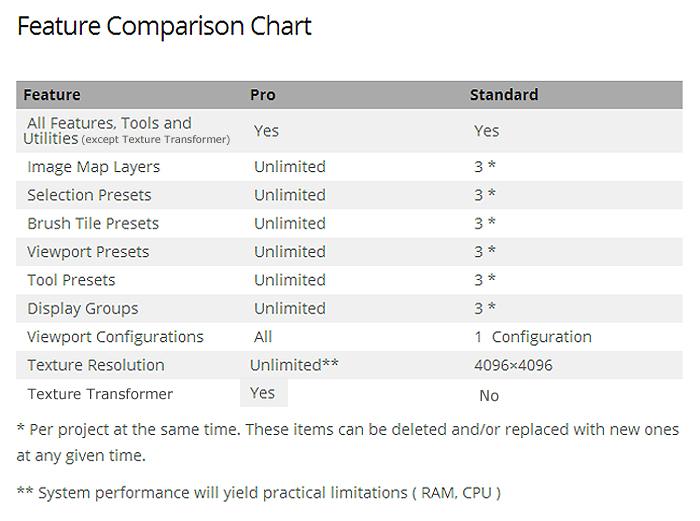
Below is the comparison chart that explains the differences between Pro and Standard. Standard is not just Pro minus the TT. But, if you have TT, then you could probably try out the Standard and upgrade to Pro later if you hit the limited presets or layers. Standard 6 is priced so that if you later upgrade to Pro-6 the prices for those are similar to if you had just bought Pro-6 from the beginning (so trying Standard first could be a benefit to you, if you find it meets your needs).


@ Blacksmith3D Are you planning to add the possibility to save user options? To save Viewport setup? To avoid the non-stopping tab change in the right pane? Will we have vertex painting, instead of that poor 2d projection? Some better sculpting tools and gizmos? Better painting tools too? Also, there's a chance to have it run at decent speed on Windows 10?

Privacy Notice
This site uses cookies to deliver the best experience. Our own cookies make user accounts and other features possible. Third-party cookies are used to display relevant ads and to analyze how Renderosity is used. By using our site, you acknowledge that you have read and understood our Terms of Service, including our Cookie Policy and our Privacy Policy.
I have asked multiple times for help, or some kind of instuction and it is really tough to get decent tutorials. It really is cumbersome to use. You really need a lot of patience with it and practice. There is a huge learning curve, and would advise a novice user or artist not to buy this. Unless you are will to invest some serious time in this product I would say it is better to use Gimp or photoshop. It was a bad investment for me because. Strongly urge to download the demo first to try.