
Renderosity Forums / 3DS MAX
Welcome to the 3DS MAX Forum
Forum Moderators: wheatpenny
3DS MAX F.A.Q (Last Updated: 2024 Aug 27 11:07 am)
Welcome to the 3DS Max Forum!
Considering 3ds Max? Download the FREE 30-day trial here

Ready to purchase 3ds Max? Go here
Renderosity maintains a zero tolerance policy concerning the trading/use of illegal software.
Refer to the Terms Of Service for the lowdown concerning warez.
POSER/MAX FAQ - This covers MANY of the issues involved when using Max in conjunction with Poser.
Take the time to look over this post before starting a thread in the forum.
Checkout the Renderosity MarketPlace - Your source for digital art content!

Enjoy your stay and keep coming back!

Subject: Basic Demonstration of Loop Tools in 3dsMax (Video)


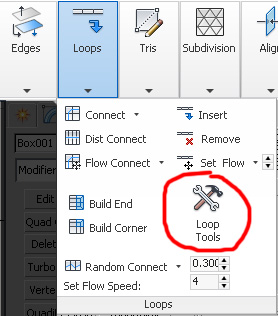
Wonderful demonstration. Unfortunately for some reason I don't have Loop tools dialog. It is certainly not under: Modeling ribbon  Graphite Modeling Tools tab Polygon Modeling panel Edge sub-object level Loops panel [expansion] Loop Tools, where the manual says it should be found. : (
<strong>bandolin</strong><br />
[Former 3DS Max forum coordinator]<br />
<br />
<a href="http://www.renderosity.com/homepage.php">Homepage</a> ||
<a href="http://www.renderosity.com/mod/sitemail/">SiteMail</a> ||
<a href="http://excalibur.renderosity.com/mod/gallery/browse.php?user_id=70375">
Gallery</a> || <a href="http://www.renderosity.com/mod/freestuff/index.php?username=bandolin">
Freestuff</a>
<p><em>Caution: just a hobbyist</em></p>Quote - Wonderful demonstration. Unfortunately for some reason I don't have Loop tools dialog. It is certainly not under: Modeling ribbon
That's highly unusual. What exactly appears in the drop-down dialogue when you expand the "Loop" menu in the Graphite Ribbon? The Loop Tools button should appear directly next to the "Build End" and "Build Corner" buttons. If it's definitely not there, due possibly to a corrupt UI installation, then you should still be able to call it up from a hotkey.
Customize Customize User Interface Keyboard Tab Group:Main UI Category:Poly Tools Action:Loop Tools
Then assign it to any available hotkey, and it should come up when you activate that hotkey. I have to imagine, if it's not where it should be in the Graphite Ribbon, you may have some kind of icon corruption in your Graphite Ribbon UI.
______________________________________
My Store
My Free Models
My Video Tutorials
My CG Animations
Instagram: @luxxeon3d
Facebook: https://www.facebook.com/luxxeon

I don't believe the ribbon structure changed in any version since 2011, but 2015 may have moved things around, not sure. Still, it should be available if you map it to a hotkey. I know it hasn't been removed from the software.
______________________________________
My Store
My Free Models
My Video Tutorials
My CG Animations
Instagram: @luxxeon3d
Facebook: https://www.facebook.com/luxxeon

Quote - OK, I found it. Turns out I was looking in the wrong place. The attached image shows where it is in Max 2015.
Ah, ok, so they did modify the location slightly for 2015, with the new tear-away menus. Cool stuff.
I still highly recommend either mapping the Loop Tools dialogue to a hotkey, or placing it inside a quad menu, for easy access. They are, quite possibly, some of the most useful linear modeling tools in the application.
______________________________________
My Store
My Free Models
My Video Tutorials
My CG Animations
Instagram: @luxxeon3d
Facebook: https://www.facebook.com/luxxeon

<strong>bandolin</strong><br />
[Former 3DS Max forum coordinator]<br />
<br />
<a href="http://www.renderosity.com/homepage.php">Homepage</a> ||
<a href="http://www.renderosity.com/mod/sitemail/">SiteMail</a> ||
<a href="http://excalibur.renderosity.com/mod/gallery/browse.php?user_id=70375">
Gallery</a> || <a href="http://www.renderosity.com/mod/freestuff/index.php?username=bandolin">
Freestuff</a>
<p><em>Caution: just a hobbyist</em></p>

Privacy Notice
This site uses cookies to deliver the best experience. Our own cookies make user accounts and other features possible. Third-party cookies are used to display relevant ads and to analyze how Renderosity is used. By using our site, you acknowledge that you have read and understood our Terms of Service, including our Cookie Policy and our Privacy Policy.
Attached Link: Basic Demonstration Video Of Loop Tools In 3dsmax (2010 or higher)
Hi, everyone. I just uploaded this video, which demonstrates, in a very basic way, how the Loop Tools panel can be used to quickly and efficiently create shape blending, and curvature, in a hard-surface workflow.The user manual explains each tool with far more depth, but doesn't seem to illustrate some of the more useful, and practical, applications for these great tools. Hopefully this video will help spark some more interest in these features, and help you decide if they would help enhance your modeling workflow, as they have done mine.
http://youtu.be/WrMQfx9k-64
______________________________________
My Store
My Free Models
My Video Tutorials
My CG Animations
Instagram: @luxxeon3d
Facebook: https://www.facebook.com/luxxeon