
Renderosity Forums / Carrara
Welcome to the Carrara Forum
Forum Coordinators: Kalypso, Anim8dtoon
Carrara F.A.Q (Last Updated: 2026 Jun 30 12:55 pm)
Visit the Carrara Gallery here.

Subject: Head scratcher


hmm, I used 8.5 once or twice, opened a scene with it then closed it without saving, when I opened it in Car 8.1 the textures were still there but the directory reference to some textures that you see in the shadfing room had been deleted! That is the file directory and name etc that your normally see under the littlepicture of the texture ... couda been a coincidence....
I've made a lot of scenes using Jack Tomlin's content. In a lot of it I used rooms like parts and combined them up. As in put rooms side by side and then unchecked visable on the meeting walls; easy wall on one, west wall on the other.
This doesn't work now. For some reason selecting the wall in the room tree in the sequincer, and unchecking visable, doesn't make the wall invisable. So now I have a dozen or so built sets that are nolonger usable; well for what I built them for.
I find it very hard to believe DAZ changed C8.1 since the last time I downloaded it; that was before C8.5. But this new downloaded version of C8.1 seems to work differently.
So now, of the hundered plus scenes I have worked on I have to go through and load each one of them to see what issues they may have.
Could some one please check this for me? Just drop in a Jack scene in C8.1 and see if you can make the individual walls invisable by unchecking visable.
OK, I apparently have several (I never can remember who made what accept for Stonemason). I've got a lot of his scifi themed stuff like GIS Skyway and such. I've been using a few of these lately. I've had to make several parts invisible and I've had no problems. Tick the box they go, tick the box again they come back. Sorry I wasn't paying closer attention earlier.
It's beginning to look like maybe DAZ did jigger with 8.1 a bit at some point. I'll double check which version of 8.1 I'm using because I'm altogether certain I have the newest 8.1 build. (I don't always update if I'm not having issues)
It also turns out I have a few other sets by Jack, so I'll take a little time later and check those out as well.
Finally had a chance to check. I'm using 8.1.0.153. Yeah, I know that's not even close to the latest 8.1, but like I said, if it ain't broke don't fix it. I wasn't having any issues so I left it.
Anyway, I tested a few of Jack's sets that I had and they all worked just fine. No problem making walls invisible and bringing them back again.
I know this isn't a perfect work around, but you could jump over to the modeling room and delete the faces that you want to be invisible. I don't know how much trouble that would be in the scenes you have, but it's a thought. (If you haven't thought of it already)
The problem isn't the issue. The problem is DAZ borked something yet again. I swear DAZ is better at braking things then fixing them.
I've checked my comp and apparently managed to delete my older versions of carrara, so I can't role it back and am stuck with this broke version.
Just don't get how DAZ can brake something in a .0.0.# release. 
I filed a ticket with customer support but I don't see it going anyware.
Something else I have noticed is any of the shaders effected by this have had the highlight set back to color. Changing it to a % is one of the first things I do.
But so far I have found no rym nor reason to it. I opened a scene and this had only effected one object in it and it was one that isn't regular content, and I had retextured. So basically it's a crap shoot when I open a scene if or what may be effected.
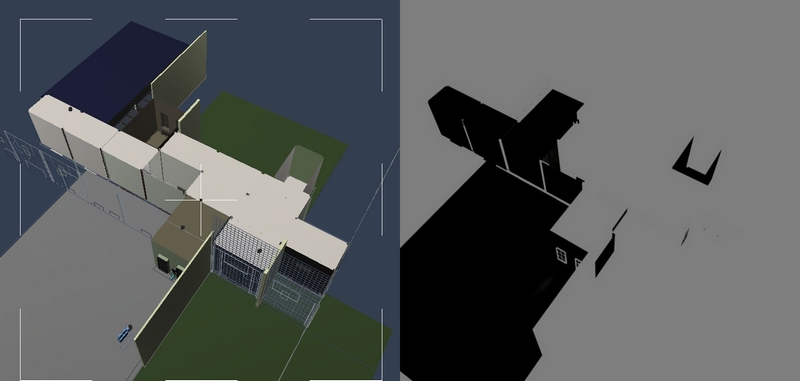
As in I used Jack's Parkside high halls to make an underground laboranth, old abandonded rooms used for storage of long forgotten about items. It's completely usless now, as much of the constrution was dependent on invisable walls; or being able to turn visability off on overlaping sections.
The above is a screen cap VS the render of an on going scene. It's various parts of the West park series.
Man, that is a problem. That second one is an actual render of the scene? That's enough to ruin anybody's day. I am definitely not having the same problem, but I'm also using an older release of 8.1. Even though I downloaded them when they came out, this makes me afraid to ever try one of the later releases.
Well here are the results. nada. They, for some odd reason, don't have a copy of C8.1.1.8, but are more then whilling to except screen caps of, or .cars with the issue.
Ya, right, DAZ is going to fix this issue with C8.1.1.12. So basically I got a "sorry charlie" from DAZ's sales and service. So off to other options.
First up, reinstalling C8.0 then reinstalling C8.1 over it. Then a fresh reinstall of C8.1 if that doesn't work. Then I may see about tapping another carraraest for his back up copy of C8.1.1.8. Don't care if DAZ doesn't like it, they had their chance.
But hey, you never know, DAZ's sales set up may glitch out again and I can get C8.5 at a resonable price.
One thing to note, this may very well be a windows 8 issue, I'm not on a testing team to have it verified.
Well, much to my chagrin this is not a carrara issue. It's a windows 8 issue. I have the same issue in C8.0. I tried running it in W7 compatability mode but nope. I had to run the C8.0 installer in W7 compatability to install. Wish I could check C8.5 but all Ihave is the beta.
Or someone with C8.5 on windows 8 could check it.
Hot damb, fixed it. I had to run carrara as admin. Don't even want to know why.
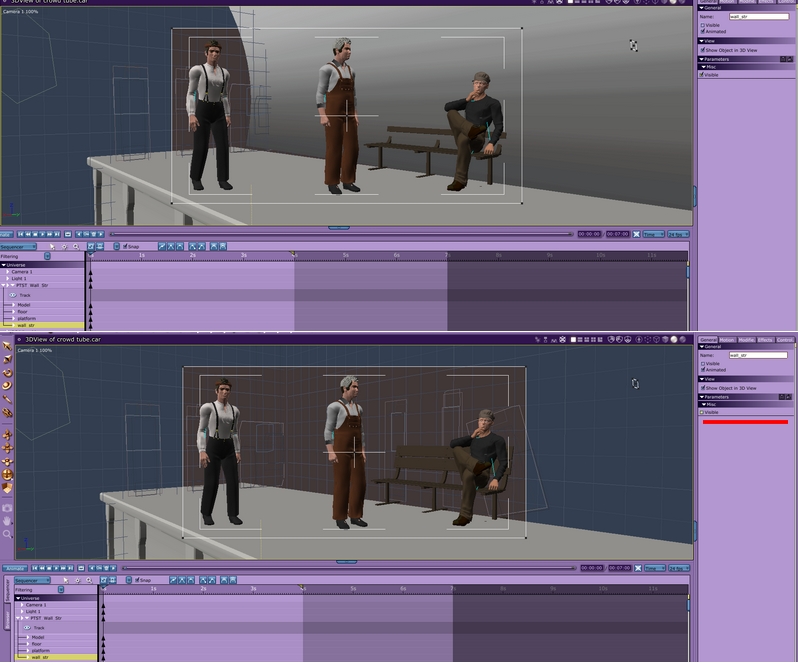
-
Run carrara in W7 compatability mode plus run as admin.
-
Uncheck misc. visability not the general visibility option on the section. Unchecking the misc. one did nothing till I ran in W7 compatability as admin; I hate W8.
That is a screen cap of a crowd set up stage. It's a piece of Jack Tomelin's park tube. Previously I had set it up by unchecking the general visibility; top pic. This doesn't work in W8.
So DAZ just throws peoples files out whenever they feel like it. What's the point of going back and redownloading an older file from your file library at DAZ when you never know if it's the file you originally bought or if it's a file DAZ thinks you'll like better (but don't).
Glad you got the transparency problem worked out. I hate Win8. So far, I've managed to stay far away from it. I bought my latest Win7 comp on sale just as Win 8 was flying into the store. Hopefully, it will last me a good long time.

Privacy Notice
This site uses cookies to deliver the best experience. Our own cookies make user accounts and other features possible. Third-party cookies are used to display relevant ads and to analyze how Renderosity is used. By using our site, you acknowledge that you have read and understood our Terms of Service, including our Cookie Policy and our Privacy Policy.
This is wierd. My big project has gotten a bit too big, takes 20 minutes or so to load and save. But it's about done.
I'm having fun and things are going smoothly so I desided go back and see about working up some scens. I have several where I got the room set up; something I bought from DAZ, loded, and spent a day tweaking and lighting.
Now, before I tell you about this these are scenes I never worked in C8.5. Scenes I've worked in it load just fine.
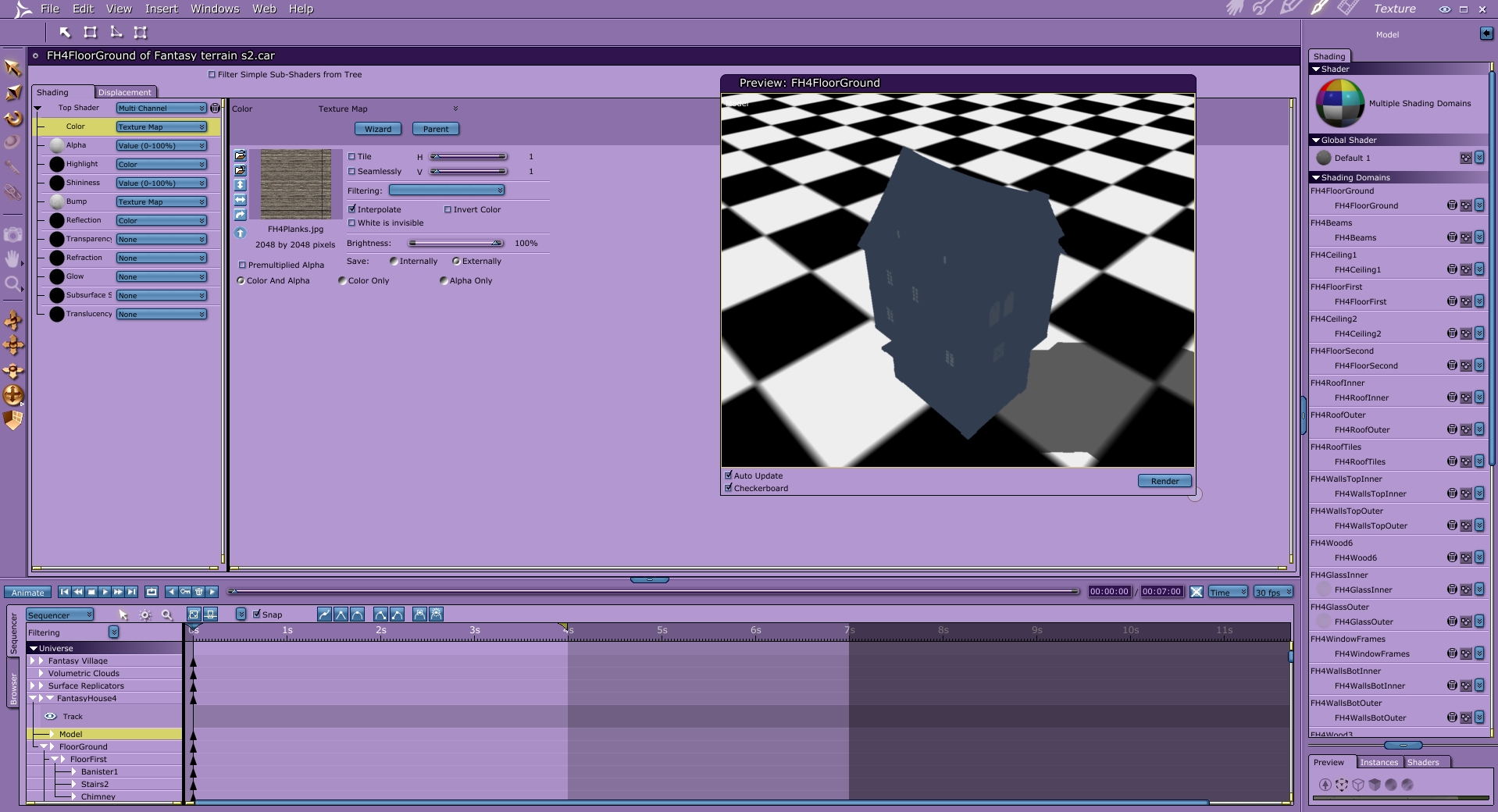
I've had this happen on a most older scenes now. I load them, they look fine in the assembly room, I render them and they are compleatly transparent. It took me a while and some guess work to see that all of the texture filterings were set to . Right, blank.
So get this, every scene I load that I had worked on in C8.1, before I went to C8.5b, yet not worked on in C8.5b, now loads with null filter settings on every texture. Yes, I have to set each and everyone
don't want to know.