
Renderosity Forums / Cinema 4D
Welcome to the Cinema 4D Forum
Forum Moderators: CHMedia Forum Coordinators: Kalypso
Cinema 4D F.A.Q (Last Updated: 2024 Aug 27 11:07 am)

| C4D Gallery | Speed Modeling Sessions | C4D Freestuff |

Subject: Cinema 4D not seeing x64 ?


No. It installs both 32- and 64-bit versions in the same place. You can then choose which one you run (because some plugins, for example, don't run in 64-bit). You should have two executables, such as Cinema 4D.exe and Cinema 4D 64bit.exe (the exact names vary slightly between releases for some reason).
NB this is on Windows. On the Mac I think some versions start in 32-bit mode, others in 64-bit, depending on the version of OSX and the release of C4D.
Steve
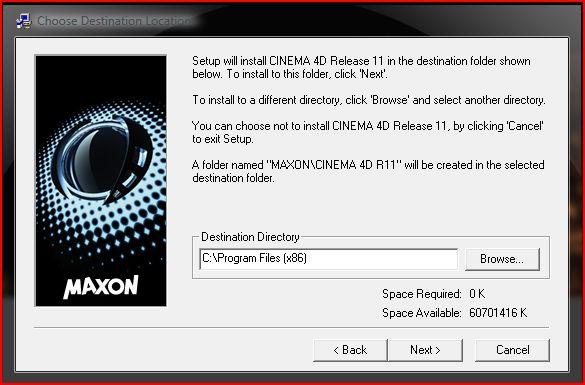
I think Microsoft confused the hell out of everyone with the two program files directories from Vista onwards. Logically, I suppose, 32-bit apps go in the program files (x86) folder, 64-bit in the ordinary program files folder, but not every installer pays attention to that. You end up with a daft situation where either 32- and 64-bit versions are in the same place, like Cinema, or a double installation taking up twice the disk space, like Photoshop.
Just to confuse you even more, R11.5 installs both 32- and 64-bit versions into the plain program files (not the x86) folder!
Steve


i have an i7 running windows 7 32 bit and c4d 11.5 runs fine. I have vista 64 bit on another drive and that works fine too albeit with limited plugins. I have yet to see if everything is fine using windows 7 64 bit
A cleaved head no longer plots.
http://www.perilous7.moonfruit.com

Privacy Notice
This site uses cookies to deliver the best experience. Our own cookies make user accounts and other features possible. Third-party cookies are used to display relevant ads and to analyze how Renderosity is used. By using our site, you acknowledge that you have read and understood our Terms of Service, including our Cookie Policy and our Privacy Policy.
Isn't Cinema 4D supposed to determine 32bit 64bit upon install ?
I'd rather be hated for who I am, than loved for who I am not.