
Renderosity Forums / Poser - OFFICIAL
Welcome to the Poser - OFFICIAL Forum
Forum Moderators: RedPhantom Forum Coordinators: Anim8dtoon
Poser - OFFICIAL F.A.Q (Last Updated: 2026 Jun 21 4:43 am)

Subject: OT a bit: database software/sorting?


sounds like a mix of a lot of things.
Having files where they are 'supposed; to go is limited to the people who actually create them...;) (guilty as charged)
I have a cludge of things. First, for just generally trying to know what's in mysterious folder names, look for Yarps P3do explorer. It will give you thumbnails of what's in each, and will do it in actual alphabetic order, and most importantly...won't go back to the top of the folder every time you look for something and not find it...;) It's free
I started out with a Microsoft Access database. Took a tip from someone to put a thumbnail for each item in it. Worked for the first 21,000 items, then the database wound up at 2 gig, and got cranky...;)
I know there's s couple of database utilities in Freestuff. There's also others scattered around the net. Stand by for St. Acadia, patron saint of lost files..;) she'll know...
I wish I'd said that.. The Staircase Wit
anahl nathrak uth vas betude doth yel dyenvey..;)
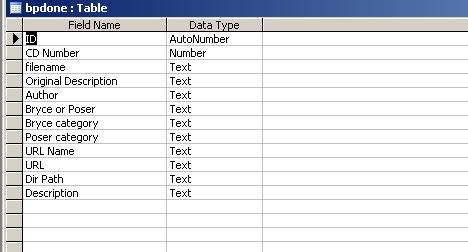
I've got a 2nd database just of web sites. That's only about 2,000 entries long. 6 years of fanatical devotion to record keeping, and only a few hundred pics...I must be insane...;)
I wish I'd said that.. The Staircase Wit
anahl nathrak uth vas betude doth yel dyenvey..;)
I'm not really sure what you want to do, but here are a few options:
If you really want to have textures accessible from different paths without duplicating files, then you'd have to use hard links. But those are poorly supported by Windows, so I wouldn't suggest to do that. Would work with any application that accesses the file system though, so you can use whatever you want to browse your library.
You can also use regular file shortcuts, but those will only work for library files and not geometry or image files. You'll be restricted to applications that can deal with shortcuts to browse your library though. Poser can deal with those for library files.
You can create a "virtual library" with Advanced Library. You'd be limited to browsing that virtual library with AL then, but no change to the file system would be needed. Of course Poser can't see the virtual library then, but you can use PRPC to load the files into Poser.
someone else suggested i look for database software with "single instance storage" which they said is what i was describing o.0 for the existing in multiple locations
aside from that, biggest thing i want though is completely viewable through windows explorer n such though (thus so any program can view it)

Privacy Notice
This site uses cookies to deliver the best experience. Our own cookies make user accounts and other features possible. Third-party cookies are used to display relevant ads and to analyze how Renderosity is used. By using our site, you acknowledge that you have read and understood our Terms of Service, including our Cookie Policy and our Privacy Policy.
so.....my runtime reached the 200gb mark, and so much stuff o.o
i may or may not gather the courage to clean stuff -_- but was wondering whats a good program (stand-alone software) that can be used to keep track of files better?
at the moment, everything is sorted pretty well into folders (a rather large number of them), but it only provides one system, unless i duplicate the files (killing the space on my harddrive).
ultimately, id like something that works in the background, that creates a drive/folder browsable by windows explorer or such, and allows me to make multiple locations that a file exists, but only keeps 1 physical copy of such file
such as.....a texture map for v4...would "exist" in the places below, but only 1 accual copy of the data would be on the drive
D:RuntimeTexturesMil4-FemaleTorsoBritney-Torso.jpg (folder for all mil4 torsos)
D:RuntimeTexturesCharactersV4BritneyBritney-Torso.jpg (folder for all britney textures)
D:RuntimeCharactersV4BritneyBritney-Torso.jpg (folder for all items relating to that character)
etc
if anyone understands what i'm trying to go for, thoughts and help in finding what i'm trying to find would be nice =P