
|
Andromeda Software produces a number of series of Photoshop compatible plug-ins. The series are: Photographic Tools and Lens Effects, Artistic Screening Tools, Graphic Design Resources, and Scientific Tools. They also make plugins for PageMaker and offer Online services such as eFXservices.com - an online Photo Effects site and eARTservices.com. Andromeda's latest Photoshop compatible filter is part of the Photographic Tools and Effects series. This filter is easy to use, inexpensive, and removes the red eye from a picture in a flash. Andromeda's RedEyePro is a photoshop compatible plug-in that will correct the red eye produced from a camera's flash or other color distortions even though it is intended to correct the red eye. It is compatible with Photoshop 7 in all versions of the Windows OS and the Mac OS's including OSX. The requirements are very basic. They are: Photoshop 4 or higher or other hosts that accept Photoshop plugins, and for Windows, a Pentium processor. The filter sells for $39.00. Special offers are available from the Andromeda website. This filter can be used in two basic modes - novice and expert. There is a short, clear, and easy pdf manual on the CD that walks one through the correction steps using two examples that are included on the CD. I used these to demonstrate how this filter works. The novice mode is used to fix red eyes only. It should not be used to correct other colors. To accomplish that, one must use the expert mode. The following examples show the before and after shots. 
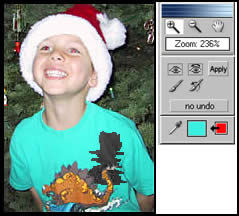
 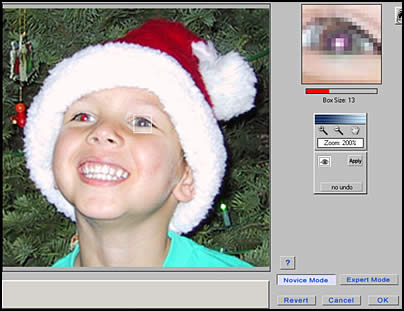 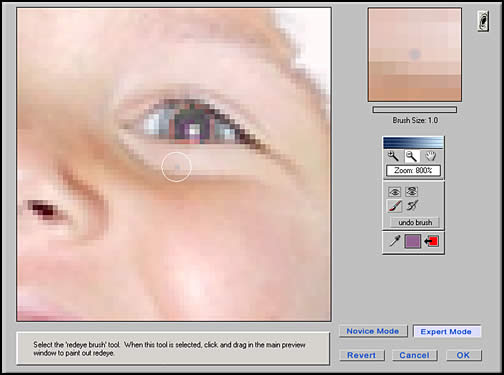 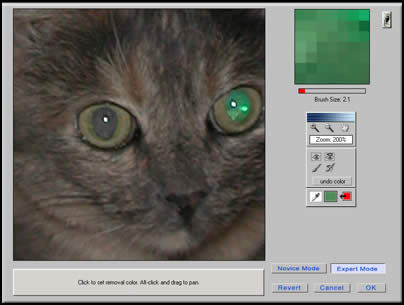 Next I chose a color on the child's shirt to demonstrate how
expert mode can neutralize any color. Notice how the brush only
changes the green as pictured in the small box. Â
copied, printed, or reproduced in any manner without written permission from the artist. 
|
Review of Andromeda's RedEyePro Filter
Jan 30, 2003 at 12:00 am by MonkeyLek
 If you look at all the examples, you will notice that the filter
turns the eye a neutral color. No filter can read the originals
colors that "red eye" has obscured. It, does, however, as
can be seen by the examples, preserve the gradations of pixel
shades that make up the corrected image as well as the highlights
contained in the image. If you are plagued by red eye in your
pictures, you never need to be plagued again. This filter is easy
to use, inexpensive, and mistake proof. I have used all of the
other Andromeda Photoshop compatible filters over the years. One of
my favorite filters of all the filters I use is their Screens
filter. One can get wonderful effects with it especially in
combination with a regular image using layer blending. Magnified, a
screened image can look like the one on the right. I have written
review about all of their filters. Some are still accessible on my
websites either in the current review section or in the archived
section.
If you look at all the examples, you will notice that the filter
turns the eye a neutral color. No filter can read the originals
colors that "red eye" has obscured. It, does, however, as
can be seen by the examples, preserve the gradations of pixel
shades that make up the corrected image as well as the highlights
contained in the image. If you are plagued by red eye in your
pictures, you never need to be plagued again. This filter is easy
to use, inexpensive, and mistake proof. I have used all of the
other Andromeda Photoshop compatible filters over the years. One of
my favorite filters of all the filters I use is their Screens
filter. One can get wonderful effects with it especially in
combination with a regular image using layer blending. Magnified, a
screened image can look like the one on the right. I have written
review about all of their filters. Some are still accessible on my
websites either in the current review section or in the archived
section.
Sections:
Archives


Privacy Notice
This site uses cookies to deliver the best experience. Our own cookies make user accounts and other features possible. Third-party cookies are used to display relevant ads and to analyze how Renderosity is used. By using our site, you acknowledge that you have read and understood our Terms of Service, including our Cookie Policy and our Privacy Policy.
Comments