Sat, Apr 4, 3:56 AM CDT

Renderosity Forums / Cinema 4D


Welcome to the Cinema 4D Forum

Forum Moderators: CHMedia Forum Coordinators: Kalypso

Cinema 4D F.A.Q (Last Updated: 2024 Aug 27 11:07 am)

C4D Gallery Speed Modeling Sessions C4D Freestuff
 
 
Checkout the Renderosity MarketPlace - Your source for digital art content!


Subject: How to remove a section from my model?


speters1 ( ) posted Tue, 01 February 2011 at 12:18 AM · edited Fri, 03 April 2026 at 10:16 PM

file_464696.jpg

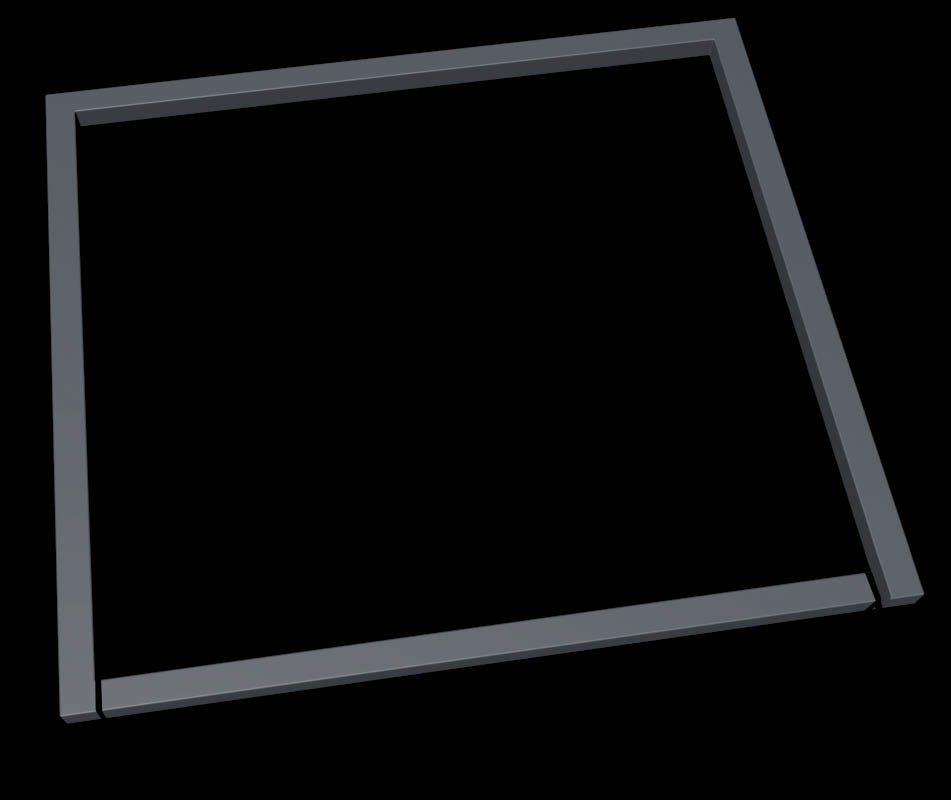
So this is a section of a part of a model of a jail I am working on, but when I built it I didn't allow for the door to look like it would actually open. So now I need to go back to my model and make some cuts. I quickly went into photoshop so that I could indicate how I am thinking that I would like to cut this frame. I made this from two rectangle splines inside a spline mask then put in an extrude nurbs. Can I delete part of the spline?

Thanks,
Steve


speters1 ( ) posted Tue, 01 February 2011 at 12:19 AM

file_464697.txt

Here is the actual model. I was created in v12


turner ( ) posted Tue, 01 February 2011 at 2:20 AM

Hmmm....

Do you know about the cut tool?

Make editable. Then cut it. Fill holes with poly tool.

I'm sure basics like this could be found by searching on the internet.

Or even in the manual.


tantarus ( ) posted Tue, 01 February 2011 at 4:12 AM

Go through 3DKiwi modeling tutorials at c4dcafe. He covers allot of basics ;)


Open your mind and share the knowledge!


speters1 ( ) posted Tue, 01 February 2011 at 12:36 PM

file_464723.png

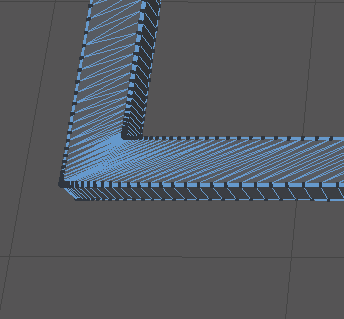
Sorry, I should have mentioned that I did try using the knife tool to make some cuts so that I could delete some polygons. The problem is that the top face is made up of triangles and this is do to the size of the rounding that I have on my rectangle spline objects. If I make that rounding bigger it would get rid of the triangles, then I could easily use the knife tool to make my cuts, but the problem is that I need to keep the rounding where it is. So that's why I thought it would be easier if I could delete a section of the spline.

The problem is that I am actually doing this for a job that is do later today and the client is happy with everything, except now I just need to make these small changes.


speters1 ( ) posted Tue, 01 February 2011 at 1:02 PM

If I uncheck Constrain, in the extrude nurbs, that gets rid of the triangles on the top surface, but then I have to adjust the size of my object to compensate for that. So then I make my object editable and connect, then use the knife tool to make two cuts, then select the polygons and delete. Then I tried to use the close polygon holw tool but I can seem to get it to close the holes? I read the help menu, and I have used this tool on a different model with no problems, but I can't get it to work on this?

Thanks,
Steve


speters1 ( ) posted Tue, 01 February 2011 at 1:04 PM

file_464726.txt

this is a zipped c4d file, so change the .txt to .zip.


turner ( ) posted Tue, 01 February 2011 at 1:47 PM

Far too many polys.

A shape this basic should only be around 100 polys.

I would make the shape again.

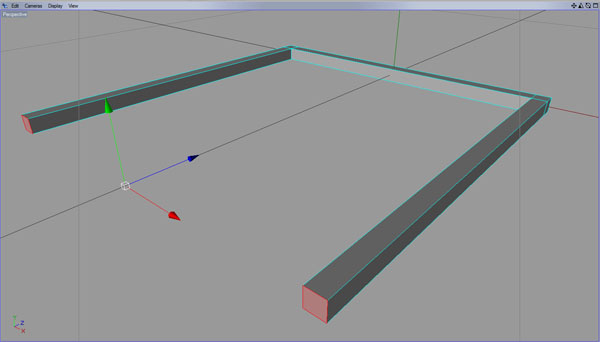
Draw a spline and use sweep nurbs with a rectangle to get the shape. Then bevel the edges if needs be.


turner


turner ( ) posted Tue, 01 February 2011 at 1:55 PM · edited Tue, 01 February 2011 at 1:59 PM

file_464741.jpg

Should look similar to this


thundering1 ( ) posted Fri, 04 February 2011 at 8:45 AM

file_464858.jpg

I was just thinking that - looking at all those polys for such a simple object.

You could even start with a basic Cube and extrude into the shape you want, then bevel as needed.

Keep it simple, don't overthink it. Good luck-

-Lew


Privacy Notice

This site uses cookies to deliver the best experience. Our own cookies make user accounts and other features possible. Third-party cookies are used to display relevant ads and to analyze how Renderosity is used. By using our site, you acknowledge that you have read and understood our Terms of Service, including our Cookie Policy and our Privacy Policy.