
Renderosity Forums / Carrara
Welcome to the Carrara Forum
Forum Coordinators: Kalypso, Anim8dtoon
Carrara F.A.Q (Last Updated: 2026 Sep 09 4:39 am)
Visit the Carrara Gallery here.

Subject: Carrara 5 on Tiger -- snail-like


Reset prefs. Repaired permissions. Ran disk tools. About the only thing I haven't done is re-installed. Works normally on an average-sized mesh (for me) but as soon as I get close to the detail level of a mil figure drops to an unusable crawl. One observation. While I was fitting a new outfit, as soon as I had most of the mil figure hidden under the new mesh I was constructing, the screen redraw kicked back up again. Was still slow as heck doing anything with vertex tools, tho.
Nomuse, are you using Open GL or the Eovia preview? I've found that switching between them will sometimes improve performance based upon the mesh. I did note some performance gains when I updated to OS 10.4.6 - there was a Nvida driver update with that if you're usin their hardward. Regarding hiding some things, I had do that myself on a project where the Carrara file was 260M due to high density meshes - but not a mil figure though. :-P Hope you can get that worked out. Is P5 still not working on your system?
Quote - Nomuse, are you using Open GL or the Eovia preview? I've found that switching between them will sometimes improve performance based upon the mesh. I did note some performance gains when I updated to OS 10.4.6 - there was a Nvida driver update with that if you're usin their hardward.
Both and all. Tried with OpenGL, with display lists on or off, and with the Eovia interactive renderer. Installed the latest driver fresh off their site after confirming Apple also listed it on their Tiger support pages, and tried all three options again. As far as I could tell there was little change. This does not appear to be a display issue per se...what creates the huge slowdowns is trying to actually insert a vert, move a line, or do a weld. When I do that the program lags far behind. I could literally make a "cut" in a mesh by using only my nose on the mouse and keyboard, and still keep ahead of the program. My guess at this point is hardware, but based on my specs and assuming no optimization, the fastest last-gen G5 will still show a slight lag if I start working too quickly. Still, that would be better than what I've got now. > Quote - Hope you can get that worked out. Is P5 still not working on your system?
Using the via-classic memory hack I was able to get P5 running for short bursts. According to e frontier it isn't supposed to be work at all and they don't support it. P6 works quite smoothly, tho, and if all I was doing was slapping 3d-party temples and swords together I'd be quite happy with it. All in all, Tiger has cost me over two weeks of productivity already, and is looking to cost more weeks on top of that. In return I've got....I'm not sure what. Sure, it runs basic services faster and I like the layout, but...
Whoo boy. Just finished a "simple" model. At least, it should have been simple. I think if I had used Carrara3 I would have been done hours ago. I was making a roll of tape. Created a cylinder. Added thickness a few times. Beveled the edges and duplicated a few segments to detail for the flappy end. Made selections of top, bottom, inside and set those to new texture zones. Then the UVmapper. Cylinder mapping for the edges, planar for top and bottom. Then go into editing mode, turn on "show merge candidates" and "show split handles" and waste about twenty minutes splitting the seam that Carrara insists on welding across the cylinder map. Cut in some edges and detailed the flappy part. Checked to see that the mapping lined up. Then my big mistake. Tried to weld the flappy part back in. Carrara created weird polys off in some other corner of the model and wouldn't undo. It also welded the UVs together across the different texture zones -- but I was prepared for that, at least. Sigh. Delete the weird polys, empty polys so I could see what I was doing, clean up the welds. Uh, oh. Can't fill polys...there's an extra vert on one edge. Triangulate? Nope. None of the tools will allow me to add an edge, weld the extra point, or fill the poly. So deleted the entire section I had attempted to weld, deciding I'd just go for the mesh break (it was, after all, supposed to be a SIMPLE model). But, oh no. When I deleted, Carrara apparently decided that I was trashing the texture zones as well. They are all gone. Not only that, the entire map has returned to the default spherical. Riight. After a little grinding of teeth went back into the UV editor. And of course. More phantom verts and the pop-up error message. Backed out, made marquees and hit "detach polygons" about a dozen times in a row. Back into the UV editor and the error messages have finally stopped. So back to all the mapping stages once more....apply mapping modes, scale results, then spend another twenty minutes in the hand-editing because of the stupid wrap-around seam. All in all, five minutes to make the model, and two hours of extreme frustration to finish it up.
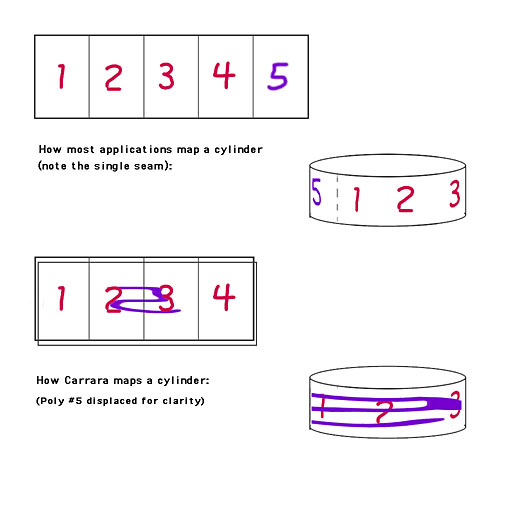
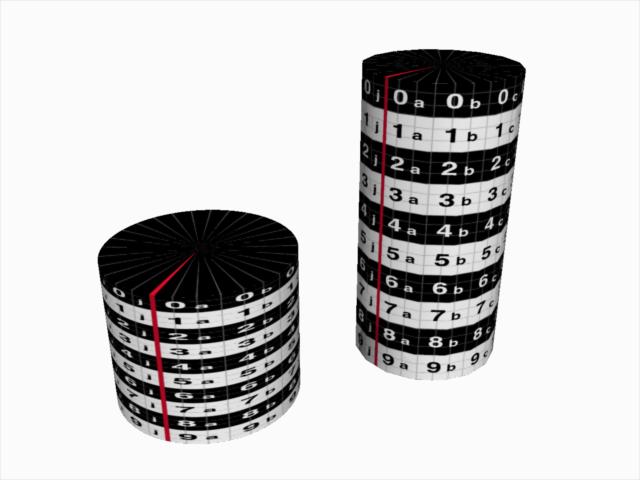
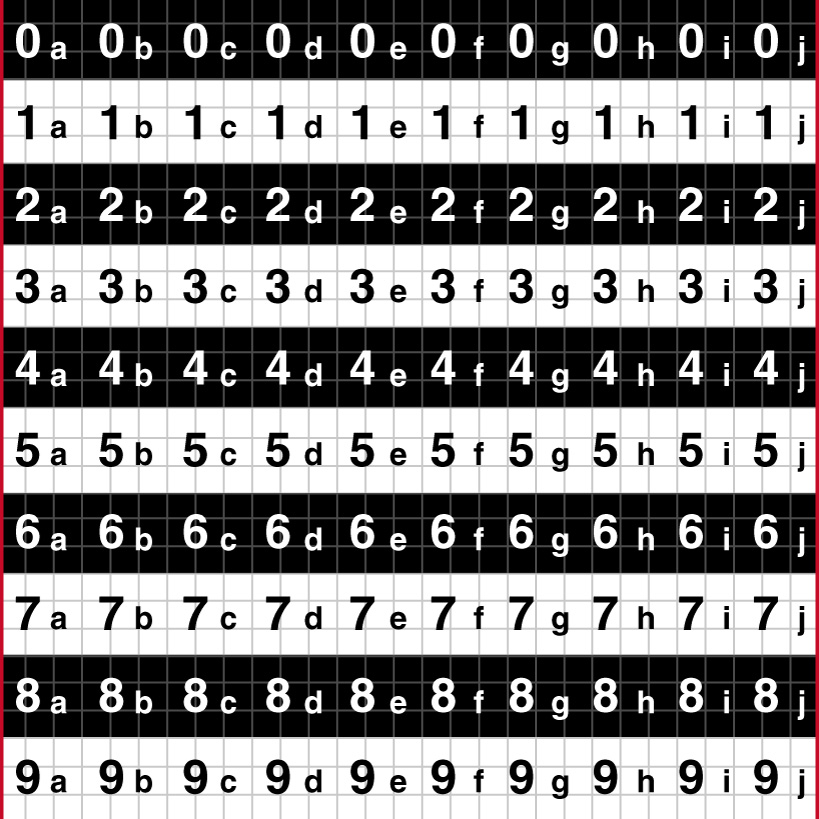
EVERY SINGLE BLASTED CYLINDER MAP I HAVE MADE SINCE VERSION 2.0 Sorry for shouting. But I get really tired of being told my computer is bad or I forgot to install the latest patch or something, when the software has delivered, consistently, the same problems for three versions (and all the interim patches) through three OS upgrades and four complete replacements of the computer itself (hardware, HD, clean installs, et al). So...please tell me....if you create a cylinder in the vertex room, go into the UVmapper, and select "cylinder" from the drop-down modes, what do YOU get? I would so love to find out there's some wacky little widget hidden behind the upper left of the screen that I need to throw. Then I could actually MAP something in Carrara without wasting hours splitting vertices manually. (I was about to say, I'm damned if I can figure out what you are going on about shader trees for -- I don't even have a shader assigned, unless you mean the "checker" preset, but then it occurs to me you might be misunderstanding and assuming I am talking about mapping modes within the 3d workspace. As far as I know those work correctly. The problem I'm having is with the built-in UVmapper, as well as the mapping applied via the properties panel.) (And now I'm also realizing that if you were able to read through my description of making a mesh from scratch in the Vertex Room and think I was talking about workspace mapping, then the bug report I sent into Eovia is going to get the "So sorry you don't understand our software. Now to turn on a computer, you need to push the button -- that's that round thing -- on the front of the big box....")
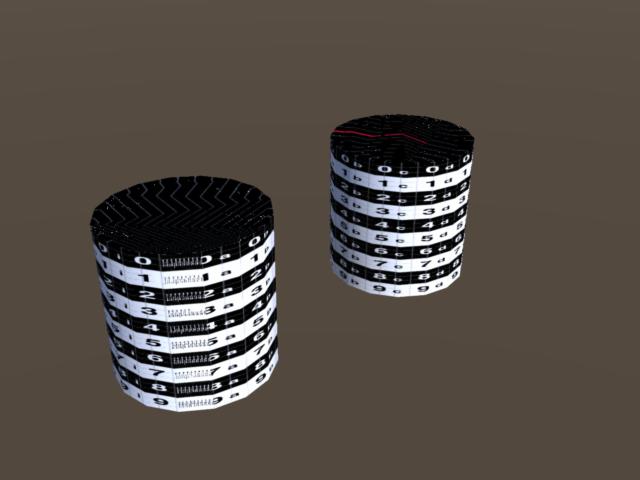
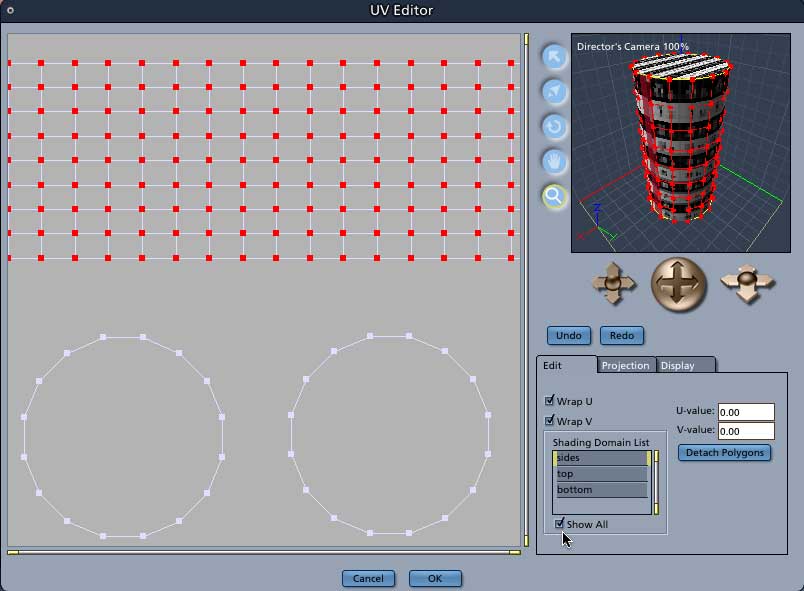
Hokay...interesting... I just created two cylinders. On the left, a prim from the assembly room drop-down. Texture is a cylinder projection using the Checker pattern function. On the right, a cylinder created from the drop-down in the Vertex Room. No modification was performed on it. In the UVmap drop-down in the Properties Tray was set to Cylinder, and -- most importantly -- Wrap U and V were unchecked. Material on this one is parametric mapping, checker pattern function. Note the nastiness towards the left front face. Now, this is where it gets tricky. If I re-check "Wrap U and V" -- either in Properties or within the custom UV Mapping room -- the cylinder becomes normal. Sort of normal. Actually, what it is doing is splitting the last poly over the margins (the "wrap around") of the UV space. So this would actually be fine and peachy if I was doing a map of, well, a cylinder. With no top or bottom, and no other model occupying the UV map. But the instant I try to scale the UV map, it becomes obvious that this smooth mapping is only being achieved by using the edges of the UV space itself for a seam. I can't scale it, you see, without either detaching the UV's that stretch across the window, or unchecking the "wrap" function -- in which case they reset themselves to wrap around INSIDE the mapped object. Now contrast this with, well, every other application I have used. When you apply a cylinder map, it may or may not be pushed to the edge of the UVspace, but there is an actual seam created, a split in the mesh, so that one row of verts is copied to two sides of the map. In Steve Cox's UVmapper (which I usually use) it is then trivial to rescale, move, etc. as needed. However. Given my previous experience with Eovia, I can almost guarantee that in their eyes this wrap-around-or-through function was not an error or bug, but in fact was designed As A Feature.
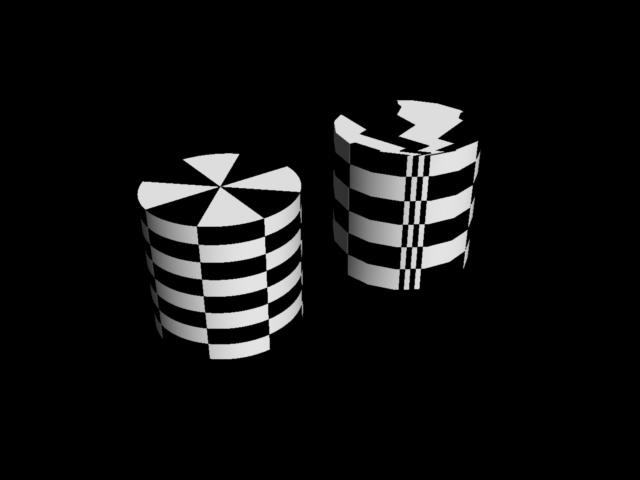
Attached Link: Mapping movie
Hi nomuse, The texture map is posted a earlier in the thread. So, I must be missing something in your process. Please take a look at the movie at the link shown above and let me know what I'm missing. Mark
Read the 4:56 post. We are performing exactly the same steps, with exactly the same order. The only difference is....I'm trying to WORK with the map after it is made. Try this next -- within the UV mapper, "select all" then scale. You may be able to see the problem then. (As I said above....what Carrara does would be great if I was making empty cylinders. But something as simple as an oil drum -- how can I scale and drag the cylinder to make room for the top and the bottom?)
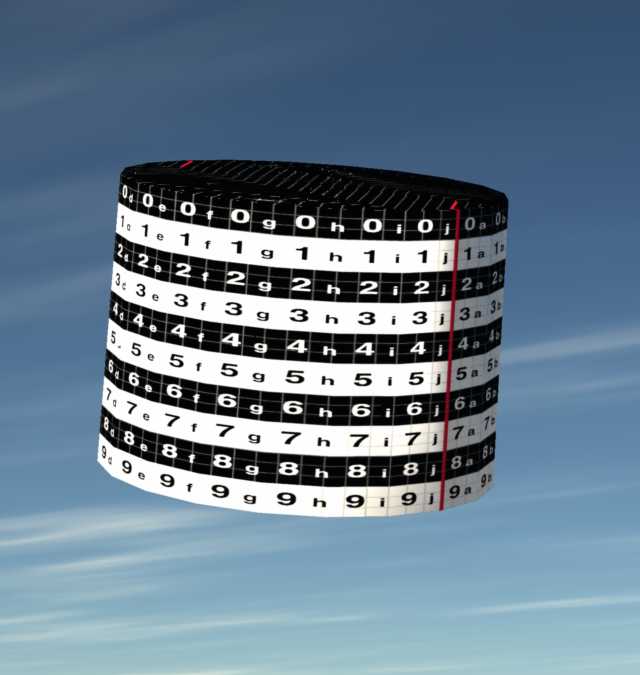
Does anyone but me actually build models for external use (for instance, Poser)? Does anyone but me try to optimize texture maps so most of a complete model appears within the same UVspace, set out and neatly labeled for use? I am rather sure now that the TWO beta testers for Carrara Mac spent all their time rendering sunsets and importing Poser figures. Actually building and exporting models seems to be a fools game and I feel like a total sucker for continuing to drop money on this program. Let me try again, since it seems I am unable to speak clearly enough about what I think a UVmap is. Imagine a barrel. Imagine a texture map. The texture map has a bunch of slats in one corner, and on another corner the top and bottom appear as two disks. None of these elements overlap in any way. All of these elements share the same UVspace and make use of the same PICT/JPG whatever texture map. Am I on drugs, that I think a Poser prop, or even something I use in Bryce, should look like that?
Content Advisory! This message contains profanity
Riiight. Again, this is all stuff I know. Except that, apparently, it is easier to grab thirty vertices and slide them by hand, instead of applying the one mapping mode to the side that automatically aligns the polys in UV space. Good work, Carrara. Now you understand why I left UVmapper with much reluctance? It doesn't punish you for using the mapping mode that gets closest to getting the job done correctly. Oh and by the way...you know Carrara trashes shader domain names, right? Not as often as it trashes polygon names, at least, but I had it just now on a simple model. Oh, yeah. And did you READ my post? Where I explained how I assigned shading domains before going into the UV mapper? Am I wearing a hat that says "I'm stupid, please assume I have no idea what I am talking about?" (Just applied box mode to see how well that worked as a starting point. You might want to investigate more closely. I discovered wrapped polygons and misplaced seams all over the results. NOT USABLE even as a starting point -- I'd waste less time manually dragging every vert into place from a spherical map starter!)

Privacy Notice
This site uses cookies to deliver the best experience. Our own cookies make user accounts and other features possible. Third-party cookies are used to display relevant ads and to analyze how Renderosity is used. By using our site, you acknowledge that you have read and understood our Terms of Service, including our Cookie Policy and our Privacy Policy.
Anyone else have this experience? Since I installed OS 10.4 the vertex room has become practically unusable. I've made sure I have the latest drivers on my Radeon 9200, I've switched on and off all the different render options..... if I have a mid-weight mil figure in the vertex room (at the moment, the DAZ PT) just selecting a single vertice has a noticeable. Simple operations such as adding a new point take several seconds. I've checked and C4 seems a wee bit faster (I could be imagining it). As of this point I'm ready to re-install an older OS. Besides, Poser5 won't run on OS 10.4, and Poser6 is a pain in the rear to do product creation on (all the added groups and nodes and those dratted binaries make editing the cr2's a real chore).