Filter: Safe | Tue, Aug 4, 9:45 AM CDT

Renderosity Forums / Carrara


Welcome to the Carrara Forum

Forum Coordinators: Kalypso, Anim8dtoon

Carrara F.A.Q (Last Updated: 2026 Jul 30 8:26 pm)


Visit the Carrara Gallery here.

Carrara Free Stuff here.

 
Visit the Renderosity MarketPlace - Your source for digital art content!


Subject: Reference Photo in 3Pro


todd71 ( ) posted Tue, 24 July 2007 at 9:18 PM · edited Fri, 31 July 2026 at 9:57 PM

Im trying to model a floor plan using 3 Pro..id like to add a reference jpg int he background to work from, but cant seem to figure out how to do it...

I found a thing showing how to do it in the vertex modeler, but there doesn;t seem to be a way to do it in the regular window...

any ideas?..

thanks for the help...


MarkBremmer ( ) posted Tue, 24 July 2007 at 10:46 PM

file_383812.jpg

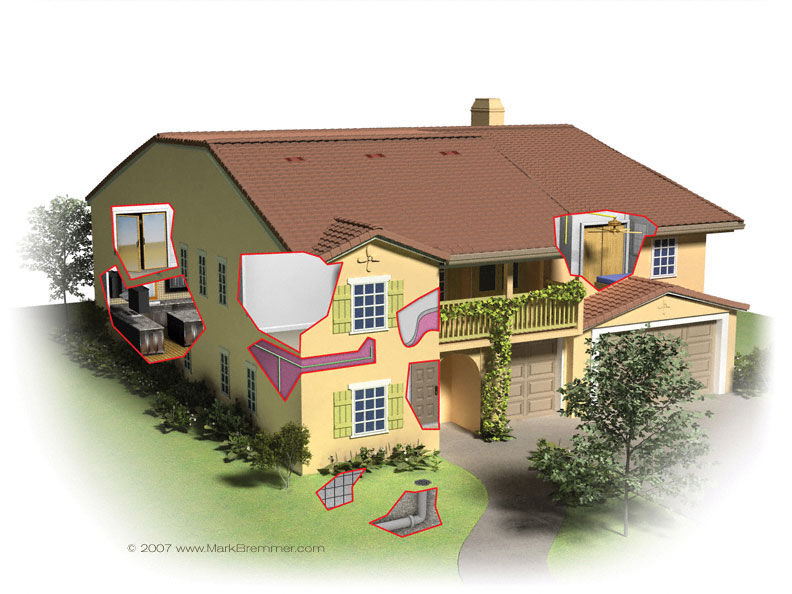
For cases like that, I simply insert a Plane and texture map the plan to it. The Plane comes in as a square so it needs to be resized of course. Another option is to create a path around the outside of the jpg floorplan and export it as a .ai v8 or less and import that as a cross section in the Spline Modeler. That way you have something that is dimensionally correct to work from. If the floor plan is simple, you can also build the whole thing in the spline modeler. That's what I did in the attached image. Mark


todd71 ( ) posted Tue, 24 July 2007 at 10:52 PM

I tried inserting the plane, but I couldnt see it without using the camera to do a render constantly...

i tried doing it as a background too without any moreluck...

I tried the vertex modeler thing and couldnt get it to work either...nothign showed up at all...it showed up in the little preview, but not in the bigger window...

lol...i have no idea what im doing wrong...lol..

thanks for the advice...


bwtr ( ) posted Wed, 25 July 2007 at 1:54 AM

There are some free tutes from Marks site. I think you need to view them-- even buy the lot!

But, certainly, work though the introductury stuff in Help and ,as well, quietly work through the Help--doing the tutes as they come up.

OK--two or three weeks full time study!----it's worth it!

bwtr


MarkBremmer ( ) posted Wed, 25 July 2007 at 6:33 AM

file_383834.jpg

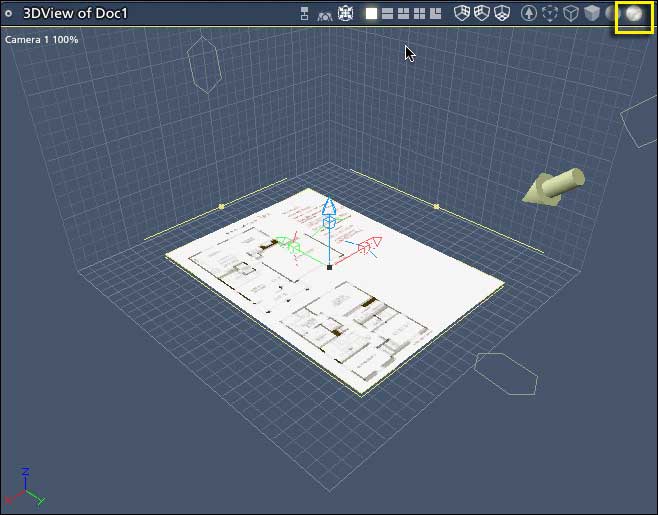
Hi Todd71, Make sure that you have the Textured display option selected in the Assembly Room. (shown inside the yellow square in the image) Keep at it! Learnying ANY 3D software takes a little time. Mark


todd71 ( ) posted Wed, 25 July 2007 at 7:05 AM

awesome...thanks for the advice...:)


todd71 ( ) posted Wed, 25 July 2007 at 8:08 PM

Ok, sorry..i have another question...

I got it using the method you mentioned, but it really aliased...its fine when its rendered...

is there a way to get a full res view?

thanks for your help...i appreciate it..


MarkBremmer ( ) posted Wed, 25 July 2007 at 9:18 PM

Not in the assembly room. The vertex room is the only place that you can get a full res repsresentation without rendering. :-/ Mark


todd71 ( ) posted Wed, 25 July 2007 at 9:19 PM

lol...ok..thanks..:)

i think im set now...:)


Privacy Notice

This site uses cookies to deliver the best experience. Our own cookies make user accounts and other features possible. Third-party cookies are used to display relevant ads and to analyze how Renderosity is used. By using our site, you acknowledge that you have read and understood our Terms of Service, including our Cookie Policy and our Privacy Policy.