
todd71 opened this issue on Jul 24, 2007 · 9 posts
todd71 posted Tue, 24 July 2007 at 9:18 PM
Im trying to model a floor plan using 3 Pro..id like to add a reference jpg int he background to work from, but cant seem to figure out how to do it...
I found a thing showing how to do it in the vertex modeler, but there doesn;t seem to be a way to do it in the regular window...
any ideas?..
thanks for the help...

MarkBremmer posted Tue, 24 July 2007 at 10:46 PM
todd71 posted Tue, 24 July 2007 at 10:52 PM
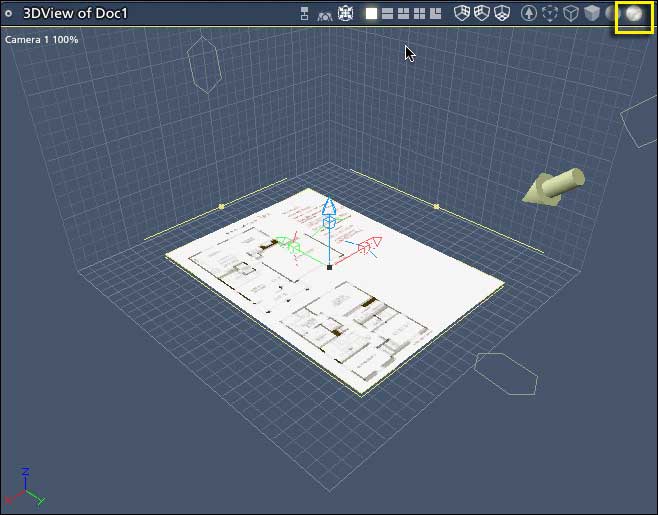
I tried inserting the plane, but I couldnt see it without using the camera to do a render constantly...
i tried doing it as a background too without any moreluck...
I tried the vertex modeler thing and couldnt get it to work either...nothign showed up at all...it showed up in the little preview, but not in the bigger window...
lol...i have no idea what im doing wrong...lol..
thanks for the advice...

bwtr posted Wed, 25 July 2007 at 1:54 AM
There are some free tutes from Marks site. I think you need to view them-- even buy the lot!
But, certainly, work though the introductury stuff in Help and ,as well, quietly work through the Help--doing the tutes as they come up.
OK--two or three weeks full time study!----it's worth it!
bwtr
MarkBremmer posted Wed, 25 July 2007 at 6:33 AM
todd71 posted Wed, 25 July 2007 at 7:05 AM
awesome...thanks for the advice...:)
todd71 posted Wed, 25 July 2007 at 8:08 PM
Ok, sorry..i have another question...
I got it using the method you mentioned, but it really aliased...its fine when its rendered...
is there a way to get a full res view?
thanks for your help...i appreciate it..
MarkBremmer posted Wed, 25 July 2007 at 9:18 PM
Not in the assembly room. The vertex room is the only place that you can get a full res repsresentation without rendering. :-/ Mark
todd71 posted Wed, 25 July 2007 at 9:19 PM
lol...ok..thanks..:)
i think im set now...:)