
Renderosity Forums / Carrara
Welcome to the Carrara Forum
Forum Coordinators: Kalypso, Anim8dtoon
Carrara F.A.Q (Last Updated: 2026 Jul 30 8:26 pm)
Visit the Carrara Gallery here.

Subject: Texture/UV mapping an 'S'


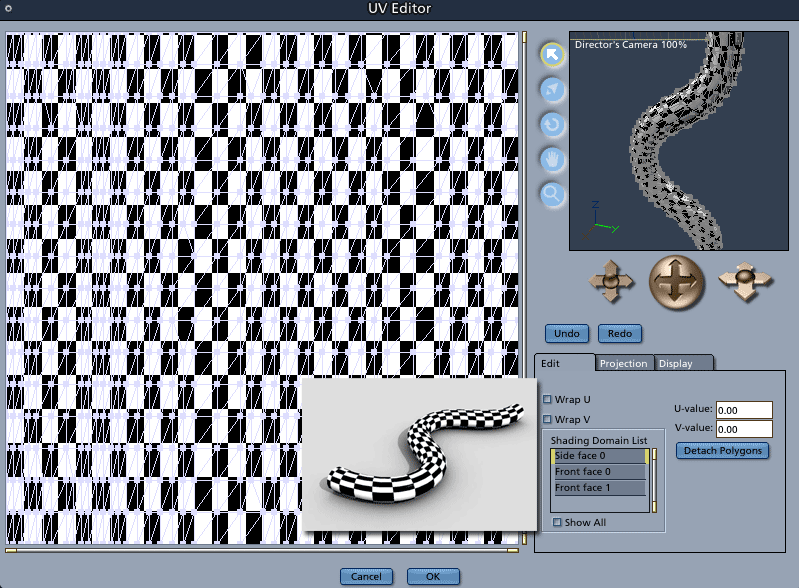
Mark, Thanks for the reply - I'm glad to know this can be done. Could you briefly explain how you built and mapped the object in your post? - it's essentially what I'm trying to do. If I can understand that I'll try and apply it to the imported objects. The models are usually imported as .STEP files. The help files state that imported objects are special cases and I converted them to vertex objects in Carrara, but still couldn't map it correctly. [the VTC training cd is excellent, I nearly watched it all in one sitting - unfortunately not much on UV mapping :) ] Thanks again for the help.
UV mapping is a wild card when importing from other apps because UVs aren't respected in .step formats. (that's one of the reasons I didn't really cover it in my tutorials - there are just so many variables that impact the results) Soooooooo, the version I showed above was creatd in Carrara so it maps "correctly" with no additional fussing around. Without seeing your .step object, I suspect that you'll be best off creating a custom box UV and then rearranging the vertexes of the object in the UV editor for a best-fit. If your object is exported to .step in quads (square polygons), it will probably "split" correctly making your job easier. If it's triangulated (like most of the .step files I've worked with), it could get a little messy. Splitting an imported object in Carrara in the UV mapping room is not always easy. Options- There are a couple of other things you can try before you mess around with creating a custom UV map. 1. In the top level of the multi-channel mixer for the hose object, convert the pull-down to Flat Mapping. This will slide the multichannel mixer underneath the Flat mapping option. Then select Whole Object and Ignore Normals. Try your texture and see how it behaves. 2. If that doesn't work as planned, try un-checking Ignore Normals and see if that behaves better. 3. Lastly, if that doesn't satisfy your needs, try one of the other modes under Projection mapping like cylinder or sphere. 4. Sometimes I'll import an object into Hexagon which has much better UV controls and remap the object there and then bring it into Carrara. Imported files from CAD programs have caused me to get gray hair prematurely. There are always issues. Mark
Mark, Importing .obj files from Rhino is no problem. Rhino meshes as quads and Carrara understands the uv mapping without any fideling [of pipes at least]. Most of my models are mechanical type things like brass fittings and aluminum extrusions and in my experience meshing doesn't always work well for 'square-ish' things with holes in them. All three of Rhino, TurboCAD, and Carrara have good .step import/export, which works well for 95% of these models. I previously tried the first three of your suggestions and the closest I came to correctly mapping the pipe was Flat Mapping with Ignore Normals checked. What that appears to do is break the pipe's uv map into a box and maps the pipe as if it has four unconnected or seperate sides rather than a continous circlular section. Close, but no dice. I'll keep at it ... thanks for all the help
In self defence, I know next to nothing about the UV editor in Carrara. Having said that ... After converting the object to get it into the vertex editor [I have to do that to get at the UV's right?] I can look at the texture map in the UV editor and if the original oject was imported as .obj the initial UV mapping [as "Custom"] in the editor looks like a regular grid mapped texture. By regular I mean rectangular UVs mapped to a rectangular grid. If I apply any other kind of mapping to the object the rectangular UV to grid relationship disapears and the pipe curvature becomes mapped at various projected angles to the grid. And I can't get the initial "Custom" mapping back. If the object is imported as .step and converted in the vertex editor, the initial UV mapping is [or looks] pretty scrambled. Various box mapping projections will lay out the object so its recognizable, but not to the extent where I could convince myself it was worth the time to map it manually [in that editor at least]. Sorry there's no screen grabs - Carrara is on another computer here without a connection.
I'm familiar with scrambled. Simply "unwrapping" an imported objects UV's, especially from a CAD program, is usually not a good idea in Carrara. Carrara handles it's own UVs on objects beautifully, but not with certain imports - simply because of the way other 3D apps generate the polys and UVs. Here is another option. Once in the vertex modeler in the Globals tab of the Property Tray, you can delete shader domains and then create new texture domains by selecting all of the polygons for a given area and then generating a new shading domain. Doing that does give you some improved control over the UVs in the Shader Editor. Creating new shading domains won't unwrap the object differently for the UV editor, but it will allow better results with the Flat, Cylindar and Spherical mapping options in the Shader Room. Also, I personally don't have Rhino and am unfamiliar with it's texture tools. Does it have a tool set that would let you import the .step into it and then create an new UV map. Then you could simply export to Carrara from Rhino. Kind of the long way to do things...
I'm familiar with the long way around. Rhino itself doesn't have texture tools per se - textures are added through whatever renderer is plugged in. What it can do is convert nurbs surfaces to meshes with control so that the meshes and the corresponding UV's can be used elsewhere. .step files are small and accurate, that's the attractive thing about using Carrara as a renderer for solid modellers, especially for cad programs using Lightworks as a rendering engine [which is most of them]. I've seen some nice Lightworks renders, but its not very flexible and the implementation in TurboCAD is clunky. The Carrara renderer is generations ahead on all counts [in my opinion]. Currently I do the solid modelling in TurboCAD and export/import .step files into Carrara. Anything that's too curvy for solids I do in Rhino. Both Rhino and TurboCAD imort/export .step quite well and I guess the work around is to export files from Rhino that need detailed texturing as .obj files [instead of .step] and put everything back together in Carrara. I'll keep playing with it - there's lots of longer ways around, you just have to look for them :)
Mark, let me back up....how did you create that object of yours so it had such a nice Carrara UV map? I have heard that if you create a spline object, it will automatically do a neat cylinder map along the spline -- is that correct? And is there any way of preserving this map whilst changing the object into a mesh that can be incorporated into a larger model? At this moment when I need a decent map for a hose or pipe or wire or similar this is what I do...I go into Poser, and manually bend into shape an easy-pose cylinder I created myself that is properly mapped on a tiling segment basis. I then export to Carrara via wavefront .obj This is not an optimum workflow!

Privacy Notice
This site uses cookies to deliver the best experience. Our own cookies make user accounts and other features possible. Third-party cookies are used to display relevant ads and to analyze how Renderosity is used. By using our site, you acknowledge that you have read and understood our Terms of Service, including our Cookie Policy and our Privacy Policy.
Hi ... I'm looking for some texture mapping help in Carrara 5.1 pro. I've started using Carrara to render imported models from Rhino and TurboCAD, but I can't find a projection method that will map a repeating tile to a 'pipe' type object normal to the UV's. For example, envision a pipe object in the shape of an 'S'. How can I map a simple checker pattern, either a bitmap or procedural, so that the texture adheres to the object 'normal' to the UV's. Maybe a better example is something like a braided hose bent in the shape of an 'S', so that the braids follow the object shape in a natural way. Sorry if that's unclear or this has been covered somwhere else, any help appreciated.