
Renderosity Forums / Carrara
Welcome to the Carrara Forum
Forum Coordinators: Kalypso, Anim8dtoon
Carrara F.A.Q (Last Updated: 2026 Sep 09 4:39 am)
Visit the Carrara Gallery here.

Subject: Bones Help?


I don't think constraints will help with the tearing... they just limit the amount of movement of a joint, right? Because if I make the constraint limit of say the knee or elbow rotation to the amount shown in my example pic, it's still going to tear when it gets to the point of rotation they are at now. Chucker

Hopefully, someone else who does this can contribute. I have worked with this very little. My understanding is constraints are important, because you don't want joints going in certain directions, because of this kind of thing among other issues.
However, probably you need certain mesh fomations at the joints. You don't appear to have much there at the elbows and knees and the bends are pretty tight. I think you should try putting elbow and knee formations on the mesh. There just doesn't seem to be enough there.
No need to think outside the box....
Just make it
invisible.

Hi Chuckerii, Sorry to be so late to the party... Could you post a wireframe screen capture? I think ren-mem is correct - there is an issue with the mesh. To get good bends, it's not uncommon to double or triple the poly count at joints. Then after the bones are attached the next step is to adjust the influences of the bones using the Bones tab in the Vertex Modeling room. As a final fine tuning, then using the weight painting tool (looks like a paint brush) in the vertex room. I wish I could say that there is a simple, no-error way to make great joints. However, it's really a matter of experimenting with each model (since each is different) and then making adjusments to the mesh. Your models look whimsical and fun so the level of mesh that a Poser figures uses is probably overkill. But, if you have Poser, importing one of those models into Carrara with the Native importer is a great way to take a look at rigging and mesh forms. Mark


I agree with Dennis445 and others: more density to the mesh at the joint and changing the way it influences the mesh with the weight thing. I like to make joints like elbows, knees look like the mesh is wide on the non bending side and narrow where it bends... like the knee is a triangle with the base being the knee cap and narrowing to the crease. Then when it bends the knee mesh will already be shaped for the bend. Another thing you might do is once it is bent, and looks funny, add a morph to it at that point to clean it up. Then only apply the morph when it is bent. You can even animate this way, just keeping in mind to add the morph and take it away when you bend and release the bend.
Never Give Up!

Privacy Notice
This site uses cookies to deliver the best experience. Our own cookies make user accounts and other features possible. Third-party cookies are used to display relevant ads and to analyze how Renderosity is used. By using our site, you acknowledge that you have read and understood our Terms of Service, including our Cookie Policy and our Privacy Policy.
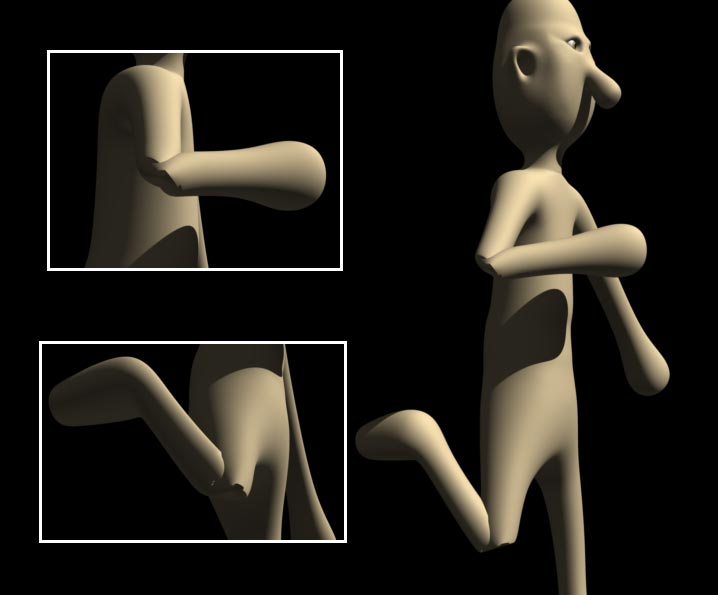
I'm making my first venture into using bones after years of animating stiff robots. ;-) I'm having trouble with elbows and knees tearing if I bend them to far in one direction or another. I'm in the early stages of modeling (The model is being built in ZBrush) and I have been doing some bone tests along the way. Any tips on preventing this kind of tearing at the joints? Any other tips of correctly applying bones to an object would also be greatly welcomed! Thanks. Chucker