
Renderosity Forums / Carrara
Welcome to the Carrara Forum
Forum Coordinators: Kalypso, Anim8dtoon
Carrara F.A.Q (Last Updated: 2026 Sep 09 4:39 am)
Visit the Carrara Gallery here.

Subject: Does Carrara subvert good mesh design?


I know the feeling. With C5, the vertex room was reworked/improved to bring Carrara closer to the workflows of other 3D apps. Which for me personally, meant relearning how to use it at the most inconvenient times. Once you're in the groove, it does flow much better. But that doesn't recover time spent trying to do things the C4 way. :-/ Can you post a couple of screen shots of what you're modeling?
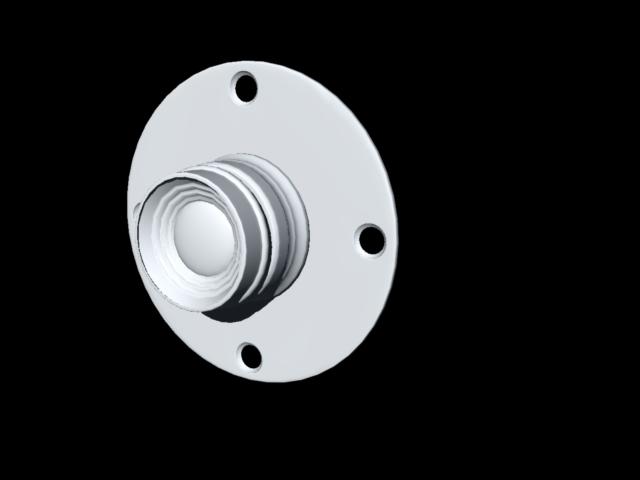
After certain boolean operations, I find I have to add (subdivide) polygon lines that result from the subtraction to get the polygons to show correctly. Otherwise, the polys fill in the void because of a weird triangulation! I don't like it either when I've got a quad mesh and do a cylindrical boolean intersection to get a round shape, like yours above, and have the result end up being a complete triangulation instead of leaving the center of the quads alone. :-P On the flip side, I haven't worked with any 3D apps that are free from "issues" requiring work-arounds at some point. I'm still waiting for the perfect software... Looking forward to seeing your progress on the camera! Mark


Privacy Notice
This site uses cookies to deliver the best experience. Our own cookies make user accounts and other features possible. Third-party cookies are used to display relevant ads and to analyze how Renderosity is used. By using our site, you acknowledge that you have read and understood our Terms of Service, including our Cookie Policy and our Privacy Policy.
Like Terra Matrix, I recently needed a plate with several holes in it. To try to control my poly count (this was an export object) I decided not to use the spline modeler. However, within the vertex room this task turned out to be nearly impossible! Boolean refused to work at all. (Which is just as well, as the results are not very clean). The old way; creating several empty polylines and bridging them, didn't work (Carrara would only flash "Can't Join n to n! Can't weld n to n! Can't empty a filled...can't fill an empty...can't add line to filled....can't add line to empty...!) Carrara must have been feeling particularly vindictive, because it would do things like this; create a polygon. Duplicate. Empty the duplicate. The first is deleted! Or...create a polygon (from the drop-down). Scale, translate, then empty. All the lines vanish as well...and the remaining points refuse to be welded! No wonder Carrara keeps generating "nil pointer" errors and crappy meshes filled with random extra points. The tools have been thoroughly bollixed by some tech-head who thinks he knows better than we do how to construct a model. At last I managed to get through my task by extruding each "hole" cylinder one at a time, extruding the "disk" cylinder, emptying upper faces, then starting to.........ADD LINES JUST LIKE CARRARA REFUSED TO DO BEFORE! So not only does it try to prevent me from modeling in a simple and logical fashion, it doesn't apply the rules consistently. In fact, the way it applied these rules (and the way it continues to auto-fill polygons -- ah, where is that button that USED to be on the program that allowed you to turn auto-fill off!) means it actually makes it easier to make a "broken" mesh. But this is all beside my main point. The point being; we all know how to design a good mesh; good flow, proper edge loops, no star points or n-gons, logical layout, minimum yet optimized polycount. ALL of Carrara's new schoolmaster-ish behavior (Can't weld THIS to THAT, you moron!) works AGAINST the efforts to either make a mesh cleanly, OR to clean up one of the bogus midden piles Carrra's automatic tools create (like the edge loops with the divots in them, for instance, or those horrible booleans, or the nightmare you'll get if you distort an object in Assembly then convert the result to mesh.) This is no longer a modeling application. (Can you tell I just spent two hours at a simple model task that Carrara 4 would have handled in ten minutes? I'm so angry I can hardly speak.)