
















Sweet by zap326

Close
Hover over top left image to zoom.
Click anywhere to exit.
Members remain the original copyright holder in all their materials here at Renderosity. Use of any of their material inconsistent with the terms and conditions set forth is prohibited and is considered an infringement of the copyrights of the respective holders unless specially stated otherwise.
No AI - This artwork was created entirely by hand or with traditional digital tools.
Description
Sweet
-----
created: 30-DEC-2013
created with: Poser Pro 2014 and rendered in
-------------------------------------
about:
------
I'm still making runtimes and installing content....(weary groan)....
I'm still coming to grips with Poser after being away from it for a coupla years....
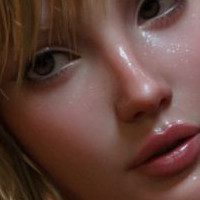
So, I decided if I could make a render that has that natural-looking skin that you see Poser do so well with the right textures, shaders, lighting etc.
The lighting I used is essentially just one I picked out of the Poser Pro 2014 library somewhere. I can't even remember what it was called. Then I added a light or two of my own and positioned others how I wanted them to be.
I really wanted to show the 'natural' look of the skin textures that comes with Maddelirium's "MDD Lillia for Victoria 4.2" product so that's why the fem has no makeup on at all.
This image is essentially straight out of Poser.
In postwork I added in a background (it was just black in the render anyway), and added in my credit. - That's it.
(I'll post up a postwork sharpened version later.)
BTW, I remembered that not so long ago when I had got my new computer system (and would finally be able to use a 64 bit version of Poser with 32gigs of memory), I could maybe use some of those little 'rendered in Poser' logo images that users and vendors attach to their promo pics.
Smith Micro (the current owners of Poser) make a page of them available for free to download.
http://poser.smithmicro.com/logos.html
But they're only for Poser 9 and Poser 2012.
There's no Poser 10 or 2014 ones that I could find. (do they exist?)
So just for myself I made a couple of them up myself using a Poser 2012 one as a base, and I slapped on a real Poser Pro 2014 circular logo to make it relevant.
I dunno what font they used to make the proper logo/badges but I used what I thought looked right.
I didn't bother with the red versions as I find them a bit too gaudy looking and it detracts from the artwork its on.
These logos aren't something I'm going to be using much anyway. It was just an exercise and to have a break from all the tedious redownloadings that I've been doing of my content these past week(s) whilst also making new runtimes and installing new stuff into them.
My current PP2014 setup is still quite bare bones. ;-)
And I'm still coming to grips with a new OS (Windows 8.1) but with the freeware "Classic Shell" for using the desktop etc and file management to keep me from going crazier.
I'm still looking for and occassionally finding solutions on the net to problems that MS throws into users faces with their idea of what and how they think users should be using their software.
It's never ending.
All this stuff is keeping me from relaxing and making artwork. ;-)
Z.
-------------------------------------
items used:
----------
* V4
* MDD Lillia for Victoria 4.2
by Maddelirium
Rendo store
(note: I diminished the character morphs for this image and I changed her a bit.)
* CLOTHING
Moonbeam II
by 3D-Age
Rendo store
:
:
* TEXS
MORE Textures & Styles for Moonbeam II
by motif
Rendo store
(I used "05 Dress")
* Leandro Hair
by 3Dream, Mairy
Rendo store
:
* Surreal Leandro
by surreality
Rendo store
(texture "003" used)
-------------------------------------
-------------------------------------
Production Credits


Mature Image Blocked
Image blocked according to your Max Maturity Rating : Safe


Comments (3)
Phenomenally realistic. I only have poser 10 not the Pro version - and am just getting to grips with it myself after not using Poser (version 6) for several years. I still find DAZ Studio much more user friendly.
wonderful portrait
those eyes.....wow................fantastic.