
Renderosity Forums / Poser 11
Welcome to the Poser 11 Forum
Forum Moderators: nerd Forum Coordinators: Anim8dtoon
Poser 11 F.A.Q (Last Updated: 2026 Oct 02 12:39 pm)

Welcome to the Poser Forums! Need help with these versions, advice on upgrading? Etc...you've arrived at the right place!
Looking for Poser Tutorials? Find those HERE

Subject: A trick to get the brow material settings to render a black brow?


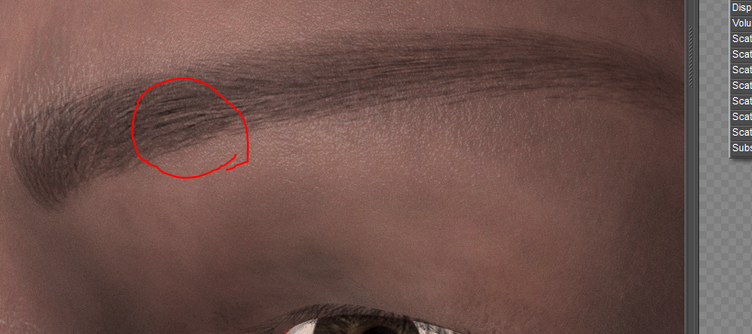
Trying your setup, I'm getting some very black eyebrows, using the ones that come with him or some think ones that come with Lehome It might be that the lashes are so thin, or it might be that the trans map isn't fully white in many locations. If you look where I circled, there is a small amount of black, which looks like it might be the densest portion of the map.
Available on Amazon for the Kindle E-Reader Monster of the North and The Shimmering Mage
Today I break my own personal record for the number of days for being alive.
Check out my store here or my free stuff here
I use Poser 14 and Windows 11

Add an invert colour node between the transmap and the colour node. This makes the hairs black in the input image for the colour node. I can't recall exactly the invert node for Poser, been using DS for a while now, but quite sure there is either a colour inversion or math node to make it inverted.
Eternal Hobbyist
OK, I'm in Photoshop and redid the transmap and your right, it needed allot more bright white and it's now showing black. Thanks folks! 😁
---Wolff On The Prowl---

A useful tip, possibly especially useful if one plans to 'Comic Book mode' or 'Photoshop filter' for a more 'line-art look'. Thanks.
Learn the Secrets of Poser 11 and Line-art Filters.

Privacy Notice
This site uses cookies to deliver the best experience. Our own cookies make user accounts and other features possible. Third-party cookies are used to display relevant ads and to analyze how Renderosity is used. By using our site, you acknowledge that you have read and understood our Terms of Service, including our Cookie Policy and our Privacy Policy.
Question for those that know the tricks. This is LH, so he has a separate brow area that I like using because I can provide color options. I can not get a really black effect. You see my settings. I've even tried adding in a black square to the diffuse channel but it's just not very black. It's OK but not as rich black as I'd like! Any suggestions?
---Wolff On The Prowl---
My Store is HERE
My Freebies are HERE