
Renderosity Forums / Carrara
Welcome to the Carrara Forum
Forum Coordinators: Kalypso, Anim8dtoon
Carrara F.A.Q (Last Updated: 2026 Sep 09 4:39 am)
Visit the Carrara Gallery here.

Subject: I have a problem in Rendr


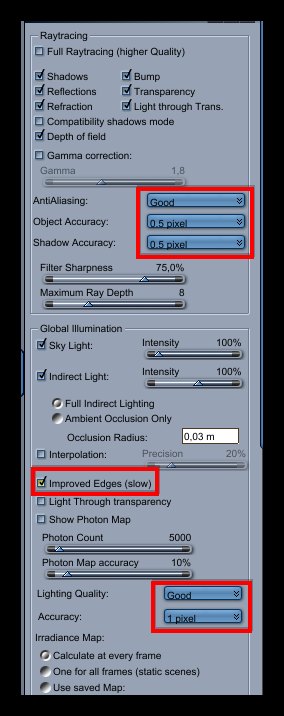
Try adjust some render settings like:
Turn ON the "improved edges"
Set "Light Quality" to Good and "Accuracy" to 1 pixel.
To get a transparent background you will need to delete the plane and in the Render Room in the Output tab:
1 - choose a file format that support alpha like PSD
2 - turn on the options: Render Alpha Channel and Use Premulti´plied Alpha
Follow me at euQfiz Digital




Privacy Notice
This site uses cookies to deliver the best experience. Our own cookies make user accounts and other features possible. Third-party cookies are used to display relevant ads and to analyze how Renderosity is used. By using our site, you acknowledge that you have read and understood our Terms of Service, including our Cookie Policy and our Privacy Policy.

Hello allwhen I export the project as I show defects Brendr ?
See the picture shows there is a defect Shares white indicates the location of the problem Brendr
I do not know why the error shows you for example, the shadow or something else
If there was a way for tutorials the export of the project to do the project background transparent
Just please help, if possible
N2008
thanks