
N2008 opened this issue on Feb 22, 2009 · 5 posts
N2008 posted Sun, 22 February 2009 at 2:46 AM

when I export the project as I show defects Brendr ?
See the picture shows there is a defect Shares white indicates the location of the problem Brendr


I do not know why the error shows you for example, the shadow or something else
If there was a way for tutorials the export of the project to do the project background transparent
Just please help, if possible
N2008
thanks

GKDantas posted Sun, 22 February 2009 at 6:22 AM
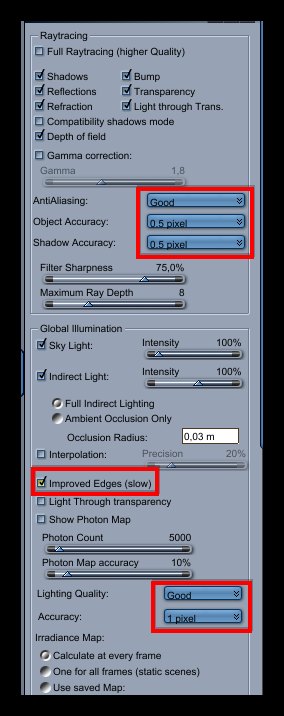
Try adjust some render settings like:
Turn ON the "improved edges"
Set "Light Quality" to Good and "Accuracy" to 1 pixel.
To get a transparent background you will need to delete the plane and in the Render Room in the Output tab:
1 - choose a file format that support alpha like PSD
2 - turn on the options: Render Alpha Channel and Use Premulti´plied Alpha
Follow me at euQfiz Digital

Miss Nancy posted Sun, 22 February 2009 at 3:31 PM
it looks like bad AO settings, as well.
there are 3 more variables to change, in case marcelo's advice doesn't provide sufficient
improvement to the areas indicated by the arrows.

ShawnDriscoll posted Sun, 22 February 2009 at 9:01 PM
Turn off Interpolation.
N2008 posted Mon, 23 February 2009 at 2:06 AM

GKDantas
Miss Nancy
ShawnDriscoll
Thank you all
We come to new amendment rendr Sense of word written in Arabic script
Sense of the word Legion VII
thennks all
N2008