Filter: Safe | Tue, Jul 21, 6:15 PM CDT

Renderosity Forums / Carrara


Welcome to the Carrara Forum

Forum Coordinators: Kalypso, Anim8dtoon

Carrara F.A.Q (Last Updated: 2026 Jul 11 2:50 am)


Visit the Carrara Gallery here.

Carrara Free Stuff here.

 
Visit the Renderosity MarketPlace - Your source for digital art content!


Subject: Please help with background.


UVDan ( ) posted Sun, 06 January 2008 at 12:47 PM · edited Mon, 20 July 2026 at 7:46 AM
Forum Moderator

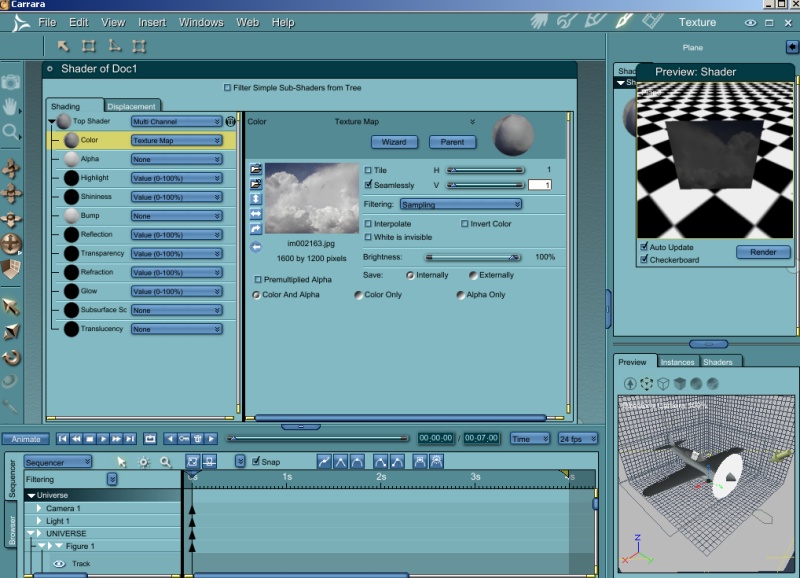
**Ok so I opened up a Poser pz3 and then added a plane to the scene in the assembly room. I went to the texture room and opened up a jpg of cloudy skies and applied it to the plane.  Now I need to know how to ditch the shadow on the cloud plane and how to make it brighter.  First here is the screenshot of the texture room.**

Free men do not ask permission to bear arms!!


UVDan ( ) posted Sun, 06 January 2008 at 12:47 PM
Forum Moderator

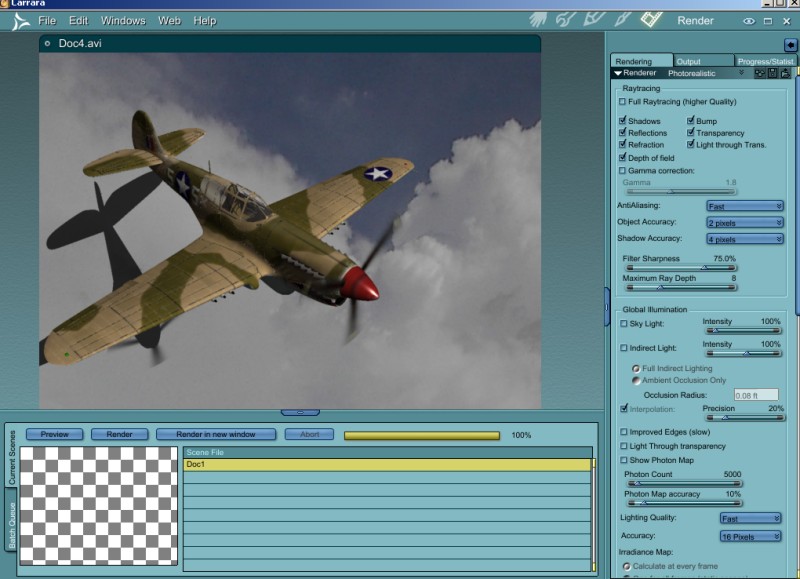
**Here is the render room.**

Free men do not ask permission to bear arms!!


Hoofdcommissaris ( ) posted Sun, 06 January 2008 at 1:13 PM

file_396990.png

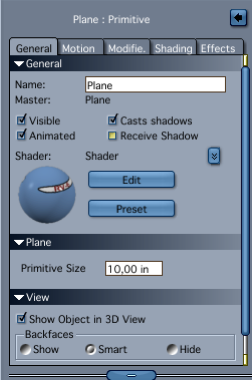
Select the plane and uncheck 'receive shadows' in the assembly room. But you can also use the clouds as a backdrop, if you select the 'Scene' in the assembly room. This prevents any interaction between objects and the background. If you want to make the clouds brighter, and do not have access to Photoshop or the likes, then it is nice to have the texture on a plane as you do have now. Then you can see what happens in the shader room when you use the texture in combination with operators like 'add' or multiply. Or maybe put a bright light on it, that you tell only to light the plane.


UVDan ( ) posted Sun, 06 January 2008 at 1:44 PM
Forum Moderator

Thanks very much for the prompt and informative reply.

Free men do not ask permission to bear arms!!


MarkBremmer ( ) posted Sun, 06 January 2008 at 3:40 PM

For brightening up the texture map, you can duplicate the texture into the glow channel and then turn down the brightness to 20 percent or so.


UVDan ( ) posted Sun, 06 January 2008 at 4:01 PM · edited Sun, 06 January 2008 at 4:02 PM
Forum Moderator

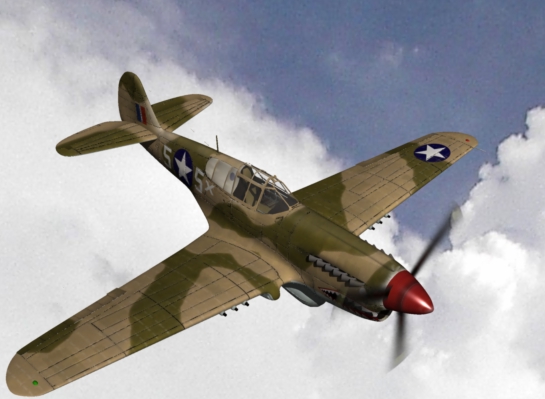
**Thanks, I will have to try that also.  I had no joy using the cloud pic as a background.  It came in waaaaaaay too artifacted.   I love that Carrara will let me choose to create a light that only illuminates the cloud plane.  Here I have done that and adjusted the brightness some.  I need to find my fighter pilot.  He is no doubt loafing in the PX or at the Officers Club.

I want to try out that anything glows for machine gun blast effects.**

Free men do not ask permission to bear arms!!


UVDan ( ) posted Sun, 06 January 2008 at 5:43 PM · edited Sun, 06 January 2008 at 6:46 PM
Forum Moderator


At least I managed to turn the prop.

Free men do not ask permission to bear arms!!


cryptojoe ( ) posted Sun, 06 January 2008 at 6:08 PM

Aw! Such a smartypants!!!

Now I definately have to catch up on how to make animated GIF's!

Yank My Doodle, It's a Dandy!


UVDan ( ) posted Sun, 06 January 2008 at 6:16 PM
Forum Moderator

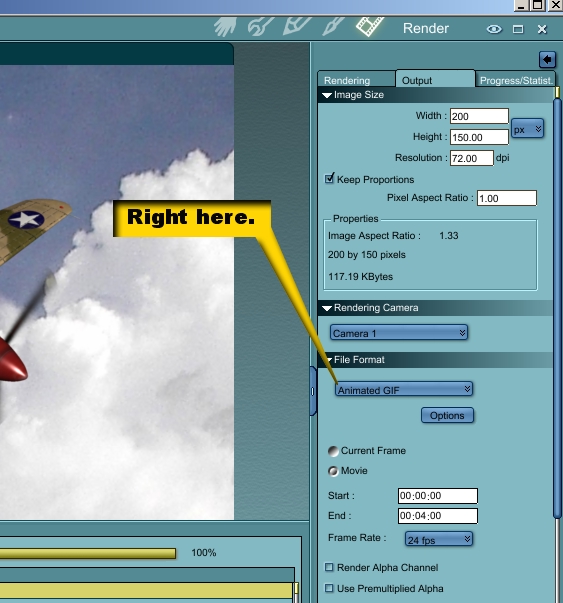
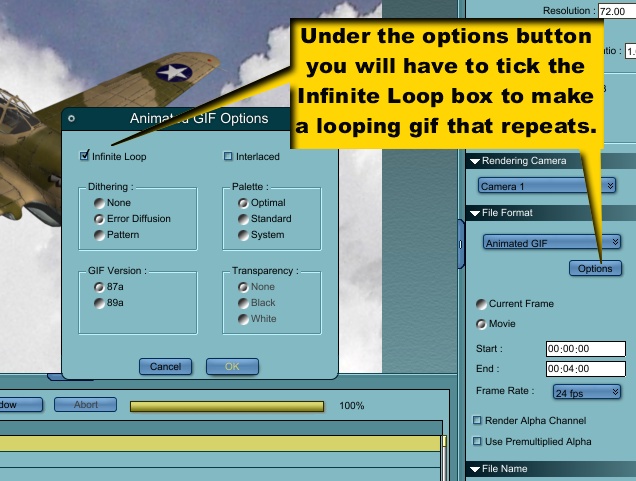
I am glad that Carrara does that for me under the render output options.  Now I do not have to render to an image file and convert to gif in Animation Shop.  That is convenience I enjoy.

Free men do not ask permission to bear arms!!


UVDan ( ) posted Sun, 06 January 2008 at 6:18 PM
Forum Moderator

I need to learn how to copy and paste the first frame to the last so that I do not get the hiccup that occurs each loop cycle.

Free men do not ask permission to bear arms!!

cryptojoe ( ) posted Sun, 06 January 2008 at 6:50 PM

Good work Dan!

Yank My Doodle, It's a Dandy!


UVDan ( ) posted Sun, 06 January 2008 at 6:53 PM
Forum Moderator

Thanks.  I wonder how long it will take me to animate World War 2?

Free men do not ask permission to bear arms!!

mhscspo ( ) posted Sun, 06 January 2008 at 7:15 PM

Quote - I am glad that Carrara does that for me under the render output options.  Now I do not have to render to an image file and convert to gif in Animation Shop.  That is convenience I enjoy.


How did you do that?


UVDan ( ) posted Sun, 06 January 2008 at 7:43 PM
Forum Moderator

**Here is the first step.**

Free men do not ask permission to bear arms!!

UVDan ( ) posted Sun, 06 January 2008 at 7:44 PM
Forum Moderator

**Here is how you get it to loop.**

Free men do not ask permission to bear arms!!


mhscspo ( ) posted Sun, 06 January 2008 at 9:15 PM

Quote - Here is how you get it to loop.

Thanks, I am going to give it a try.


UVDan ( ) posted Sun, 06 January 2008 at 10:45 PM
Forum Moderator

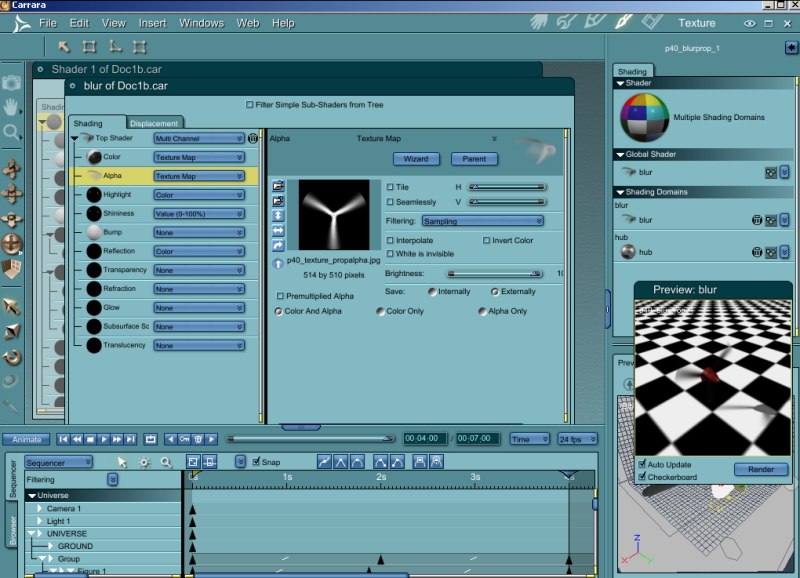
**The tut that I IM'd you about will show you how to do the alpha channel in Bryce.  You try to do the same in Carrara.   The screenshot shows where to load in the alpha map.**

Free men do not ask permission to bear arms!!


Privacy Notice

This site uses cookies to deliver the best experience. Our own cookies make user accounts and other features possible. Third-party cookies are used to display relevant ads and to analyze how Renderosity is used. By using our site, you acknowledge that you have read and understood our Terms of Service, including our Cookie Policy and our Privacy Policy.