
Renderosity Forums / Carrara
Welcome to the Carrara Forum
Forum Coordinators: Kalypso, Anim8dtoon
Carrara F.A.Q (Last Updated: 2026 Sep 09 4:39 am)
Visit the Carrara Gallery here.

Subject: Can't Create New Master


Did it work? Is there an option in C6 preferences to turn it back on like in C5?
www.youtube.com/user/ShawnDriscollCG

Privacy Notice
This site uses cookies to deliver the best experience. Our own cookies make user accounts and other features possible. Third-party cookies are used to display relevant ads and to analyze how Renderosity is used. By using our site, you acknowledge that you have read and understood our Terms of Service, including our Cookie Policy and our Privacy Policy.
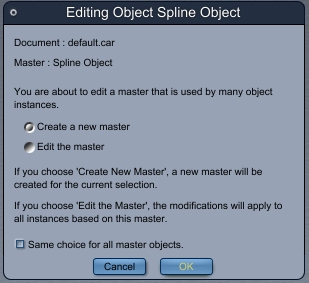
I just installed C6 today. I wanted to wait with the expectation that there would be bugs that would hopefully be worked out.Immediately out of the box (figuratively), I notice that when I duplicate and object and then edit it (model or shader), I cannot create a new master (using the attached image of the dialogue box).
This is very annoying for a couple of reasons.
1.) I have to have the ability to create new masters off of old ones. Without it, I will go back to C5 and not touch C6 again.
2.) Such a bummer to find the new version doesn't work after only using it for 20 minutes.
Any help would be had.
Thanks,
-Kix